Source Filmmaker

Source Filmmaker

293 ratings
Animated Computer Lights [Ambience]
   
Award
Favorite
Favorited
Unfavorite
Universe: Team Fortress
Model
Models: Industrial
Tags: SFM
File Size
Posted
12.576 MB
Apr 15, 2016 @ 12:04pm
1 Change Note ( view )

Subscribe to download
Animated Computer Lights [Ambience]

Description
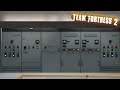
Various Computers from Team Fortress 2, edited for ambience purposes.
This pack contains several computers that now have animated lights, that way the environment seems livelier. this was originally designed as a TF2 mod, but works just as good in SFM.

The models directly replace the models used in maps. So you literally just have to load a map to have this "mod" do it's work.

If you want to use the models as posed props, as opposed to be used by maps, you can snap them to the "props_spytech\computer_wall_cabinet.mdl" model. That way it will be installed in a case.


Includes:
props_spytech\computer_low.mdl
props_spytech\computer_wall02.mdl
props_spytech\computer_wall03.mdl
props_spytech\computer_wall04.mdl
props_spytech\computer_wall05.mdl
props_spytech\control_room_console01.mdl
props_spytech\control_room_console02.mdl
props_spytech\control_room_console03.mdl
props_spytech\control_room_console04.mdl
props_powerhouse\powerhouse_industrial_computer01.mdl
props_powerhouse\powerhouse_industrial_computer02.mdl
props_powerhouse\powerhouse_industrial_computer03.mdl
props_powerhouse\powerhouse_industrial_computer04.mdl
props_powerhouse\powerhouse_industrial_computer05.mdl
props_mining\computer_industrial01.mdl
props_mining\computer_industrial02.mdl
props_mining\computer_industrial03.mdl
props_mining\computer_industrial04.mdl
props_mining\computer_industrial05.mdl

If you want to get the TF2 Mod version of this, download from here[tf2.gamebanana.com]

45 Comments
мяFunreal  [author] Sep 23, 2022 @ 4:55pm 
1. Open steamapps\common\Team Fortress 2\tf - tf2_misc_dir.vpk in GCFscape or crowbar.
2. Extract the "materials" folder into steamapps\common\SourceFilmmaker\game\tf
3. Open steamapps\common\Team Fortress 2\tf -tf2_textures_dir.vpk
2. Extract the "materials" folder into steamapps\common\SourceFilmmaker\game\tf
☾ Dani 💔 Sep 23, 2022 @ 2:45pm 
You don't mind if I add you and message you more details about this in DMs?
This seems a bit confusing to me
мяFunreal  [author] Sep 23, 2022 @ 2:42pm 
i'd just extract the materials from tf2's ****_dir.vpk's into sfm.
☾ Dani 💔 Sep 23, 2022 @ 2:40pm 
Weird...Shouldn't SFM already do that?
if not then mind helping me about it?
мяFunreal  [author] Sep 23, 2022 @ 2:38pm 
You probably didn't extract the textures of tf2 to sfm. Not really sure tbh.
I made this 6 years ago and it worked for me
☾ Dani 💔 Sep 23, 2022 @ 2:17pm 
The entire model has Missing Textures, why is this??
мяFunreal  [author] May 29, 2022 @ 6:37am 
like any others. it just replaces the existing models.
Ark May 28, 2022 @ 5:55pm 
I cant find the models besides the computer walls. How can I use these in SFM?
Weirdo2121 Aug 10, 2020 @ 5:50am 
cool thanks
SkywardDawn May 8, 2020 @ 8:01pm 
The only ones that work are the powerhouse ones, and even then it's mostly missing textures besides the lights. Any way to fix this?