Don't Starve Together

Don't Starve Together

89,302 ratings
Combined Status
27
16
4
4
4
3
3
2
2
584
261
78
66
64
64
58
48
45
37
36
28
27
23
20
19
18
16
14
11
10
10
8
1,545
   
Award
Favorite
Favorited
Unfavorite
File Size
Posted
Updated
1.132 MB
Jan 16, 2015 @ 10:30pm
Aug 21 @ 6:19pm
61 Change Notes ( view )

Subscribe to download
Combined Status

Description
Supports all versions of Don't Starve (Vanilla, Reign of Giants, Shipwrecked, Hamlet, Don't Starve Together).

You can also download from GitHub[github.com], although that won't auto-update for you. (code contributions also welcome via GitHub)

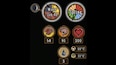
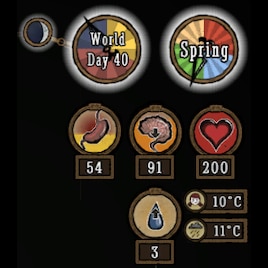
This mod enhances the HUD to better show the player's stats and various information about the world, such as temperature, season, and moon phase.

This is a client-only mod, so whoever has enabled it will see the changes, and whoever doesn't won't, regardless of what server you're on and whether the server has the mod or not.

Note that unlike Kiopho's Always On Status, I use the game's temperature units directly here, so player temperature can safely vary from 0-70, with freezing/overheating warnings occurring at 5 and 65. (you can change it to C, which works like Kiopho's version, or F if you want)

Credits to Kiopho (Always On Status), Soilworker (Season Clock), and hotmatrixx (Better Moon) for making the original mods. I completely rewrote all of the code to be more compatible, aesthetic, and easily maintained going forward.

Configuration Options

Option
Description
Temperature
Whether to show the temperature of the player. Defaults to Show.
Show World Temp
Whether to show the temperature of the world. Defaults to Hide.
Show Temp Badges
Whether to show small images to indicate which temperature is which. Badges only get shown if this is set to Show and both player and world temperatures are enabled. Defaults to Show.
Temperature Unit
Whether to use the game's internal units (default), or approximations of Fahrenheit or Celsius.
  • In Game Units, the player freezes at 0 and overheats at 70, with warning occurring 5 away.
  • In Celsius, the player freezes at 0 and overheats at 35, with warning occurring 2.5 degrees away.
  • In Fahrenheit, the player freezes at 32 and overheats at 95, with warning occurring 4.5 degrees away.
Show Waning
Whether to show if the moon is waxing or waning by adding new icons. Defaults to Show. (The game normally only shows icons for one direction). In Don't Starve Together, this is now a feature of the main game, so the option doesn't do anything.
Show Moon
Whether to show the moon only at Night (the game's default), during night and dusk (Dusk, the mod's default), or Always.
Predict Full Moon
Whether to predict the day of the next full moon, shown when hovering over the moon icon. Defaults to Yes.
Flip Moon
Whether to flip the moon phase icon to show it like it is in the Southern Hemisphere, instead of the default Northern Hemisphere. Defaults to No.
Season Clock
Clock, the default, shows a full clock of the seasons. Compact shows a smaller badge with the season and day count, while Micro shows an even smaller badge. No disables the season clock entirely.
Naughtiness
Whether to show the naughtiness of the player. Doesn't work in Don't Starve Together (unless Insight is installed), as naughtiness is not available to clients. Defaults to Show.
Log Meter
Whether to show the log meter for Woodie when he is human. Only relevant to singleplayer, as Don't Starve Together always shows the log meter already. Defaults to Always.
Cave Clock
Whether to always show the clock in the caves. Only relevant to singleplayer Reign of Giants, as the data is not available in vanilla and the clock shows in Don't Starve Together. Defaults to Show.
Stat Numbers
Whether to show the sanity, hunger, and health numbers without having to mouse over the badges. Defaults to Always.
Show Max Text
Whether to show the "Max:" text when hovering over the sanity, hunger, and health badges to see their maximum values. Defaults to Show.
Show Clock Text
Whether to show text on the Clock and Season Clock. Defaults to Show. If set to Hide, text will only be shown when mousing over or opening the Controller Inventory.
HUD Scale
Lets you adjust the size of the badges and clocks independently of the game's HUD scale. Defaults to 1.
Popular Discussions View All (35)
11
9
Aug 20 @ 8:28pm
[Bug + Fix] Season clock is ~2x too large after DST clock texture update
Grizzly
1
Jul 31 @ 8:32pm
服务器mod无法启用
唯君遥安
25
8
Dec 2, 2025 @ 1:11pm
For people facing broken mod problem
Rock C.
4,600 Comments
4 hours ago 
好用
12 hours ago 
能不能调下季节的图标,很大。
This comment is awaiting analysis by our automated content check system. It will be temporarily hidden until we verify that it does not contain harmful content (e.g. links to websites that attempt to steal information).
Sep 10 @ 5:46am 
GOAT
Sep 9 @ 9:56pm 
YAAAAAAAAAAAAY
rezecib  [author]
Sep 9 @ 9:54pm 
Sure
Sep 9 @ 8:43pm 
hello! Could i yoink the temperature widget from this mod for a unrelated mod with ui i am making? i can elaborate if needed.
Sep 9 @ 7:02am 
like it
Sep 7 @ 12:00pm 
关掉其它HUD模组。
你好,在使用这个mod后,最上方的时间与日期的指针很小,只有时钟的一半大,能问一下是什么情况吗