Avorion

Avorion

Not enough ratings
Official modding guide
By Cepheni
Hi everyone!
This is a short introduction to modding with the new modding features introduced with update 0.23 by Boxelware. For further information on the topic check out the Avorion wiki![avorion.gamepedia.com]
   
Award
Favorite
Favorited
Unfavorite
Using Mods
Subscribe to mods in the Steam Workshop and wait till they're downloaded. You may have to restart Avorion for them to show up.


In the main menu, go to Settings - Mods to enable or disable them.

Note: Force enabling or disabling is highly discouraged and can lead to broken saves.
Note: Client will override the server's config in singleplayer and when hosting a game. Use the menu to configure mods!
Note: For easier mod development, the client will prefer local mods over workshop mods in case of an ID collision!

If you want to use mods on an dedicated server please have a look in the official Avorion wiki[avorion.gamepedia.com] on how to install them.
Writing your own Mod
Avorion is a complex multithreaded environment and allows modders a lot of freedom. Sadly this freedom also comes with high complexity, so you should read up on how Avorion is structured internally to get a better gist of everything. We provide a comprehensive list of how scripts are used and which effects they have in the game here.[avorion.gamepedia.com]


Where to start
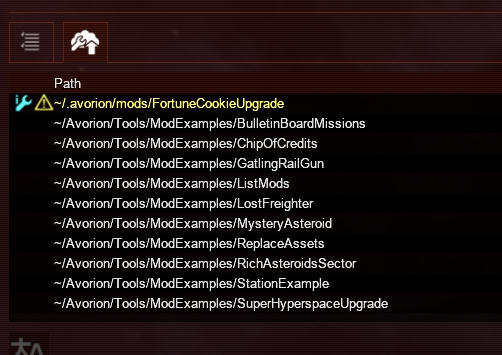
You can let the game create a mod stub for you. In the main menu, go to Settings – Mods – Upload to workshop. Here you’ll find an overview over all currently installed mods, and where to find them in your local files. If you create a new mod with the button at the bottom a new mod will appear in the list. Go to the file location and you’re good to go!

For more information on how to proceed from here, please go to the Avorion wiki’s modding section.[avorion.gamepedia.com] The wiki contains lots of useful information and tips on how mods have to be structured.

There are also several examples and proof-of-concept mods uploaded to the Steam workshop by Boxelware themselves. They are meant as a stepping stone for mods and to show how the modding API works.
Uploading mods to the workshop
Before you upload your mod to the workshop, you should make sure that all required fields in your modinfo.lua are filled out, such as dependencies, authors and the contact field, so people can reach you in case they run into trouble.
Avorion itself will also tell you about issues in your mod, for example when configurations are wrong (ie. server side only but localizations were detected, etc). Find more information on that here.[avorion.gamepedia.com]

Note: Mods can only be uploaded to the workshop when their file- and folder names have ASCII-only names!
3 Comments
Kodaxmax Nov 23 @ 6:52pm 
it seems like whoever wrote the wiki pages just stopped writing everytime they got halfway through a page. like it talks about non existant lists of functions, but forgot to actually include those lists.
Alfuken Jan 4, 2024 @ 6:15am 
Can we, please, have an in-game mod configuration mechanism? So people don't have to upload 10 editions of the same mod with 10 different multipliers of value X...
Mine_Turtle06 Dec 9, 2021 @ 3:48am 
Thank you!

My idiot ass tried other methods for the past 2 hours until i came across this