Pathologic 2

Pathologic 2

128 ratings
Pathologic 2 - Performance Fix (FPS BOOST)
By Volmer
A quick guide on how to increase game performance easily.
9
3
4
2
   
Award
Favorite
Favorited
Unfavorite
First step
1º - In your main storage, go to the following directory: C:\Users\Your User Name\AppData\LocalLow\Ice-Pick Lodge\Pathologic 2\Settings
PS: You cant find the AppData paste? Enable Hidden items, it is a hidden paste.

2º - Right click on ExternalOptimizationSettings.xml and choose edit

3º - Search for (its on end of file): <Item type="SmartAllockMemoryStrategy">

4º - Edit MaxMemory to 1000000000 and MinMemory to 120000000.

5º - Save changes.


Second step
1º - Now we go to the game paste. You can open the game local files from steam or go C:\Program Files\Steam\steamapps\commom\Pathologic

2º - Go to Pathologic Data

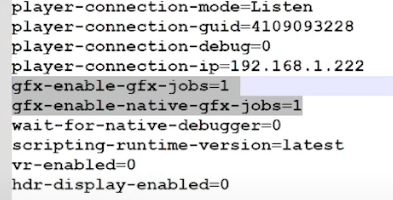
3º - Open boot.config with NotePad or any other text editor

4º - Change gfx-enable-gfx-jobs from 0 to 1

5º - And just below add the line: gfx-enable-native-gfx-jobs=1


6º - Save and now, open the game as administrator. Enjoy :)

46 Comments
Abendrot Oct 21 @ 8:22am 
This guide helped me gain atleast 150fps in some areas and turned the game from a stuttering mess into a buttery smooth experience. Thank you!
Famicom89 Oct 6 @ 1:06pm 
Thanks, these suggestions fixed the problem it seems, when from less than 60fps to over 140fps in the first area.

Only thing, didn't find the same strings, I had two "AllocMemoryStrategy" entries and changed both... and the "gfx-enable-gfx-jobs" was assent, just added manually for good measure.
StraightEdgeJoe Sep 22 @ 9:58am 
Thank You! This really helped my pc from sounding like a jet plane. My PC specs are way above the recommended and after doing this my pc sounds normal again!
Cheers :estusfull:
Theylienn Sep 5 @ 11:46pm 
Just wanted to say thank you for this, editing those memory values in the external optimizations xml file makes a huge difference.
iSellDrugs Jul 10 @ 4:34am 
My fps are fine but Im still getting the same stuttering... Is there a fix for the stuttering?
eatsumbees Apr 23 @ 4:45pm 
Still works in 2025! Went from getting 70-90 fps to 120+ in the first area.
WelTigZ Apr 6 @ 10:23pm 
useless, does nothing
miguel.14.alves97 Mar 19 @ 7:30am 
What if it doesn't say <Item type="SmartAllockMemoryStrategy"> but instead something like <Item type="AllockMemoryStrategy"> ?
Schwartz Mar 15 @ 1:08am 
Thanks, huge fps boost
ShiroXfetch Feb 18 @ 11:49pm 
You are a legend! I was so excited to play this, but was a little turned off by some of the stuttering and frame drops. This guide solved my issue, so thank you!