Borderlands 2

Borderlands 2

Not enough ratings
How to solve Borderlands 2 crashing on launch (Linux)
By Serfism
A guide to help Linux gamers play Borderlands 2
   
Award
Favorite
Favorited
Unfavorite
Solution 1 (Worked for me)
1. Go to BORDERLANDS 2's properties in steam library
2. Go to general>launch options
3. Paste command line below into launch options
-nomoviestartup

Credit: https://forum.manjaro.org/t/testing-branch-borderlands-2-not-starting-on-steam/76735/5
Solution 2 - Missing lib32-openal (Manjaro)
Solution 3 - Nvidia problems
If you have a Nvidia GPU this could possibly make some problems if you are duel booting with another CPU (such as intel)
1. Go to BORDERLANDS 2's properties in steam library
2. Go to general>launch options
3. Paste command line below into launch options
prime-run

Credit: https://forum.manjaro.org/t/testing-branch-borderlands-2-not-starting-on-steam/76735/11
Solution 3 - Removing incompatible libstdc++ file
For whatever reason, libstdc++ from the steam runtime directory makes it difficult for games like Civ 5, Borderlands 2 & Pre-Sequal, etc to run. So you'll have to remove it.
[Caution: Some other games may require it]

Credit: https://github.com/ValveSoftware/steam-for-linux/issues/4379
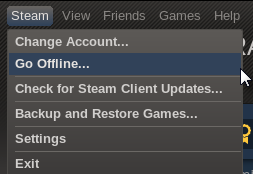
Solution 4 - Start it in offline mode
Start/restart steam in offline mode and then launch up the game.
Solution 5 - Run BL2 through a compatibility tool
Perhaps Borderlands 2 just doesn't want to work through native run. So use a compatibility tool like proton.
6 Comments
Egg @bandit Apr 12, 2024 @ 7:46am 
i thought the first one worked for a few seconds but, no:steamsad: and none of the others worked so ♥♥♥♥ borderlands:steamfacepalm:
Faalagorn Oct 6, 2021 @ 12:24am 
Faalagorn Oct 6, 2021 @ 12:03am 
I also saw comment on your original Reddit post; generally it seems that someone made a comment there that generally explains it all; TL;DR due to game issues Proton is a better way (port was abandoned, so the game lacks content and have problematic issues on native), but it also gave all things that need to be performed to launch the game nevertheless!
Serfism  [author] Oct 3, 2021 @ 7:32am 
Thank you @ https://steamcommunity.com/id/Faalagorn for your helpful comments. I am a bit new to the Linux scene. As well these solutions aren't exactly my solutions that I made. As you can see from the "Credit". These simply are gathered from the internet :signix:
Faalagorn Oct 3, 2021 @ 3:49am 
Oh, and you have two "Solution 3" ;)
Faalagorn Oct 3, 2021 @ 3:23am 
Ad. solution 1.
Does PROTON_USE_D9VK=1 does anything nowadays? It was obsoleted in Proton 5.0 since D9VK is merged with DXVK now. The rest of the commands might help though.

Ad. solution 2.
You should make it explicit that you actually have to *install* the AUR package either via `makepkg -si` or with your favorite AUR helper :)

Ad. solution 3.
I know what you meaning, but you confused some terms, du a l (not duel :P) booting is about the OS and PRIME is about having two GRAPHIC cards (GPUs), even while the Intel's GPUs are technically integrated into CPUs for a while one, you aren't "dual booting Nvidia GPU and Intel CPU", you are running Nvidia GPU with integrated Intel GPU.

Keep up the good work otherwise!