Tabletop Simulator

Tabletop Simulator

602 ratings
Flex Table - A table of any size
12
6
6
6
3
2
2
43
   
Award
Favorite
Favorited
Unfavorite
File Size
Posted
Updated
51.469 KB
Oct 14, 2017 @ 12:17pm
Oct 15, 2017 @ 9:10am
2 Change Notes ( view )

Subscribe to download
Flex Table - A table of any size

Description
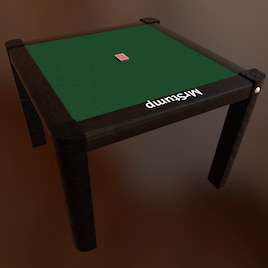
Flex Table is a table that you can re-size to fit any game. Make it as large as the bounds of the space or so tiny it is laughably impractical. You can also change the tabletop image at any time, and even keep presets saved for quick access to various tabletop images. Just click the white button on the one leg to open the control menu, change settings and hit apply.

It works by having the side pieces and legs all be separate pieces from the central board. So when you re-size the center, it moves the legs and sides to match. The sides get stretched to match the new dimensions length-wise, but they don't change size besides that. This way you can re-size the table without it getting all distorted.

There is a checkbox on the control panel to move the hand zones to match the re-sizing. It does not rescale the hands. I tried it and it just didn't work very well. Feel free to add or remove hands from the table as you please, the script will handle them properly.

Minimum scale is 0.1 (too small to do anything) and maximum scale is 12 (so large the camera can't view it all properly)

[ko-fi.com]
Popular Discussions View All (1)
3
Apr 19, 2020 @ 10:51am
Possibility of making changes to Control Panel button?
PeteCrighton
158 Comments
Brawnie Apr 3 @ 3:30am 
My favorite table, easy to use and very useful! Thank you!
jamalcolmson Mar 9 @ 10:10pm 
How versatile!
sillvi Feb 20 @ 12:02am 
how do i delete the notes on the right bottom?
Habanero Jan 8 @ 5:18pm 
@Oldbastage My flex table fork still works last I checked.
Oldbastage Jan 4 @ 1:44am 
Broken with new patch?
Charles Fruity Lwanga Nov 25, 2025 @ 1:31pm 
How do I use it?
Oscillating Bitches Nov 23, 2025 @ 4:53pm 
Getting a BD69BD error. Might be the new update, will revert to stable to check.
Vaggumon Nov 8, 2025 @ 10:59am 
I don't know much about LUA, so please forgive if it's an easy solution, or if it' snot really possible. I'd like to move the button, or at the very least the control panel that pops up when it's pressed. I added a DM wing for my games, and the panel shows under the wing now. Thank in advance for any help.
Noodle Sep 8, 2025 @ 4:17pm 
I like having larger pieces for my games, this this was an amazing find.
Habanero Aug 6, 2025 @ 10:30am