Dota 2
545 ratings
Automated Ancient Stacking
By Carry Potter and 1 collaborators
This guide Provides a tutorial to perform Automated Ancient Camp stacking on Radiant and Dire on the current map [6.84].

Russian Request
Я не ожидал что прошлый гайд будет столь успешным, спасибо за поддержку. Я умею говорить только на английском и испанском если вы готовы, поддержать меня в предстоящих гайдах, не постесняйтесь связаться со мной, учитывая, что мне нужен переводчик для будущих гайдов.

Thanks to user NonSollus for translation

Donations [www.paypal.com]
   
Award
Favorite
Favorited
Unfavorite
Requirements
  • Knowledge of the Shift-Queuing mechanic
  • Helm of the Dominator, or unit control ability (Holy Persuasion/Chen)
  • Knowledge of using custom configuration files .cfg (optional)

*Note: If you dont like Reading here is a Video tutorial that explains the contents of this Guide.

Basics
  1. Shift–Queuing

    This is a mechanic in DotA that allows to ‘queue’ actions in sequence to any selected
    controlled unit. This mechanic is activated by holding SHIFT and performing the desired actions.

    Without holding shift, if you give a selected unit a command during the transition of any
    given action (right click, use item/ spell etc . . .) it will cancel the action to perform the
    new one.

    Shift-Queuing enables you by holding shift to use a spell, item, walk etc . . . after the selected unit completes the first command without canceling it. Using this mechanic the unit will rather wait until his current action is completed to perform the queued commands.
Automated Ancient Stacking
The automated stacking employs the basic method of ancient camp stacking at 53 seconds, using a dominated neutral creep, by queing its movements.

  1. Neutral Creeps Requirements for this guide
    • 320 MS ; Good base HP
  2. Compatible Neutrals
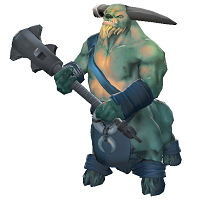
    Centaur Conqueror
    Hellbear/ HellbearSmasher


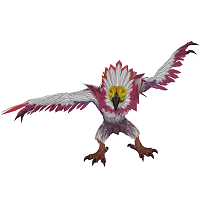
    Wildwing Ripper
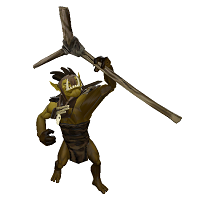
    Dark Troll Summoner

  3. Radiant Automated Stacking

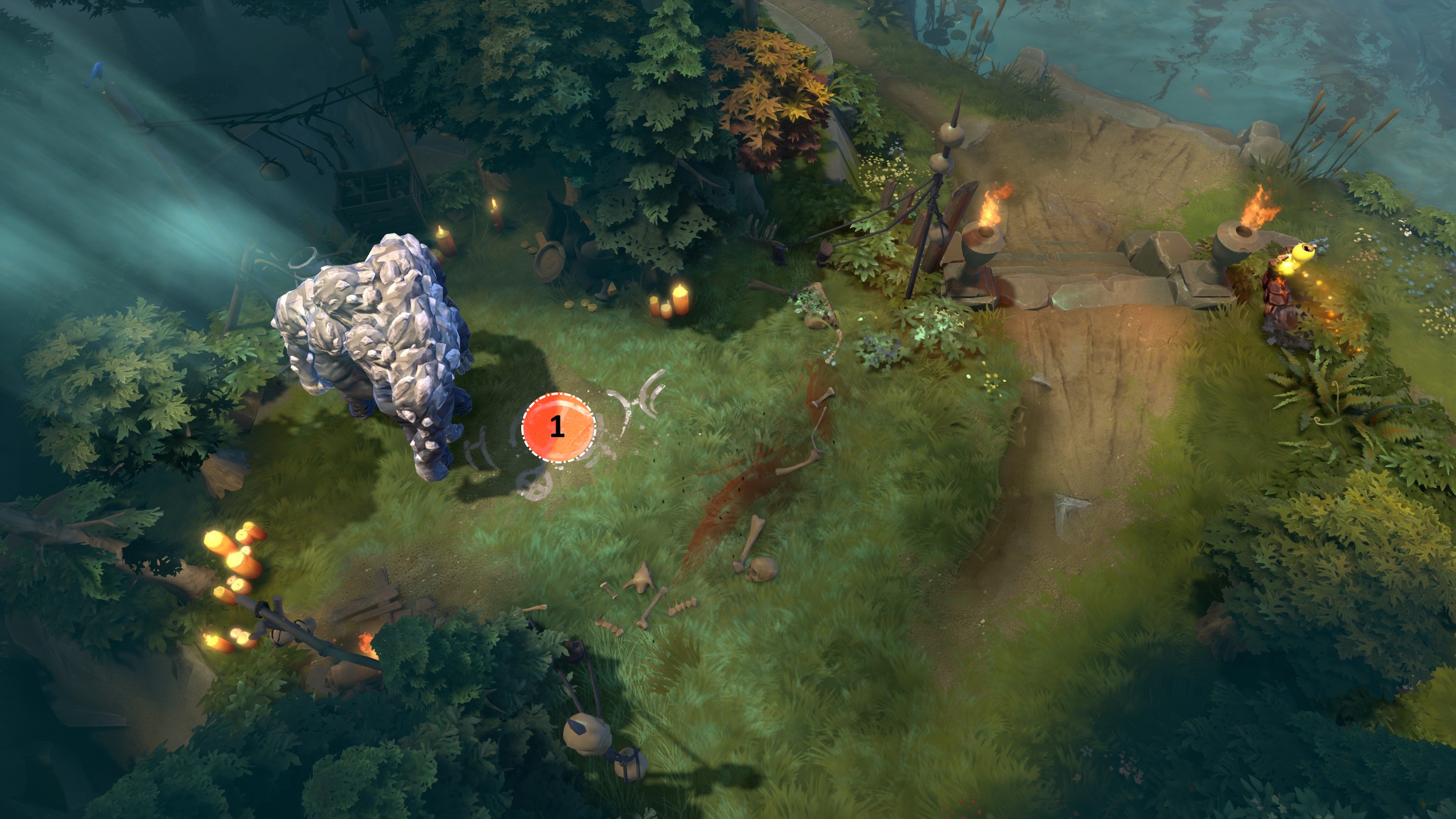
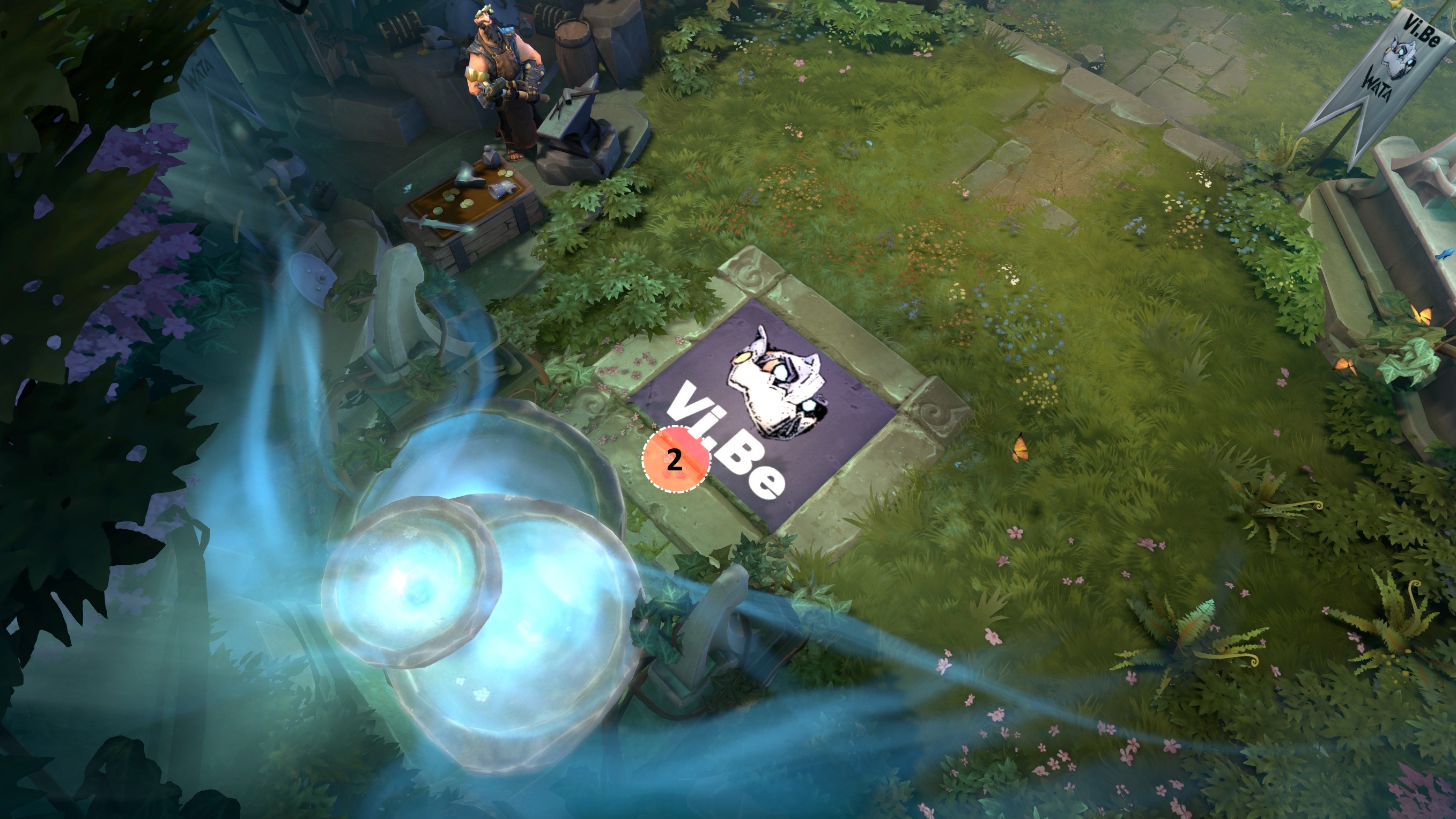
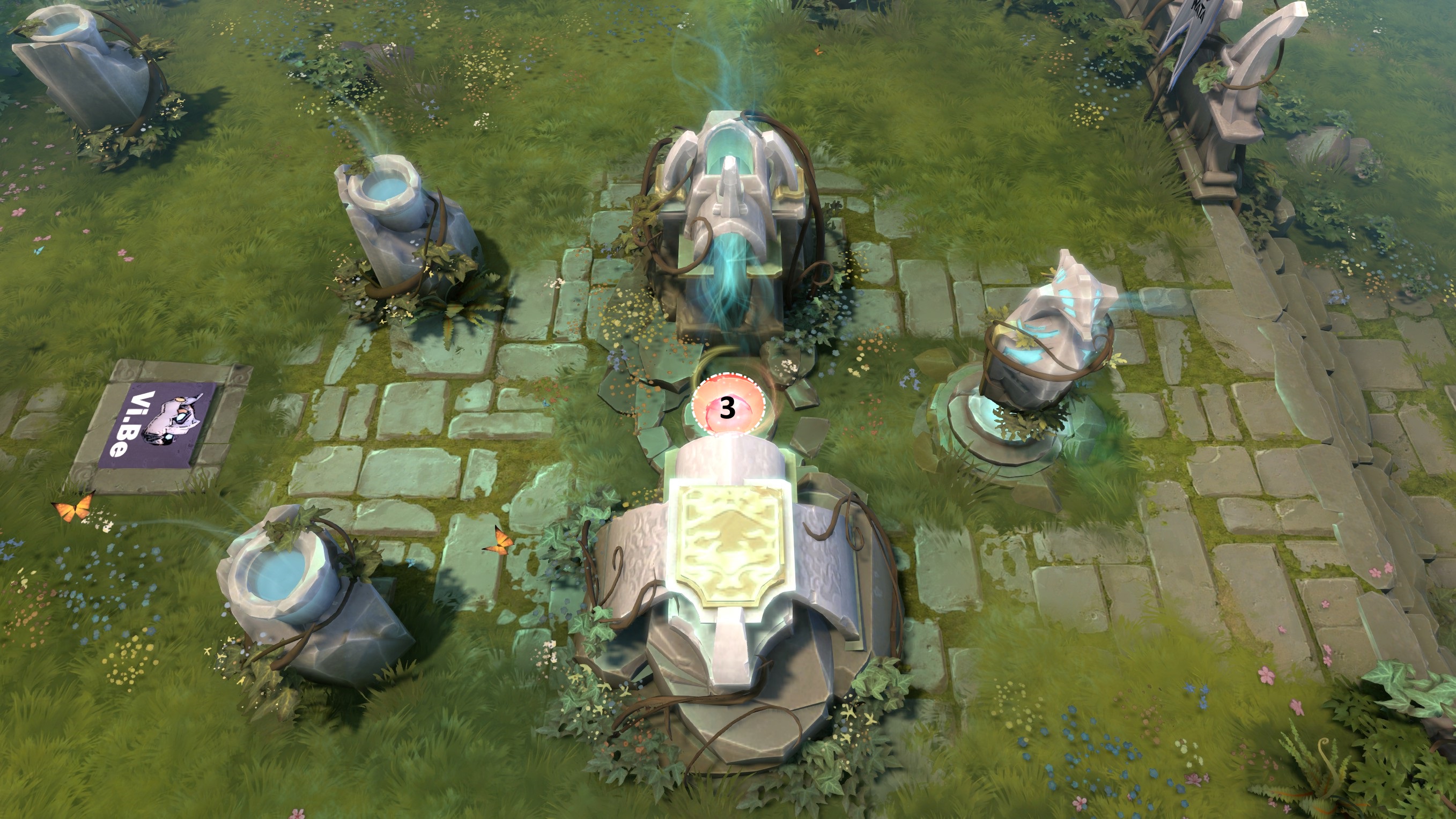
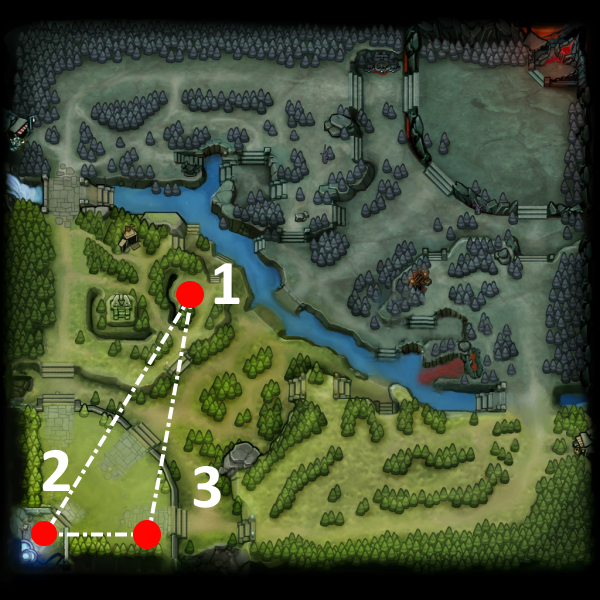
    In order to do the automated stacking on radiant, you must activate ancient camp Agro at second 53 on Position 1, and then proceed to hold shift and right click on this three positions in a loop.

    Position 1.


    Position 2.


    Position 3.


    For advanced users if they desire to keybind a Key to toggle between these three coordinates on a cfg file here is the code [*This is a example of keybinding 1, to toggle between the coordinates]:

    bind "1" "radcheck" alias "radcheck" "radcheck1" "radcheck2" "radcheck3" "radcheck4" "radcheck5" alias "radcheck1" "dota_camera_set_lookatpos -7232.000000 -7145.617676; alias radcheck radcheck2" alias "radcheck2" "dota_camera_set_lookatpos -4366.135742 -6497.172852; alias radcheck radcheckhero" alias "radcheckhero" "dota_camera_set_lookatpos -2594.752930 -352.812622; alias radcheck radcheck1" "radcheck2" "radcheck3" "radcheck4" "radcheck5"

    In summary these are the desired points to click:


  4. Dire Automated Stacking

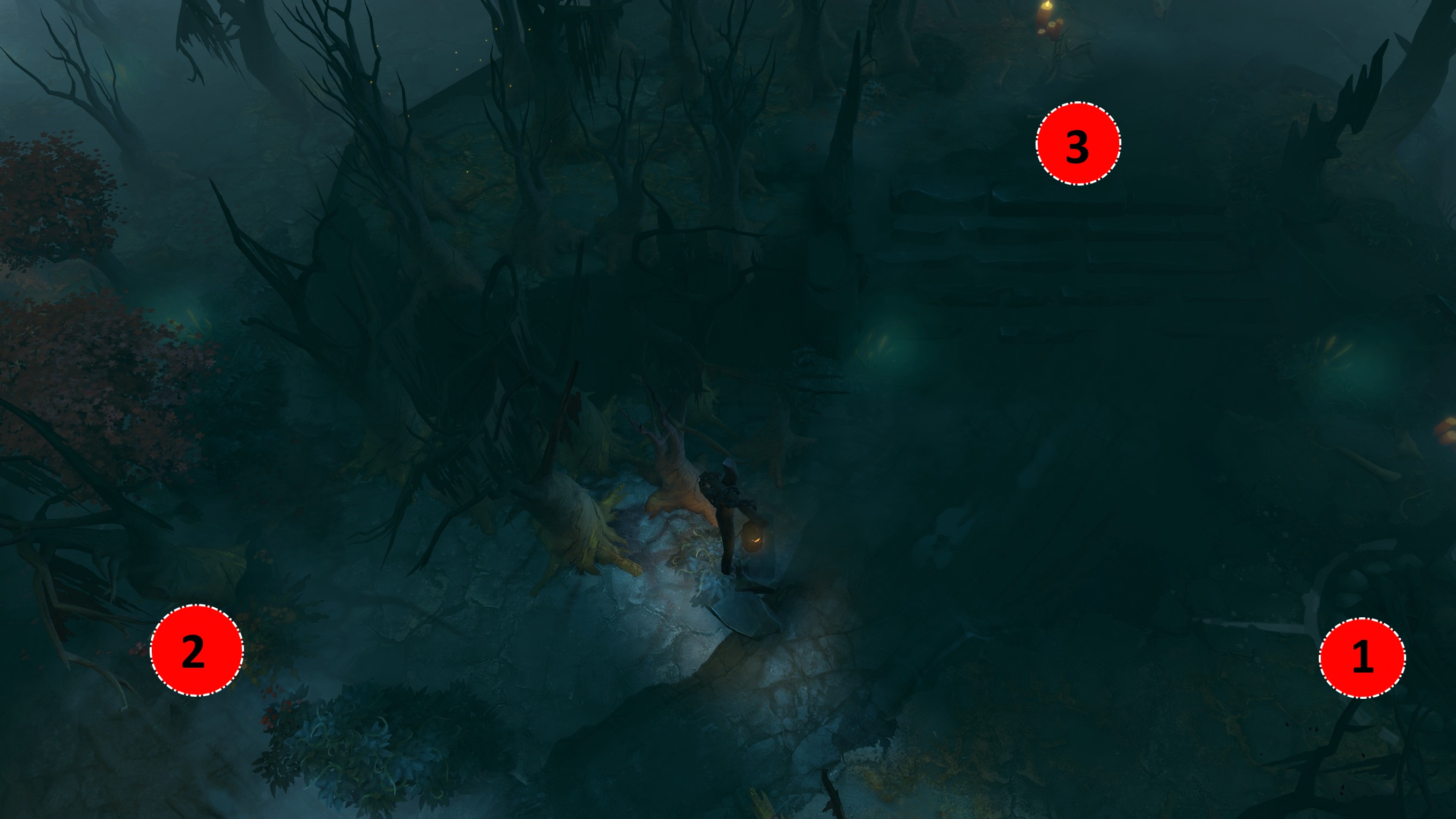
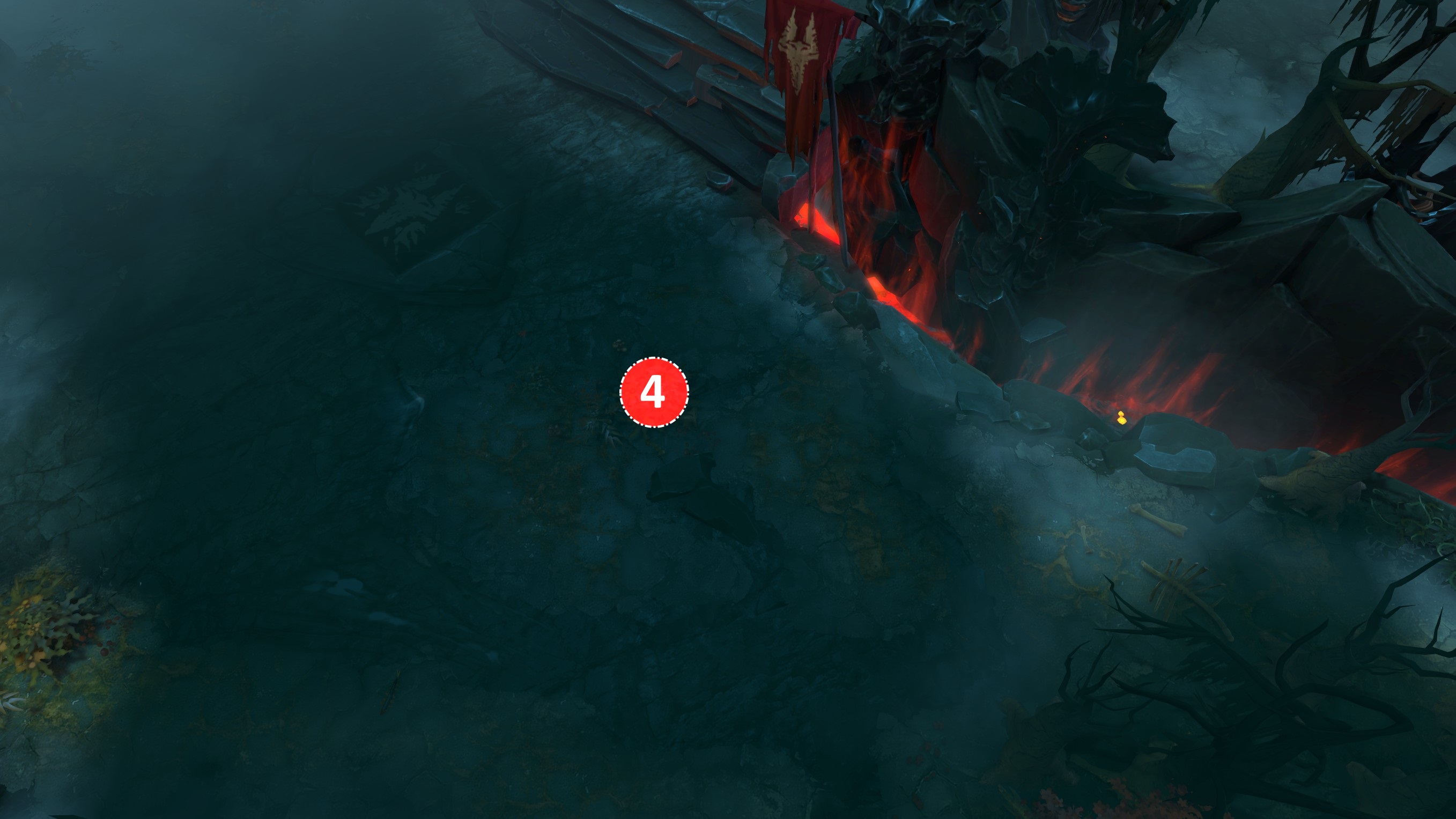
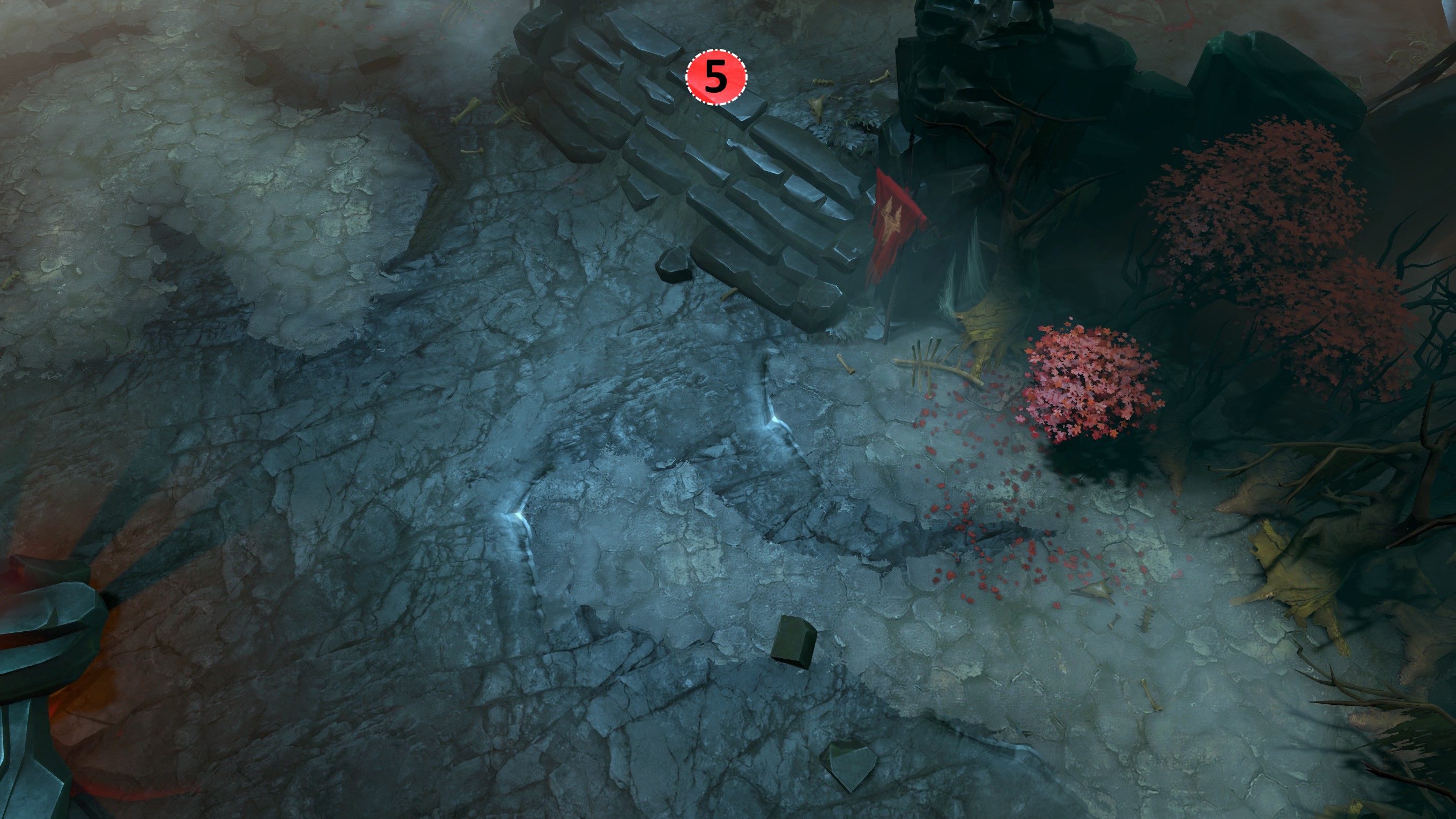
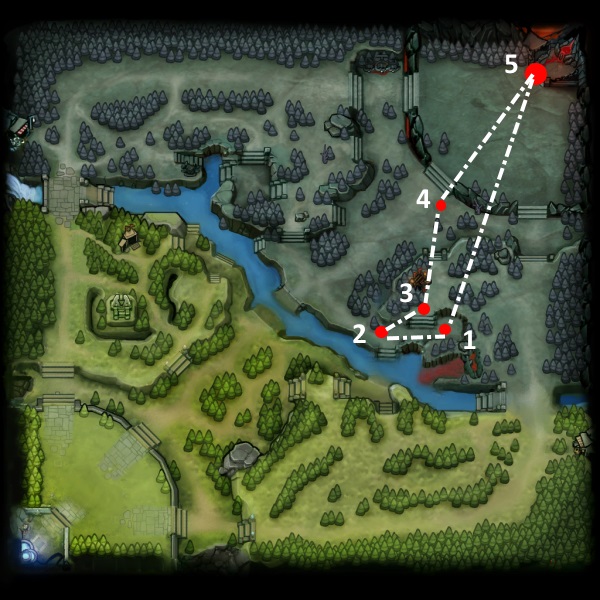
    In order to do the automated stacking on dire, you must activate ancient camp Agro at second 53 on Position 1, and then proceed to hold shift and right click on next 4 three positions in a loop.

    Positions 1,2,3


    Position 4


    Position 5


    For advanced users if they desire to keybind a Key to toggle between these three coordinates on a cfg file here is the code [*This is a example of keybinding `, to toggle between the coordinates]:

    bind "`" "direcheck" alias "direcheck" "direcheck1" "direcheck2" "direcheck3" "direcheck4" "direcheck5" alias "direcheck1" "dota_camera_set_lookatpos 2117.700684 -1361.106079; alias direcheck direcheck2" alias "direcheck2" "dota_camera_set_lookatpos 3351.074219 -779.887085; alias direcheck direcheck3" alias "direcheck3" "dota_camera_set_lookatpos 4036.265137 2078.925049; alias direcheck direcheck4" alias "direcheck4" "dota_camera_set_lookatpos 6580.812500 5481.610352; alias direcheck direcheck5" alias "direcheck5" "dota_camera_set_lookatpos 6580.812500 5481.610352; alias direcheck direcheckhero" alias "direcheckhero" "dota_camera_set_lookatpos 3351.074219 -779.887085; alias direcheck direcheck1" "direcheck2" "direcheck3" "direcheck4" "direcheck5"
    In summary these are the desired points to click:
Summary
  • On average, an ancient camp yields 234 gold and 355 experience. Most ancients are magic immune.
  • Employing at least 30 ~45 seconds in 3 loops, gets you 4 stacks for a average of 936 gold and 1450 exp.

Attached here is a Video tutorial that explains the content of this Guide.

-----------------------------------


References


Optional: Custom Configuration File Setup
Setup

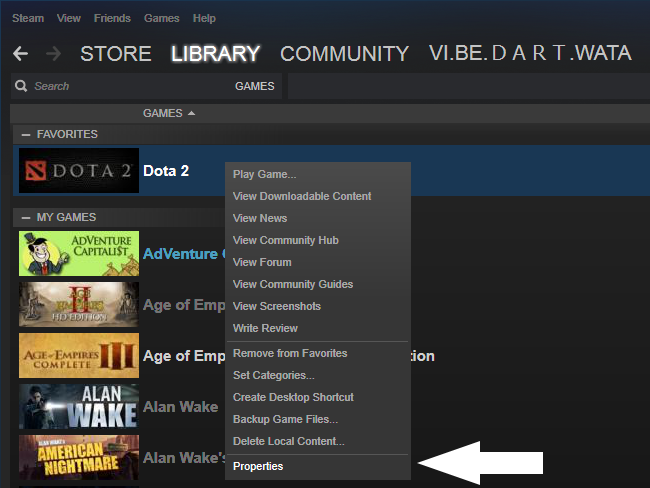
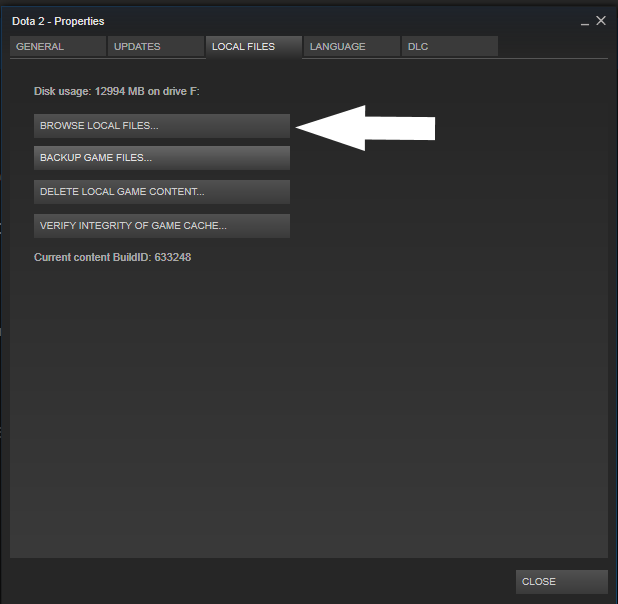
  1. Go to STEAM, go to LIBRARY, and Right Click DOTA 2 & Click on PROPERTIES

  2. Select LOCAL FILES, and then BROWSE LOCAL FILES

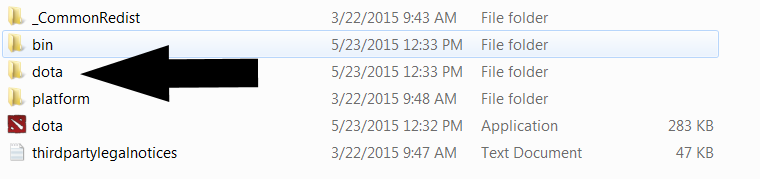
  3. Once you see the DOTA 2 Installation Directory OPEN DOTA FOLDER

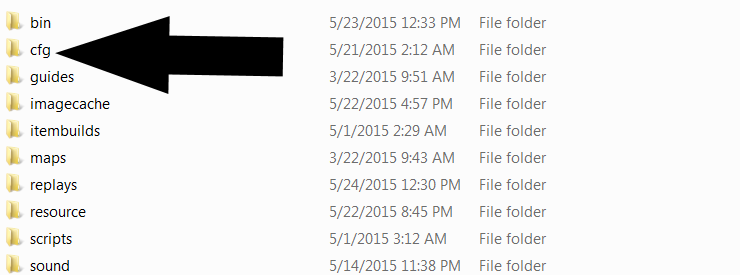
  4. Now Open CFG folder

  5. Here in this Folder you can make your own custom CFG files.
    • Proceed to Open your TEXT EDITOR [Notepad++, Notepad, etc.]
      Paste this :
      bind "PLACEHEREANYKEY" "runecheck" alias "runecheck" "runechecktop" alias "runechecktop" "dota_camera_set_lookatpos -2273.898682 1832.745483; alias runecheck runecheckbot" alias "runecheckbot" "dota_camera_set_lookatpos 3035.773438 -2472.680176; alias runecheck runecheckhero" alias "runecheckhero" "dota_select_all; dota_select_all; +dota_camera_follow; alias runecheck runechecktop" bind "PLACEHEREANYKEY" "direcheck" alias "direcheck" "direcheck1" "direcheck2" "direcheck3" "direcheck4" "direcheck5" alias "direcheck1" "dota_camera_set_lookatpos 2117.700684 -1361.106079; alias direcheck direcheck2" alias "direcheck2" "dota_camera_set_lookatpos 3351.074219 -779.887085; alias direcheck direcheck3" alias "direcheck3" "dota_camera_set_lookatpos 4036.265137 2078.925049; alias direcheck direcheck4" alias "direcheck4" "dota_camera_set_lookatpos 6580.812500 5481.610352; alias direcheck direcheck5" alias "direcheck5" "dota_camera_set_lookatpos 6580.812500 5481.610352; alias direcheck direcheckhero" alias "direcheckhero" "dota_camera_set_lookatpos 3351.074219 -779.887085; alias direcheck direcheck1" "direcheck2" "direcheck3" "direcheck4" "direcheck5" bind "PLACEHEREANYKEY" "radcheck" alias "radcheck" "radcheck1" "radcheck2" "radcheck3" "radcheck4" "radcheck5" alias "radcheck1" "dota_camera_set_lookatpos -7232.000000 -7145.617676; alias radcheck radcheck2" alias "radcheck2" "dota_camera_set_lookatpos -4366.135742 -6497.172852; alias radcheck radcheckhero" alias "radcheckhero" "dota_camera_set_lookatpos -2594.752930 -352.812622; alias radcheck radcheck1" "radcheck2" "radcheck3" "radcheck4" "radcheck5"

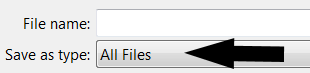
    • On the PLACEHEREANYKEY, replace with the keyboard key you would like to toogle map camera to check runes, or Radiant/Dire coordinates for this guide. Then select SAVE AS > ALLFILES, and proceed to write the Filename with the extention .CFG

      Example:

      File name >>>>> dota.cfg
  6. Activating Console
    ** If you have Console Enabled, Skip this section.
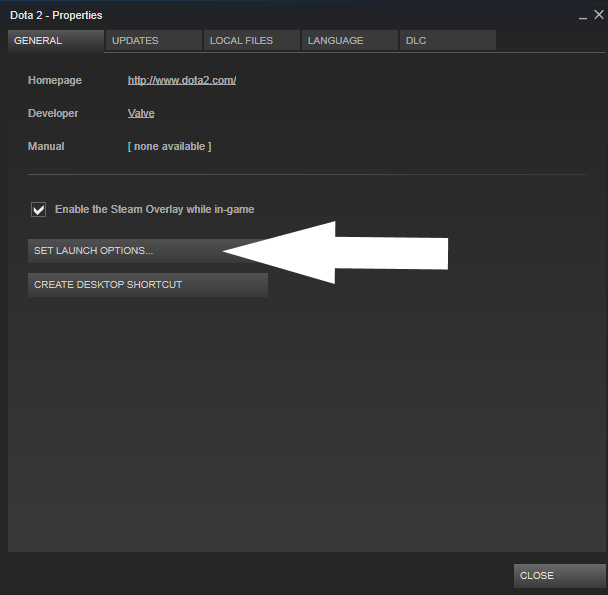
    • Go to STEAM, go to LIBRARY, and Right Click DOTA 2 & Click on PROPERTIES

    • Click on SELECT LAUNCH OPTIONS


    • On this Window Write
      -console

    • Activating Custom CFG file For Ancient Stacking
      • Open DOTA
      • On the Console Write
        exec XXXXXX.cfg

      ** Here you need to replace the XXXXXX with the filename you selected to save your custom configuration file on the Dota CFG installation folder.
    Closing Remarks
    If you Save the custom cfg file with the name, autoexec.cfg It will auto activate when opening Dota, if not you need to use the exectution command in the console
    exec
    to turn on the commands. You can also add more commands to the file, in order to deny creeps without pressing A on keyboard and a lot of other things.
71 Comments
Glitch Jun 1, 2015 @ 8:46pm 
the girl's voice is similar to puck's voice !
Kazushigenity Jun 1, 2015 @ 11:19am 
i love who is talking in the vid :)
Coco Jun 1, 2015 @ 11:07am 
you should add requirement : laziness
76561198073509613 Jun 1, 2015 @ 2:00am 
what if the dominated creeps gets blocked by our teammates or creeps for 4 to 5 secs ?
it will fail
Carry Potter  [author] May 31, 2015 @ 2:43pm 
Click on the 3 points 3 times for, 4 stacks it can take you ~+ or - 30 to 45 seconds
Harding Grim May 31, 2015 @ 2:31pm 
So do I just click it once and it constantly does it, or do I have to shift click it multiple times.
Carry Potter  [author] May 31, 2015 @ 9:59am 
Just to Clarify, Source Engine Coordinates in Script are compatible with multiple ingame rendering resolutions; they have nothing to do, and were obatined using dota_camera_getpos
Huh? May 31, 2015 @ 9:30am 
IMO, the dire stacking method you presented has too much workload on it. I watched a video on dotatvru(check the video here about the dire ancient stalking method that only requires 3 steps (and is only probably applicable if you have mid lane domination)

After you pulled, shift click onto these 3 spots as much as you could while farming on the lane/jungle

1st Spot:
Uppermost right of the dire's 1st tower circle(structures have model area fields around them that can be defined as circles), it's basically located on a 2 o'clock position of the tower

2nd Spot:
The beginning of the dark earth crack next to the Dire's Fountain steps

3rd Spot:
Right side of the small campfire of the Dire Ancient Spawn Area

Tried these a few times while playing on Gyrocopter. Helped me win those seemingly auto lose fights. Overall your guide is great, I'll keep in mind those spots in the Radiant side. Thanks :)
Carry Potter  [author] May 31, 2015 @ 1:52am 
I deleted 1 comment by accident, I apologize. I'm only deleting racist, degrading and negative remarks that doesn't contribute to the discussion. I do welcome constructive feedback, thanks for the support.
Zote the Mighty May 30, 2015 @ 7:18am 
amazing!!!