Counter-Strike 2

Counter-Strike 2

Not enough ratings
CS2 Launch Options Guide 2026
By CSbePRO
You’ll see which CS2 launch options still work in 2026, which ones are outdated leftovers from CS:GO, and why fewer launch options often lead to a cleaner, more predictable setup. No myths, no copy-paste strings - just a clear, tested explanation of what works and what doesn’t.
   
Award
Favorite
Favorited
Unfavorite
What Are CS2 Launch Options and How They Actually Work
The Launch Options are Steam startup parameters that are parsed only once when the game launches. They do not modify game mechanics, do not bypass engine limits, and do not magically optimize performance. However, some launch options are still useful for training and debugging environments. When working with offline practice sessions, custom maps, or repeated testing workflows, certain launch options can save time or ensure consistent startup conditions. This is especially relevant for content creators, server admins, or players who regularly test configs and mechanics.

It’s important to understand: launch options are not a way to make the game faster or boost FPS. Graphics, network settings, and interface behavior are now handled internally - or through config files like autoexec.cfg or through the console. Launch options only affect how the game starts, and for most players, they aren’t even necessary.

To make this crystal clear, here’s what John McDonald - one of the developers of CS:GO - said in response to a question about launch parameters:
Best Launch Options are no Launch Options. They are the most heavily tested by the dev team.

This means that CS2 is tested and optimized under default launch conditions, without any extra flags. If any specific command truly improved performance or stability for all players, Valve would’ve made it part of the default config.
How to add CS2 Launch Options in Steam
The most common way to use CS2 launch options is directly through the Steam client. This method is simple, reliable, and works exactly as expected - as long as you understand that launch options apply globally to the game until you remove them.


To add launch options in Steam:
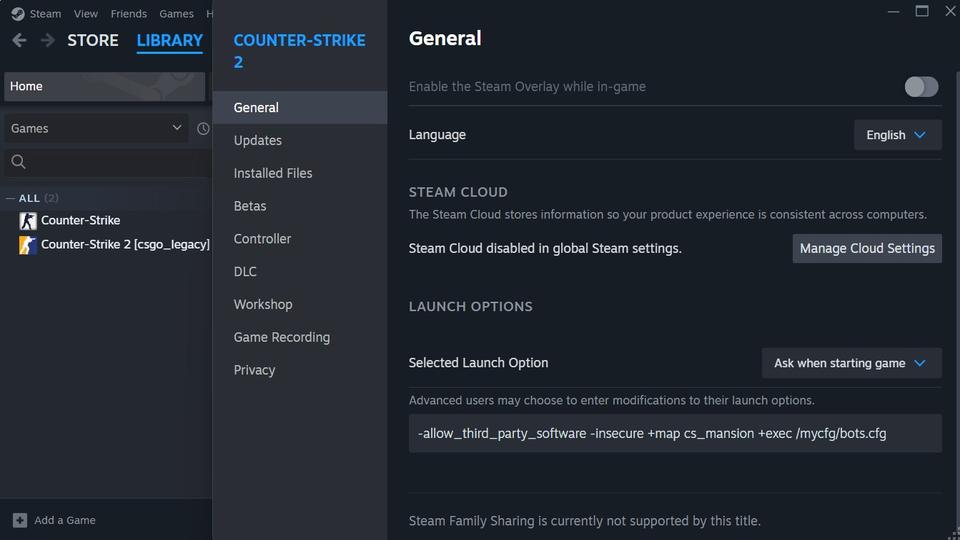
  1. Open Steam and go to your Library.
  2. Find Counter-Strike 2, right-click it, and select Properties.
  3. On the General tab, locate the Launch Options field.
  4. Enter your desired launch options.
Each option must start with a dash, (-) and separate multiple options with a space. To remove launch options, simply clear the field.

Launch options set this way remain active every time the game starts. This is why players often forget that the option like "-insecure" is still enabled when they try to queue for matchmaking.

If you frequently switch between matchmaking, training, and testing, this limitation is exactly why Steam shortcuts - covered in the full guide - provide a cleaner and safer workflow.
General - Launch Options
Note: I didn’t want to overload this guide with edge cases and secondary workflows. In the full version, I break down how -threads and -high actually behave, the difference between using a normal Steam shortcut and launching cs2.exe with high priority without -high, along with real performance tests, results, and practical scenarios where launch options are genuinely useful.

For anyone who wants the full technical breakdown, the complete guide is available here:
The Ultimate CS2 Launch Options Guide 2026: Full List & Optimization[csbepro.com]


General launch options control basic startup behavior rather than gameplay, performance, or graphics.

Option
Description
CS2?
-novid
Skips intro video. No longer needed – CS2 has no startup video.
Useless
-console
Opens the developer console at launch.
Works
-lv
Low-violence mode from CS:GO. Not used in CS2.
Useless
-nosound
Disables all sound. Only useful for debugging.
Works
-safe
Launches the game in safe mode with minimal settings.
Useless
-insecure
Disables VAC. Used for custom servers or offline play.
Works
-allow_third_party_software
Allows OBS, Discord overlays, MSI Afterburner, and similar tools.
Works
-language <lang>
Forces the game to use a specific language (e.g., -language english).
Works
+exec filename / +map map_name
Executes console commands or loads a map at startup. Not a launch option, but supported in the launch string.
Works*
Display & Graphics - Launch Options
Display and graphics launch options are among the most misunderstood and overused parameters in CS2.

Option
Description
CS2?
-w <x>; -h <y>
Sets screen resolution (e.g., -w 1920 or -h 1080 or -w 1920 -h 1080).
Works
-full / -fullscreen
Forces fullscreen mode. -full works in GoldSrc and Source; -fullscreen works in GoldSrc, Source, and Source 2.
Works
-window, -windowed, -startwindowed
Forces windowed mode. These options work in GoldSrc and Source, but are ignored in CS2.
Useless
-noborder
Used with windowed mode to simulate borderless fullscreen. Works in GoldSrc and Source, but has no effect in CS2.
Useless
-refreshrate, -freq, -refresh <Hz>
Forces a specific screen refresh rate. Functional in GoldSrc and Source, but ignored in Source 2. CS2 automatically uses the refresh rate set in the operating system and will warn if it is lower than the monitor’s nominal value.
Useless
-stretchaspect
Stretches the aspect ratio. Has no effect in CS2, as aspect ratio is controlled through the in-game video settings.
Useless
Mouse Input & Misc - Launch Options
Mouse-related launch options were once mandatory in classic Counter-Strike versions, especially in CS 1.6. Back then, parameters like -noforcemaccel, -noforcemparms, and -noforcemspd were essential for disabling Windows mouse acceleration and ensuring consistent, predictable input. For competitive play, these options were not optional - they were a must-have.

In Counter-Strike 2, however, this entire category has become legacy noise. CS2 uses a different input pipeline, and mouse behavior is now handled internally by the engine and in-game settings.

Option
Description
CS2?
-noforcemparms
Prevents CS from overriding Windows mouse settings.
Useless
-noforcemaccel
Disables forced mouse acceleration.
Useless
-noforcemspd
Disables forced mouse speed settings.
Useless
-nomouse
Disables mouse input (debug only).
Useless
-nojoy
Disables joystick support. Already disabled in CS2 by default.
Useless
-noipx
Disables IPX protocol (obsolete).
Useless
-nopreload, -preload
Forces/prevents preloading assets. No effect in CS2.
Useless
-no-browser
Disables in-game browser. Deprecated.
Useless
-autoconfig
Resets all game settings to default (resolution, binds, etc.). Use with caution.
Works
CPU, GPU & RAM Optimization - Launch Options
CPU and threading-related launch options are often advertised as performance tweaks, but in CS2 this category is mostly misunderstood. The Source 2 engine manages CPU threads, scheduling, and memory allocation automatically, which makes most manual overrides either unnecessary or ineffective.

Option
Description
CS2?
-threads <x>
Manually sets number of engine threads. Works, but offers no FPS gain. CS2 auto-manages threads by formula your_threads - 1, check the sys_info command output.
Works (not useful)
-nosse4
Disables SSE4 instruction set. For Source engine, may be usefull fol old CPU.
Useless
-high
Launches CS2 with high CPU priority. Better handled via system settings.
Works
-low
Launches hl.exe (CS 1.6) and csgo.exe (CS:GO) with low priority.
Useless
-dxlevel, -d3d9ex
Forces specific DirectX versions. Deprecated, removed from Source 2.
Useless
-soft
Enables software rendering. Not supported in CS2.
Useless
-d3d, -gl
Forces specific API. CS2 auto-selects best renderer (DX11 or Vulkan).
Useless
-noaafonts
Disables anti-aliasing for fonts. Obsolete.
Useless
-r_emulate_gl
Emulates OpenGL. Source 2 does not support this.
Useless
-softparticlesdefaultoff
Disables soft particles. No effect in CS2.
Useless
-limitvsconst
Limits vertex shader constants. DirectX 8-era setting.
Useless
-forcenovsync
Tries to disable VSync. Use driver-level or in-game settings instead.
Useless
-heapsize
Sets RAM allocation (obsolete from GoldSCR era).
Useless
-dev
Enables developer mode (more verbose logging).
Works
-condebug
Saves console output to console.log.
Works
-nocrashdialog
Suppresses Windows error popups. Used for automated testing, often by server administrators on Source engine.
Useless
-zone
Legacy memory allocator from older Source games.
Useless
Myths from CS:GO That No Longer Work in CS2
A large portion of modern CS2 "optimization guides" is still built on CS:GO-era assumptions. Launch options that once had real effects are now blindly copy-pasted into CS2 launch strings, even though the underlying engine has completely changed.

The options listed below are among the most frequently repeated launch flags in CS:GO quides and forum posts. In CS2, however, they have no functional impact on performance, graphics, input, or networking.

Option
Description
Status
-novid
There is no intro video in CS2. This option does nothing.
Useless
-tickrate 128
Doesn’t affect official servers or matchmaking. Used to work in CS:GO for offline servers.
Useless
-d3d9ex
Removed entirely in Source 2. Was used in CS:GO for better performance.
Useless
-fullscreen, -windowed, -noborder
All of these can be set in CS2’s in-game video settings. Launch flags not required.
Useless
-threads
Used to manually set CPU thread count in CS:GO. CS2 now auto-manages this (CPUs - 1).
Obsolete
+fps_max 0
Not a launch option. It’s a console command and should be used in config or console directly.
Misused
-lv
Low violence mode from older versions. No longer supported in CS2.
Removed
-refresh
CS2 automatically detects your monitor's refresh rate. Will even offer to raise it if needed.
Ignored
-nojoy
Joystick support is already disabled by default in CS2.
Useless
Conclusion
There’s no more guessing: in CS2, launch options aren’t magic - they’re just technical switches. And they only matter if you actually know what you’re doing.

If you came from CS:GO and still paste -novid, -tickrate 128, or -high out of habit - you’re wasting your time. Most popular launch options are either outdated or completely ignored. They keep showing up in guides simply because no one bothers to test them anymore.

CS2 runs on the Source 2 engine, and it’s a different beast. It automatically decides how many threads to use, which API to select, and how to start the game efficiently. Most "optimizations" are already baked into the engine.

Yes, there are a few useful launch options, like -console, -insecure, -allow_third_party_software, or -autoconfig. But they’re about convenience, not performance. Everything that actually affects FPS and responsiveness is inside the game itself - in settings, in your OS and video driver configuration.

If any launch option truly improved performance, Valve would have made it default. And John McDonald - developer of CS:GO - said it best:
"Best launch options are no launch options. They are the most heavily tested by the dev team".
That’s the whole answer.
5 Comments
Aug 2 @ 11:10am 
What about the ones below?
cl_interp_ratio
cl_interp
Mar 7 @ 11:37am 
Nice guide! Time to clean up these cmds i have been piling up since 2003 :D Maybe a dumb question. Is setting "-tickrate 128" useless if u play on community servers sometimes? I remember it being useless for official servers in csgo also, but i believe it did work when u joined community servers. Thanks again.
Feb 21 @ 10:26pm 
Что РАБОТАЕТ:

-console — вызов консоли при старте.

-allow_third_party_software — чтобы OBS видел игру (может снизить Trust Factor).

-insecure — для тестов и тренировок локально (VAC отключен).

-vulkan — если на DX11 есть графические баги (актуально для AMD).

-language english — смена языка интерфейса.
Feb 21 @ 10:22pm 
База. Лучший параметр запуска в 2026 году — это его отсутствие. Valve годами полировали движок, чтобы он сам подхватывал частоту монитора и потоки процессора. Пора перестать тащить в CS2 мусор из 2013 года вроде -novid или -freq. Если хотите стабильности — используйте autoexec.cfg для игровых настроек, а параметры запуска оставьте для отладки (-insecure или -console). Автору респект за развенчание мифов!
Feb 16 @ 1:29pm 
good