ASTRONEER

ASTRONEER

Not enough ratings
Portable oxygenator timer clock
By mece
How to build adjustable timer clock based on portable oxygen generator, battery sensor and splitter.
   
Award
Favorite
Favorited
Unfavorite
How to build
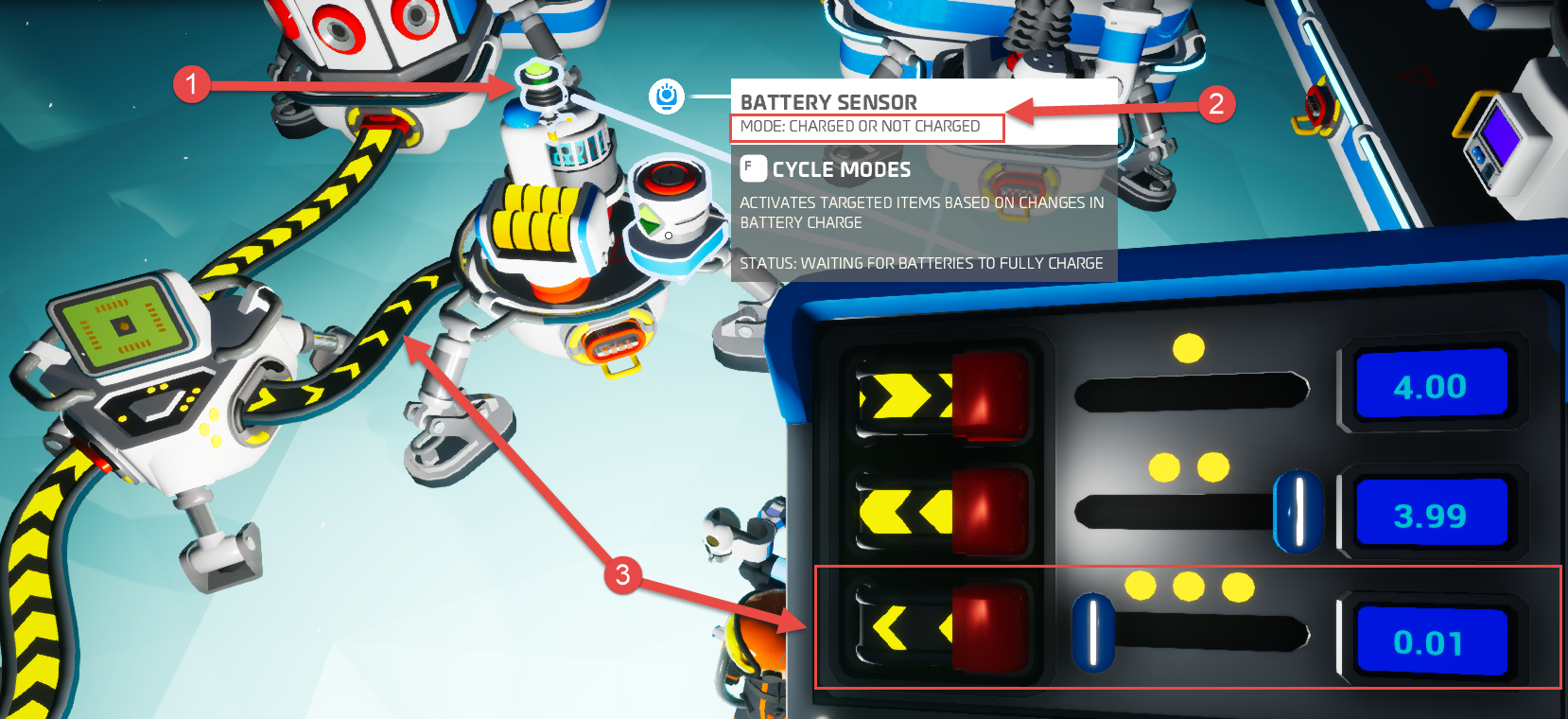
  1. Place on a platform one small battery and one portable oxygen generator.
  2. Attach a battery sensor to the platform and connect one of its target pins to the oxygen generator. Set sensor mode to "Charged or not charged".
  3. Give the platform some power from 0.01 to 0.25 from a splitter. Timer will work with power up to 1.35, but very fast. With 0.01 it's period will be approximately 6-7 seconds.
  4. Start the oxygen generator.

8 Comments
Erathanos Dec 20, 2020 @ 7:01pm 
@manyuser It is an example of things you "could" do, but in all reality something you would never need to do, nor should you. The standard O2 gen and platform uses less space on your backpack, and is free to use. ( This is simply an example of a timer clock )
manyuser Dec 20, 2020 @ 3:28am 
@Erathanos isn't this just a clock, not for oxygen? The oxygenator just consumes some power. You can take the output of the sensor and apply it to something else as well.
Kupie Oct 22, 2020 @ 1:52pm 
What does this do?
Takeraparterer Aug 19, 2020 @ 11:09pm 
:slimeamazed:
JulianDoof Aug 10, 2020 @ 12:27pm 
wow
:slimeamazed:
Erathanos Jul 25, 2020 @ 9:34pm 
Yes, I understand that, the portable one that you put on your "C" or "V" slot that uses personal power to get emergency O2 the platform you have in the picture, "could" have the "standard" O2 Gen ( which packs to a single pip size ) on it for free in place of the small bat, bat sensor, and portable.. its what I was saying.
Slimez Jul 25, 2020 @ 11:09am 
@Erathanos The oxygenator does not require power, the portable oxygenator (Tier 1 slot) requires power to work.
Erathanos Jul 24, 2020 @ 2:00am 
The portable Oxygen Generator, doesn't require power to function though.. Just needs to be on a platform..