Arma 2: Operation Arrowhead

Arma 2: Operation Arrowhead

215 ratings
DayZ Origins - Home Building Guide v1.0
By Ambitosis
(1.7.5) Want to build a house, a garage, or even a fortress within the world of DayZ Origins? Blueprints won't tell you what you need to do so, and they certainly won't help you with the annoyances and intricacies of the building system - this guide should help to clear things up and help you along your way.

NOTE: This guide has not been updated since 1.7.5 and as a result some info is incorrect, missing or otherwise out of date. Most is still in use, though.
   
Award
Favorite
Favorited
Unfavorite
Foreword
One of the neatest features in the Origins mod for DayZ is the ability for players to build their own houses in order to secure both themselves and loot. Unfortunately, inside the game itself, they don't really tell you how to do it!

The purpose of this guide is to provide basic, but accurate information intended for newer players to DayZ Origins who are perplexed or otherwise unsure on how to go about building their first houses and structures, as well as provide information on what materials and requirements are needed to build additional ones later on. Skip to the later sections if you're just looking for a list of required materials and storage capacities. Otherwise, read on, and hopefully the otherwise draconic rules of housebuilding will be understood by the time you're through.
Location, location, location!
Since you're building a home in a (usually, but not strictly) hostile environment on an Origins server, you want to pick somewhere that suits your wants and needs well enough. There are no perfect spots. Each location has its ups and downs, but to help get you started, here are some suggestions when scouting around for a spot for your future home.

  • Close to spawn. This is the ultimate convenience for a home - if you ever die, you can find yourself back to your home base within minutes. This is probably the most common way I've seen people do their homes. Just wander in the woods or along the coast north of Kameni and you'll likely find a good collection of houses without much effort to reach them. The downside is that players that discover these locations can be prone to camp them when you're online, and ungaraged vehicles (in some cases, ones that are in a garage as well) are prone to being stolen or destroyed.

  • On top of a mountain. Another common choice, with obvious benefits. Houses that are on mountains are difficult to camp - there is no foliage, trees or rocks to obstruct the view, and the advantage of high ground is a given. The problem with building up on one is it can be time consuming to reach your house on foot or even with a vehicle. While not as often checked as houses closer to spawns, players with helicopters will often check up on these types of locations, especially if they're between point A and B for them. If you have a helicopter yourself or with your group, or if you have a bit of patience and don't mind a climb, mountains are a good choice. Just be sure to choose one with enough 'flat' surface area to accommodate the amount of people you expect to set up shop with you.

  • Along the coast. Generally speaking, it's pretty safe to build your house almost anywhere on the coast of either mainland. There are very few spots where the ground is so steep, or the coast is so heavily bushed, that making a house is impossible or very inadvisable. The benefit of being on the coast is that you only have to check for campers from one direction - they won't be sitting in the water waiting for you, after all. The downside is that these are some of the easiest houses to spot - players in vehicles, helicopters and on foot patrol the coast all the time to find helicopter crashes for their rare loot, and the odd boat spawn. Your vehicles will not be safe for more than a day on an average population server, unless luck is on your side.

  • On an island. Building your base on an island, especially one that isn't located between the two mainlands, is quite possibly the single best way to hide your things. Not only is the home generally unraidable by anyone who doesn't have a chopper to throw at you (since boats are even less common to see), people have to deliberately go out looking for bases. Nobody stumbles upon a house that's out on a little island in the middle of the ocean by mere chance. Both of these things drastically reduce the traffic that will come by - if that's a worry for you. The downside is the same as the benefit; to get to your house, you'll need a boat or a helicopter readily available. In the absence of it, you might find yourself without a way to get home!

  • Anywhere else. If you're not by a spawn, not on a mountain, not on the coast, and not on an island, you're probably just off in the woods in the middle of 'nowhere', such as anywhere on the eastern side of the mainland. Which is perfectly fine - just remember, you'll have to hoof it back to that house if you die, and that can be a laborious task for those who prefer to play Jogging Simulator as little as humanly possible.

    Keep the points above in mind, pick a spot for yourself and/or your friends, and get to work building!
Materials (and where to find them!)
In the next section, I'll be detailing exactly what materials are needed for each stage of each structure. Some of them you might have seen in your travels, but others can be more difficult to find or get your hands on. Here's all the materials that a building will call for, and where to find them when you need to:

  • Blueprint: Every home needs a blueprint for the foundation, and then you don't need it anymore. Level 1 blueprints can be found most commonly in residential loot spawns such as bars and apartment buildings, but have been known to spawn in industrial spots too. Keep an eye out for a Hero or Bandit L1 and hang onto it to save yourself the trouble later on down the road. Level 2's and 3's both drop off of Dr Ivan, the orange-coated zombie that takes a lot more bullets to the head to kill than a regular one. Kill a few of these and you should find your L2 or L3 before long.

  • Cement Mixer: An annoyingly common industrial loot spawn. Big red thing. Should be easy to find - you only need one for each building, and they're practically everywhere.

  • Wood: This one's simple. Grab a pickaxe, find a forest, and right click it while it's on your toolbelt and hit Gather Wood (or something to that effect). It'll instantly add a 2 slot Wood item to your inventory. An axe can break randomly while chopping, so having 3-4 in your bag will help the task immensely. Given the amount of space wood takes up in the inventory, chopping trees without a vehicle to load into will be difficult.

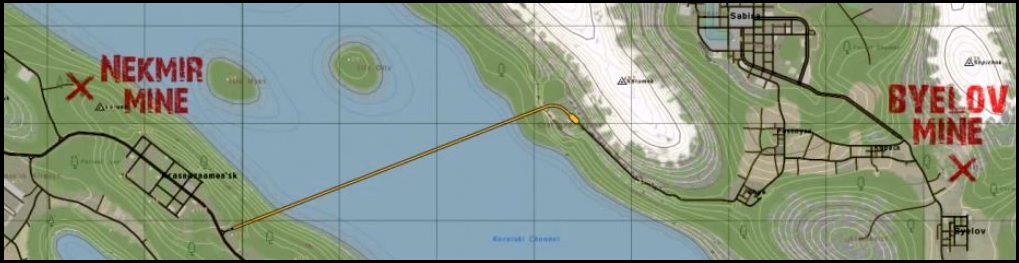
  • Rocks: The second building material required in everything. This one is a bit more tricky to find - there are only two places on Taviana that you can gather rocks at. One is at a mine just north of Byelov, and the other is on the other island, northwest of where you get off the bridge. You have to go near the mineshaft itself (the stone structure leading into the hill, with the double doors and minecart tracks) and use a pickaxe, similar to how you chop wood. Keep in mind that a pickaxe can break as well, and given the amount of rocks needed to complete a stage of any structure, mining without a vehicle to dump into will also prove very time consuming.


  • Cement Bags: A two slot item that is found in regular industrial loot sites. Nothing special about these.

  • Reinforced Materials: Similar to cement bags, although a little more rare - checking large industrial sites such as Dalnogorsk or Ekaterinburg, along with a bit of loot recycling, will speed this along. Keep in mind Reinforced Materials are six slots, so make appropriate room in a backpack or in your inventory before you shuffle it around in order to avoid it being destroyed accidentally.

  • Cinder Blocks: These are obtainable at the urals of Sector B, but are more commonly acquired by combining 2 Limestone and 2 Reinforced Wood. Combine them by pulling all 4 items into your inventory, right clicking one, and hitting Combine. Those two materials are produced naturally every server reset in the inventory of a level 2 home. Since this is only used for strongholds, level 3 homes and large garages, the progression makes sense. You won't have to worry about this unless you're building one of those three things.

  • Battery / Code Lock: These two items are residential, so you're best off checking apartments and bars for them. They're not extremely rare, and you should come across them while looking for other stuff easily enough.
Methodology
You've picked a spot, and now you're ready to start gathering materials in order to build a home. The first thing you need to know is that both homes and garages come in several steps known as stages. For a level 1 home, every stage is mandatory. For a level 2 and 3 house, along with garages, the final step is, in fact, optional - but you'll find yourself without a roof, in that case.

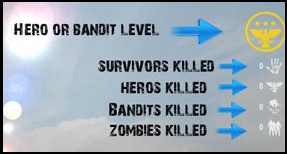
Level 1 homes come in two flavors - bandit, and hero. You need to be either a level 1 bandit, or a level 1 hero, in order to build a level 1 home. This guide doesn't go in depth on the mechanics of levelling, but the top right symbol on the DayZ Origins in-game UI will show you what you are. A gold eagle with at least 1 star means you're a level 1 bandit or higher, and a red skull with at least 1 'x' means the same for bandit. If you have a white hand encircled, you can't build a house yet. You can easily attain level 1 hero in this case by killing a bunch of zombies, and to get to bandit level 1, start killing players. The same is true for a level 2, or a level 3 house respectively.

Each house consists of building the foundation first. Note, for each foundation you need a toolbox and an entrenching tool. Once a foundation is set, it can be destroyed in order to move it - but this will destroy all the materials used to make it as well, so be careful how you place it! More info on this point will be further down.

Level 1 Bandit/Hero Home

Stage One:
  • 1 Cement Mixer
  • 1 Hero/Bandit L1 Blueprint
  • 15 Rocks
  • 25 Wood
  • 2 Cement Bags
  • 2 Reinforcing Materials

Once the above materials are gathered, take the cement mixer into your inventory and kneel about 10 feet back from where you want the front of the house to be. Right click the cement mixer in your inventory, and there should be an option to deploy it. Find the 'gear' option on the deployed cement mixer, and fill it with the rest of the above materials except for the blueprint.

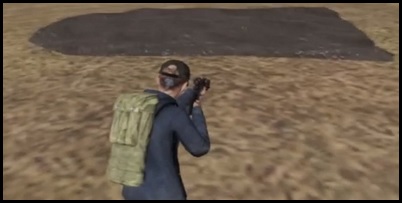
Once the cement mixer is filled, take the blueprint into your inventory, move near the cement mixer (within 10 feet or so) and face where you want the front of the house to be, as if you were standing in front of it, about 10 feet back. Then use the blueprint. This image should help to show the distance you should expect the foundation to be from you once you commit to building. If you're given an error message, such as you're being obstructed by trees or rocks, move the cement mixer and it's contents to a more open space, or simply back up a little and try the blueprint again. Your player should, after a 10 second or so animation, complete the foundation. Congratulations, you're finished the first stage of a level one house.

At this point, the foundation has to set. What this means is, is the foundation is still wet and can't be built upon just yet - either 24 in-game hours (by default this translates to 4 real world hours) must pass, or the server must reset before you can complete Stage 2 (which always happens within 4 hours anyways). This is true for any structure, not just a level 1 house; the first stage is always the foundation, and it must always set.

After a server reset, it will be set, and you can move on to stage 2. At this point, materials are loaded into the gear icon of the foundation itself - most commonly found somewhere in the middle or off to one side, on top of the actual cement. It may take a minute or two to find it.

Stage Two:
  • 25 Rocks
  • 35 Wood
  • 4 Cement Bags
  • 4 Reinforcing Materials
  • 1 Battery
  • 1 Code Lock

Once all of the above materials are loaded into the foundation, back up about 10 feet from the 'front' of the house and aim around at it until you get the option to 'Build Stage 2'. This can also be a bit tricky to find, don't get discouraged if you don't immediately find it - it is NOT in the same location as the gear.

If you had enough materials in there, it will pull up a prompt for a 4 digit pin number. This number does not matter at all, just be sure to remember it. You can't use your friend's house, even if you know his PIN, so something simple like 1234 or 1111 works just fine. I prefer 1111, just because I can enter it quicker, and with hostile players around, you want to get in and out of a house as quickly as possible.

As the pin is saved, the house will finish. Congratulations, you finished your first house. There are a few tips and tricks in regards to owning your home that'll be covered in a later section that you should check up on, but besides that, the method for building your first home is the same as building any other.

Keep in mind that a level 2 and a level 3 house is not an upgrade for your level 1 house - it's an entirely separate home. You can build it nearby your first, or somewhere else. You don't even need a level 1, you can skip straight to 2 if you so desired. Here's the list of materials and stages for the other two homes.

Level 2 Bandit/Hero Home

Stage One:
  • 1 Cement Mixer
  • 1 Hero/Bandit L2 Blueprint
  • 15 Rocks
  • 25 Wood
  • 2 Cement Bags
  • 2 Reinforcing Materials

Stage Two:
  • 25 Rocks
  • 35 Wood
  • 4 Cement Bags
  • 4 Reinforcing Materials

Stage Three:
  • 30 Rocks
  • 45 Wood
  • 4 Cement Bags
  • 4 Reinforcing Materials
  • 1 Battery
  • 1 Code Lock

    Note that after stage 3 is complete, a level 2 house is entirely functional. The last stage is optional - you'll just be without a roof, which means players could potentially parachute in, attack from higher ground, or lob grenades in. I recommend finishing stage 4.

Stage Four:
  • 35 Rocks
  • 55 Wood
  • 4 Cement Bags
  • 4 Reinforcing Materials

As explained in the materials section, a level 3 house requires cinderblocks, which level 2 homes naturally produce every server reset.

Level 3 Hero/Bandit Home
Note, the hero and bandit builds on stage 3 and 4 are slightly different in terms of code lock and battery timing. Pay attention to which you choose.

Stage One:
  • 1 Cement Mixer
  • 1 Hero L3 Blueprint
  • 15 Rocks
  • 25 Wood
  • 2 Cement Bags
  • 2 Reinforcing Materials
  • 5 Cinder Blocks

Stage Two:
  • 25 Rocks
  • 35 Wood
  • 4 Cement Bags
  • 4 Reinforcing Materials
  • 1 Battery (HERO ONLY)
  • 1 Code Lock (HERO ONLY)
  • 10 Cinder Blocks

Stage Three:
  • 30 Rocks
  • 45 Wood
  • 4 Cement Bags
  • 4 Reinforcing Materials
  • 15 Cinder Blocks
  • 1 Battery (BANDIT ONLY)
  • 1 Code Lock (BANDIT ONLY)

Stage Four:
  • 35 Rocks
  • 55 Wood
  • 6 Cement Bags
  • 6 Reinforcing Materials
  • 25 Cinder Blocks

Stage Five (Garage Extension):
  • 15 Rocks
  • 25 Wood
  • 2 Cement Bags
  • 2 Reinforcing Materials
  • 5 Cinder Blocks

Stage Six:
  • 25 Rocks
  • 35 Wood
  • 4 Cement Bags
  • 4 Reinforcing Materials
  • 10 Cinder Blocks

Stage Seven:
  • 30 Rocks
  • 45 Wood
  • 4 Cement Bags
  • 4 Reinforcing Materials
  • 15 Cinder Blocks
  • 1 Code Lock
  • 1 Battery

Stage Eight:
  • 35 Rocks
  • 55 Wood
  • 4 Cement Bags
  • 6 Reinforcing Materials
  • 20 Cinder Blocks
Garages
Building a garage is no different from a home - they have foundations and multiple stages, the last of which is optional since it's just the roof. Garages aren't just for storing cars, either - they have an inventory that works exactly like a home. It's like another house entirely! In order to build a garage, follow the same steps as earlier, using the following material sets. Keep in mind any garage requires you have a house first, and a large garage requires materials from a level 2 home.

Location for a garage can be a little more important than a home - building it on the edge of a slant can result in difficulty parking a car inside. Not only that, server resets make cars move slightly - if your garage is slanted, the car can actually begin to glitch outside the wall, at which point players can steal the wheels, fuel tank or engine, access the gear, and blow your car up. Trust me, I've done it before. Try to find a location as flat as possible with as little obstruction as you can manage.


Small Garage:

Stage 1:
  • 1 Cement Mixer
  • 1 Small Garage Blueprint
  • 25 Rocks
  • 25 Wood
  • 5 Cement Bags
  • 5 Reinforced Materials

Stage 2:
  • 35 Rocks
  • 35 Wood
  • 5 Cement Bags
  • 5 Reinforced Materials

Stage 3:
  • 45 Rocks
  • 45 Wood
  • 5 Cement Bags
  • 5 Reinforced Materials
  • 1 Code Lock
  • 1 Battery

Stage 4 (Roof):
  • 55 Rocks
  • 55 Wood
  • 5 Cement Bags
  • 5 Reinforced Materials

Large Garage:

Stage 1:
  • 1 Cement Mixer
  • 1 Large Garage Blueprint
  • 45 Rocks
  • 45 Wood
  • 10 Cement Bags
  • 5 Reinforced Materials
  • 10 Cinder Blocks

Stage 2:
  • 55 Rocks
  • 55 Wood
  • 10 Cement Bags
  • 5 Reinforced Materials
  • 20 Cinder Blocks

Stage 3:
  • 65 Rocks
  • 65 Wood
  • 20 Cement Bags
  • 10 Reinforced Materials
  • 1 Code Lock
  • 1 Battery
  • 30 Cinder Blocks

Stage 4 (Roof):
  • 75 Rocks
  • 75 Wood
  • 20 Cement Bags
  • 10 Reinforced Materials
  • 40 Cinder Blocks
Storage (Homes and Garages)
Each house can, of course, only hold a certain amount of gear. Here's the most recent list of each home's item capacity. If you overfill any of these categories, the gear will appear on the ground outside of the structure - it won't get outright deleted, thankfully. Note that weapons and tools (tools being anything that takes up a spot on the bottom toolbelt in your inventory, such as a map or flashlight, as well as binoculars, rangefingers and NVGs) take up the same space in a house.

Level 1 Home:
  • Items: 400
  • Weapons/Tools: 10
  • Backpacks: 5

Level 2 Home:
  • Items: 400
  • Weapons/Tools: 25
  • Backpacks: 10

Level 3 Home:
  • Items: 400
  • Weapons/Tools: 50
  • Backpacks: 15

Small Garage:
  • Items: 400
  • Weapons/Tools: 10
  • Backpacks: 5

Large Garage:
  • Items: 400
  • Weapons/Tools: 50
  • Backpacks: 15
Tips, Tricks and FAQ
There's a lot of intricacies and annoyances with the building system that you should be aware of, or might find interesting.

  • Houses can be built on a slant just fine, but accessing them will be a lot more difficult. Try to keep things flat!
  • If in doubt when the foundation is placed, don't risk building a house in a questionable location. Once you complete stage 2 of a home, it's indestructible. Cut your losses with the foundation and move!
  • The code to your house as of 1.7.5 doesn't have to be complicated, as nobody can access anyone elses home.
  • Be safe! Get in and out of your home quickly, and check around for enemies, since someone can kill you while your door is open and access all your loot.
  • Homes are great to heal in. If you're lower than full blood, sleep inside them to heal. Close your door first, though, to be safe.
  • People CANNOT kill you while you're inside your home (most of the time). Even grenades should be blocked. This includes the slider on your door.
  • Don't try to crawl underneath someone's home if it's on a slant. You'll break your legs and die a horrible death.
  • Did you know you can actually make houses touch, despite the minimum distance requirement? Place the cement mixer as close as possible, but then move even closer to an adjacent home to place the foundation with your blueprint. If you do it right, the tank traps should touch. Great for making walls out of buildings!
  • To follow up on the last point, the position/orientation of a cement mixer doesn't determine where your house is or how it faces - your position and orientation when you use the blueprint does. You just have to be within 10 meters of the cement mixer to actually finish the foundation.
  • You can only own one home of each level. Sorry, you can't make more than one level 1! (AUTHOR NOTE: Would like confirmation if you can or can't have a level 1 hero AND a level 1 bandit or not. Been getting mixed reports.)
  • Loot in the home will NOT spawn if it is CLOSED AND LOCKED. The house must be open and unlocked for your gear to be accessible - this is to prevent people glitching into your house or parachuting in to steal all your stuff. If you lock yourself into your house and access the gear, nothing you put in there will save after server reset. Be wary!
  • Houses have to be 100 meters from cities. This includes abstract buildings like MOST castles, racetracks, homes etc. Some castles don't count though - such as the tower north of Kameni. Experiment!
  • You don't need to keep your level once a foundation is set. In fact, you can swing both ways! If you place a level 2 hero foundation and then become a level 3 bandit, you can still complete and use your level 2 home, AND build a level 3 bandit home.
  • Big ego? Need space? Consider going Bandit for a Level 2 Home. It's a lot more spacious!
  • Need to refill those DMR mags? Locking unfilled magazines for guns in your house actually refills them. Just lock them in, reopen the house, and voila! More ammo.
  • Found someone you dislike? Try setting a bear trap on their doorstep for maximum hilarity.
43 Comments
BananaGirl⁧ ⎝⧹KiTiTy⧸⎠ Apr 15, 2024 @ 3:22pm 
i can't figure out how escavators or siege ladders work, as well as how to unlock doors or demolish enemy bases.
BananaGirl⁧ ⎝⧹KiTiTy⧸⎠ Jan 26, 2024 @ 7:07pm 
not really lol.. more zombies for me xD
Ambitosis  [author] Jan 22, 2024 @ 9:23am 
Do people still play this?
BananaGirl⁧ ⎝⧹KiTiTy⧸⎠ Jan 17, 2024 @ 12:25pm 
this is so useful, but i didn't know if you build a house you are locked out of building an electronic nested house :(
https://dayz-origins.fandom.com/wiki/Nested_Buildings
https://dayz-origins.fandom.com/wiki/Nested_Houses
i wish i could build both a normal and electro house!
French Blue May 14, 2022 @ 1:03pm 
Download dayzlauncher and then when you goto join the LFS orgins mod server (the only orgins server thats worht playing), it will automatically download the mod for you
Ambitosis  [author] Feb 25, 2021 @ 10:44pm 
You'll have to look up the DayZ Origins launcher, it has its own thing now. Its not very populated these days, maybe one or two servers with anyone on and that's it.
MELO Feb 24, 2021 @ 12:45am 
HI HOW GET ORGIN MODE ?
Heisenbooger Sep 11, 2019 @ 6:49pm 
I've been meaning to play the mod. Do I need to have both Arma 2 & CO installed at the same time? And what mod browser would be the best to use. I haven't played the mod in a long time. Only for a brief couple mins last week. Server was empty.
Revaliz Nov 17, 2018 @ 9:42am 
Great work!
Gua Jul 30, 2017 @ 8:13pm 
@Distorted Thanks for your work!