Darkest Dungeon®

Darkest Dungeon®

Not enough ratings
A guide on Changing Hero stats (*IT'S KIND OF CHEATING)
By Lukasblade2
Hello and welcome everyone to this (hopefully) short and semi-informative guide. In this guide I'll be showing you how to edit hero stats (i.e. change the crusader's damage from 5 to 500 or something crazy like that [ disclaimer: I've never actually set the crusader's damage to 500 before so if you try it good luck]) and make your game less unbearable. Let's get right into it. This guide was inspired by this person's guide: https://steamcommunity.com/app/262060/discussions/0/612823460273726401

Things you will need:
- Your wits and some common sense
- An inquisitive and adventurous mind
- and Notepad ++ (which you can download online, just look it up.)

Disclaimer:
I take no responsibility for anyone's actions regarding the editing of files. If you the reader decide to follow this guide, know that you are responsible for your files and that anything that happens to them is your responsibility.
   
Award
Favorite
Favorited
Unfavorite
Finding the Game Files to edit
Here you'll be looking for the game file.

So first off you're going to want to go into the game's folder, so go into the main game file,

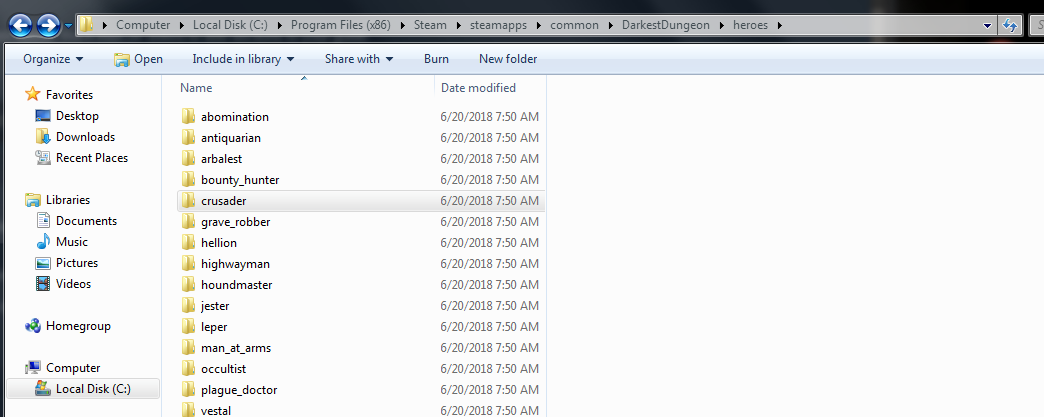
(Local Disk (C:) > Program Files (x86) > Steam > steamapps > common > DarkestDungeon ). Now select the "heroes" folder.

Here you can see all of the hero files. For this guide we will be changing up the crusader a little bit.

You'll also be glad to know that this method works for ALL of the hero files
Editing the Game Files
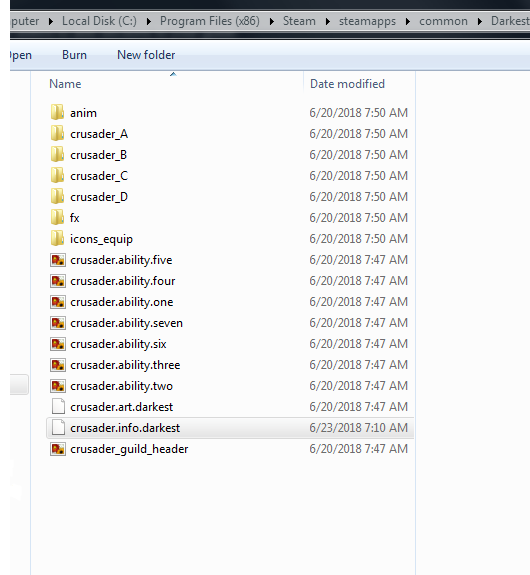
Now that we've found the files lets dive right into it! Select the "crusader.info.darkest" file, from here you'll need notepad++ to edit the file.
But first make sure to copy the original file somewhere on your computer!!!!!
COPY AND PASTE THE ORIGINAL INFO.DARKEST FILE SOMEWHERE, ANYWHERE ON YOUR PC
I recommend creating another folder on your desktop, and copypasting the original file into it.
This is so that should you want to make the game normal again, you can simply move and replace the original over the edited one.


Now that you've copied the original file, it's time to get into changing the game! Here's where you need Notepad++. Right-click on the .info.darkest file and select the "edit with Notepad++ " option.

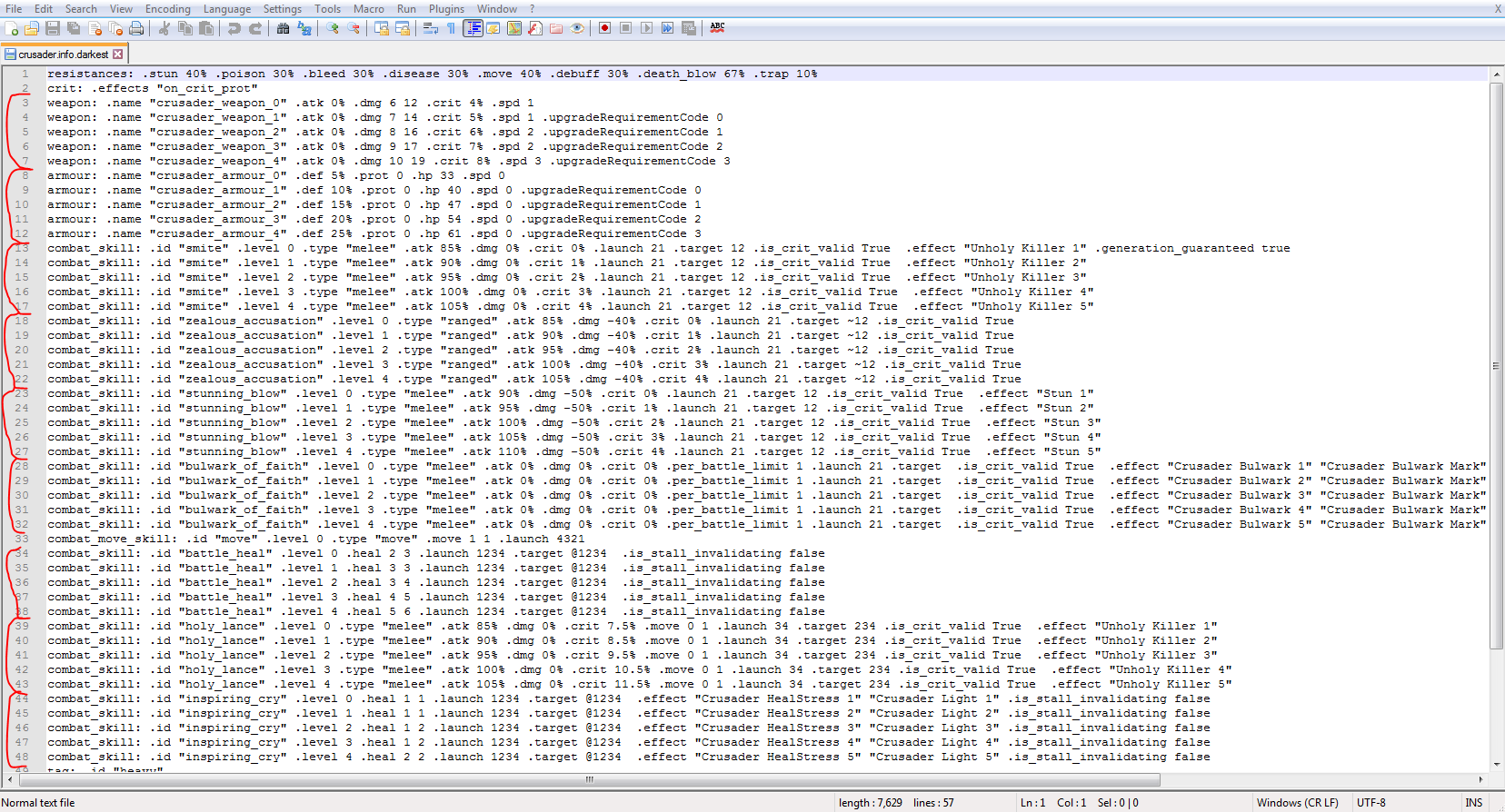
Once you're in you'll be met with this beautiful T H I C C chunk of text, but don't be intimidated.

The reason why there are a lot of repeats is because of leveling. The first lines of each section represent the hero at, say, level 0. And then it scales upwards(i.e. lvl 2, lvl 3, lvl4, lvl5, etc.).

I've gone and highlighted the different sections in red for you in hopes that things might be easier. Anyway, moving on:

So if you want to change up the damage your character deals, simply go to the first section highlighted, and change the ".dmg 6 12" to ".dmg x x"

x being any number you want. The reason there are two numbers is so that the damage varies (e.g. your character hits stuff with a damage of 6-12.). If you don't want to vary damage, simply double the digits, for example: ".dmg 500 500".

WARNING: Spacing is SUPER important, so make sure all of your spaces are correct!

For attack and defense percentages, they essentially act as mulitpliers for stats. Play around with them, the higher the percentage (you can go over 100% if you want) the stronger the damage!

The .dmg -50% means that the damage your character ability deals will be reduced by 50%, so if you don't want a reduction put it to 0%. Or possibly increase it... Although I would not recommend that as I personally have not tried it.

If you want to change where the heroes can hit, simply edit the ".launch" and ".target" numbers to "4321" and "1234" or whatever you want it to be.
The numbers represent the position the characters can be in in order to use their abilities. So by changing combat skill smite's ".launch" to 4321, it will allow the crusader to be in any position to use that ability.

For .targets, the "~" sign is the multiple strike capability. So by adding "~1234" to an ability, you're allowing the hero to be able to strike all 4 enemies with the ability.

WARNING: Once again, ORDER IS IMPORTANT. Do NOT change .launch and .target's ordering around (Keep .launch's "4321" like that, and .target's "1234" just like that) otherwise you will jack your game up.

Now that you've edited your files, save it (file > save) and you're set! Exit the editor and play the game! It should work instantly so there's no need to start a new game.


That's all folks!
I hope you've found something useful in this guide, I just wanted to share what I learned. "Saturate the market" if you will, with this kind of information.

Happy Playing!
4 Comments
Lukasblade2  [author] Jul 13, 2018 @ 11:48am 
@Ribs Yeah you're right. It would definitely be safer............. Unfortunately I have no experience modding. Just hard-editing files :(

But yeah definitely if anyone's down to do it they can go ahead and do it.
Ribs Jul 13, 2018 @ 11:31am 
Wouldn't it be safer if you would just make mods that edit hero stats instead? You leave your game files untouched and you can revert the change by not using the mod instead.
Lukasblade2  [author] Jul 12, 2018 @ 7:16am 
@Flo No problem! Glad to have helped ^u^
Flo Jul 12, 2018 @ 1:54am 
Finally my quad Lepers are useful! Thank you for this guide! ;)