STEAM GROUP
Big Picture bigpic
STEAM GROUP
Big Picture bigpic
517
IN-GAME
3,997
ONLINE
Founded
September 10, 2012
ABOUT Big Picture

Steam Big Picture

Welcome to the Steam Big Picture Group!

Big Picture features the Steam Store, your Library of games, and your Community of friends, chat and feeds, all in a full-screen interface designed for use with a TV and controller.

We need your feedback! Please share your experience with the Big Picture in the Discussions area.

Welcome to Big Picture
Running Steam on Your TV
Big Picture Support
POPULAR DISCUSSIONS
VIEW ALL (39)
RECENT ANNOUNCEMENTS
Big Picture Update: Easily discover the games you can play
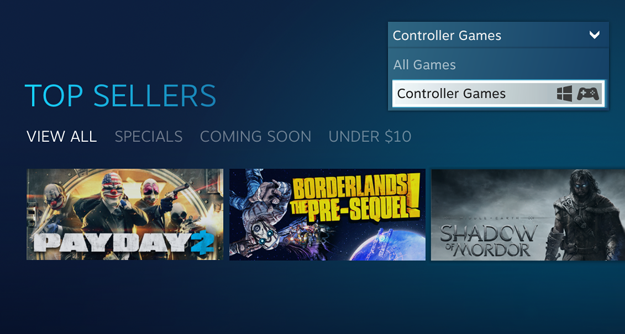
Fig 1. When navigating the Store with a traditional game controller, featured items are limited to controller-friendly content. A new Store setting allows advanced users to easily switch between viewing controller games and everything available on Steam.

Either way, you’ll find we’ve added tips to the Store, letting you know when a game requires an additional keyboard and mouse, or a streaming connection, in order to play it on your current machine.

In the Big Picture Library, the default view now shows you the collection of games you can play locally. But don’t worry - you can still easily view everything else in your Steam Library here, too.

Give the changes a try after you opt into our Beta and let us know what you think of the new simplified shopping experience. If you’re a user who wants to keep an eye on All Things Steam, give the advanced option a try. We’d love to hear what you think of being able to quickly swap between locally playable and all content available on Steam.

Improving Steam Community in Big Picture
1,744 Comments
Oct 7 @ 9:53pm 
:shipenergy: comment 4 comment :shipenergy:
:47_thumb_up: rate 4 rate :47_thumb_up:
:csgo_loser: favorite 4 favorite :ussr_banner:
:csgogun: 100% back :steamthumbsup:
Rate & Favorite Here
Sep 21 @ 9:07am 
While playing on the XBOX ROG Ally X I can play with the controller without any issues UNTIL I place the device in sleep/hibernate and then awaken the device. If I have Steam open or a game from my library running prior to the hibernation I no longer receive input from the embedded controller. I have tried to cycle between control modes from armory crate, uninstall/reinstall of Steam, Armory Crate SE, and Windows without resolution. This is still a persistent issue I am experiencing. I have also changed steam client to beta without resolution
Sep 9 @ 9:28am 
Feel free to add :sparklybluecrystal:
Aug 19 @ 11:16pm 
the performace overlay doesnt show any stats in beta or preview latest updates
Aug 5 @ 1:25am 
:shipenergy: comment 4 comment :shipenergy:
:47_thumb_up: rate 4 rate :47_thumb_up:
:csgo_loser: favorite 4 favorite :ussr_banner:
:csgogun: 100% back :steamthumbsup:
Rate & Favorite Here
Jul 14 @ 2:54pm 
I've had an Issue where Shift+Tab/ CTL+Shift+ Tab has stopped working completely. I know that this is not an issue with Decky Loader or any of the plugins, due to not having it installed the first time it started happen with update 3.8.14. It hasn't happened in a couple of days so I haven't thought anything of it. It happened again today. This is was I noticed about the issue so far.
1. It only happens to me after playing a game with keyboard for a while (Glyphica, Arc Raiders). 2.In these games I am hitting the shift button alot (Maybe some sort of desktop artifact like sticky keys interjecting itself into big picture mode) 3. In order to fix this I have restarted my pc, this worked (I'm using a coustom built PC running Steamos not a steam deck or machine). I have also switched from desktop mode then back into Big Picture, this worked (is also faster than a restart). I have also attemtped to use the restart steam function, where it just restarts big picture mode, this did not work.
VIEW ALL (25,592)
GROUP MEMBERS
Administrators
Moderators
517
IN-GAME
3,997
ONLINE
843 IN CHAT
Enter chat room
Founded
September 10, 2012