



Install Steam
sign in
|
language
简体中文 (Simplified Chinese)
繁體中文 (Traditional Chinese)
日本語 (Japanese)
한국어 (Korean)
ไทย (Thai)
Български (Bulgarian)
Čeština (Czech)
Dansk (Danish)
Deutsch (German)
Español - España (Spanish - Spain)
Español - Latinoamérica (Spanish - Latin America)
Ελληνικά (Greek)
Français (French)
Italiano (Italian)
Bahasa Indonesia (Indonesian)
Magyar (Hungarian)
Nederlands (Dutch)
Norsk (Norwegian)
Polski (Polish)
Português (Portuguese - Portugal)
Português - Brasil (Portuguese - Brazil)
Română (Romanian)
Русский (Russian)
Suomi (Finnish)
Svenska (Swedish)
Türkçe (Turkish)
Tiếng Việt (Vietnamese)
Українська (Ukrainian)
Report a translation problem



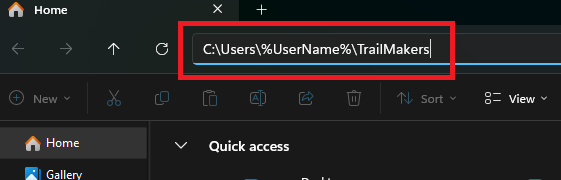 If you find your blueprints in one of these locations but do not see them in game, then the location the game is using has changed due to the game not being able to read/write from the previous location when it last attempted to.
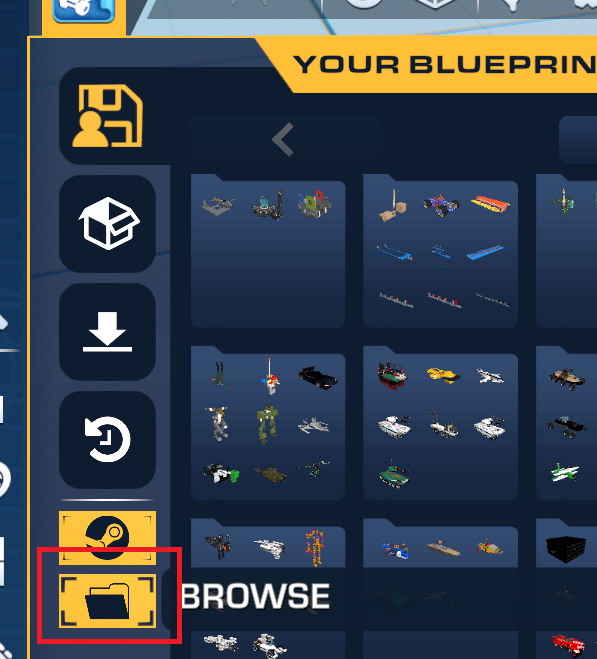 If you have blueprints in a different location to the one that opens when clicking the Folder icon, you can copy them into that location and they should appear in your inventory again.






 Award
Award 3
3
 How to make a wall crawler
 Parts & Construction Catalog [outdated for 2.0]

 100% Trailmakers; All achievements and how to get them (By _MifiX_)
 Unwritten rules of Trailmakers


 Guide for Stranded in Space (blueprints included)





 Loading

