American Truck Simulator

American Truck Simulator

522 ratings
Real US Radio, 370 Stations (2024 Update)
By Gabe Valentine
Over 370 actual radio stations from all 50 US states and all 10 Canadian provinces, along with national programs like ESPN, StarTalk, major news networks, and more. Includes 18 Spanish and 7 French stations. Bringing radio to the players since 2017!
10
9
5
4
3
2
2
2
45
   
Award
Favorite
Favorited
Unfavorite
Introduction
Hello! Here are some radio stations formatted for American Truck Simulator.

When I bought ATS I found the in-game radio pathetic. There were less than 40 streams added by “update from internet” in-game so I started looking for more streams on my own. Initially, this was just a list of a few radio stations I listen to daily but now includes over 360 radio streams. Most of these stations are U.S. based, but the list also now covers Canada and includes national programming. Each URL is a publicly available radio stream I gathered from the internet myself using an internet browser’s network traffic monitor (F12).

Update, 1 Apr 2024:
  • The list is now available as a Workshop item. You still need to manually move live_streams.sii to your user folder for now.
  • The list is updated, removing and replacing many dead streams. Every station has been tested and all currently work.
  • Over 100 more stations are added, bringing the total to 361 stations with over 300 of those being geographically-based stations.
  • The list now includes a minimum of 3 stations from each of the 50 U.S. states and all 10 provinces of Canada.
  • The non-English selection has been expanded, with 18 Spanish stations, 7 French stations, and even Chinese and Native American language streams.
  • There are 57 non-geographic streams made up of national programs, TV simulcast, and a small selection of web-based RFC streams.
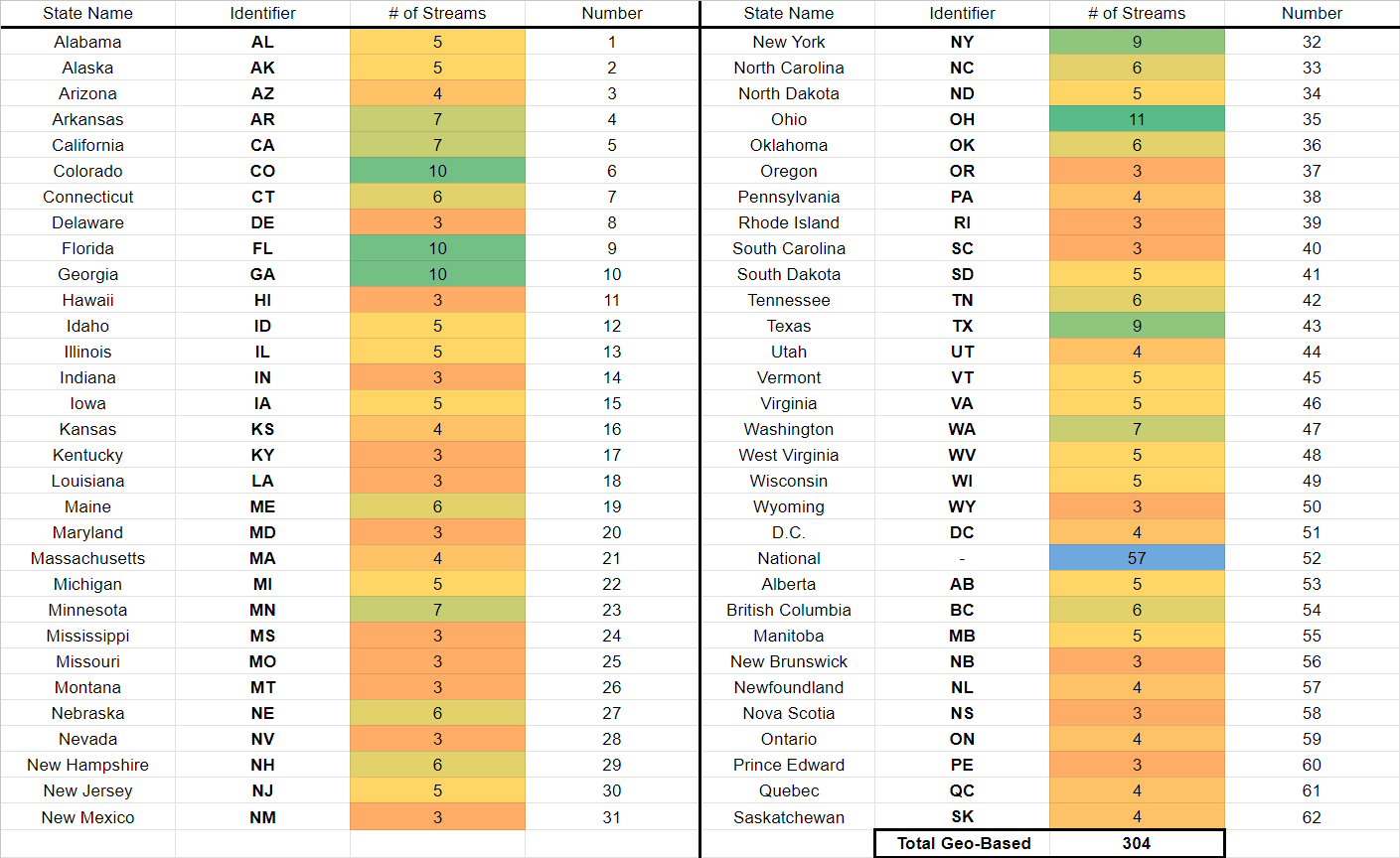
  • Bitrate has been replaced. Instead, the streams can now be arranged alphabetically by location using the “bitrate” column. All streams from Alabama have a listed bitrate of 1, all streams from Alaska have a listed bitrate of 2, and so on for every state. The Capitol, Washington D.C., is listed as 51 and non-location based streams are 52. The 10 provinces of Canada are 53 through 62.

Thanks for visiting my guide! Please give a thumbs up and add it to your favorites!
How To Use
Option A
  1. Get the Workshop file here: https://steamcommunity.com/sharedfiles/filedetails/?id=3211499388
  2. Navigate to your Steam folder. From there, go to:
    \steamapps\workshop\content\270880\3211499388\universal
  3. Place live_streams.sii in \Documents\American Truck Simulator.
  4. Overwrite old file.
    WARNING: This will delete any other custom stations that you have added.
  5. (optional) Open ATS and select radio. Click "update from internet" to add default stations.
Option B (Merge Custom Stations)
  1. Do step 1 and 2 from Option A.
  2. Locate your copy of live_streams.sii, located in \Documents\American Truck Simulator.
  3. Open both copies of the file with Notepad++ or similar program.
  4. Find the stations you want to import from my live_streams.sii file, or add your custom stations to the end of my list (whichever is less).
  5. Change ID number to be unique for each line (if last entry was 360, new station is 361).
  6. Save the finalized file in \Documents\American Truck Simulator.
Tips
  • Don't worry about sorting! The game will rearrange the list when you sort stations in-game, so don't waste your time.
  • Don't worry about first few lines of code (live_stream_def and number of streams). You can change them manually but ATS updates them automatically when you launch the radio.
  • You can replace any existing entry (for example, non-working streams) without problem.
  • ATS can be running when you edit live_streams.sii. Game will re-check file each time you click "radio" in-game.
  • A couple stations do not broadcast 24/7. They're not dead, just sleeping. If you do notice consistent problems with a specific station, let me know in the comments and it will be replaced.
  • You can leave an entry blank; ATS will add dividers and set bitrate 0. Example:
    stream_data[111]: "" stream_data[111]: "|||0|0”
How To Read Live_Streams.sii Entries
Within the file live_streams.sii, you will find each line contains stream_data entries. Each one will be formatted like this:

stream_data[Number]: "URL|Name|Genre|Language|Bitrate|Favorite"

  • Number is unique stream id number, used by the game to organize the list. These must be sequential starting with 0.
  • URL is a direct link to the stream and can be tested in web browser. Watch out for dividers!
  • Name is in-game description of station. I use the following format: call sign, branding and/or info (such as HD# or station affiliation), frequency & band, then location.
  • Genre can be changed for organizing preferences. I use the genre listed on each station’s Wikipedia page or directly in stream metadata.
  • Language is ISO two-letter code (639-1). The list currently includes English (EN), Spanish (ES), French (FR), Chinese (ZH), and Cree (CR) language streams.
  • Bitrate is not bitrate anymore! I have replaced this with an “alphabetical by location” filter. See chart below!
  • Favorite is boolean, 0 or 1.

324 Comments
great mod but most of them don't work. how do i fix?
Gabe Valentine  [author]
May 12 @ 9:58pm 
@d3rr0n A lot (probably most) of the stations use geographic-based restrictions, you will need a VPN set to USA
May 11 @ 4:06am 
I try to use it in Germany but it dont works. Stations are there but iu dont get any sound.
Can someone help me?
Apr 27 @ 9:44am 
Gabe, your work is appreciated and we are grateful that you've done this in your free time for no compensation whatsoever. People are often entitled and I hope that doesn't impact your day-to-day in regards to the support and love that you've put into this project of yours. It is an incredible feat. Keep up the good work.
Gabe Valentine  [author]
Apr 6 @ 7:48pm 
@ellis.dan41 Please replace the entry with this, tested and working in-game.

stream_data[20]: "https://stream-02.surfernetwork.com/e1deqsoqhufvv|KZHE 100.5 FM Texarkana, AR|Classic Country|EN|4|0"
Gabe Valentine  [author]
Apr 6 @ 7:42pm 
@ellis.dan41 A bit disrespectful of my effort and time. I do all this by hand and to update the list is a significant time investment. It isn't something I can do 5 minutes here and there, aside from a single fix for a single station (like you've requested).

Glad to have given you and others a nice mod to use with the game. It's good to remember that everything is ephemeral - nothing lasts forever. I've maintained this mod when I can since 2017; before mods were even an official thing for these games. Comments like yours do not motivate me to prioritize upkeep on it (for which I am paid nothing).
Mar 24 @ 5:13pm 
if your not keeping up with the updated stations please remove this mod or let someone else take it over i got a bunch of county station that are not working thunbs down on thins mod
Mar 20 @ 5:17pm 
the station i posted below is not working no more
Mar 12 @ 6:10pm 
can someone check on a station for me its kzhe out of texarkana Ar i was listing to it monday now im not getting anything this is the station i can hear it on my ipad and computer but not in the truck stream_data[20]: "http://crystalout.surfernetwork.com:8001/KZHE-FM_MP3|KZHE 100.5 FM Texarkana, AR|Classic Country|EN|4|0"
Sep 28, 2025 @ 12:32pm 
Thanks! That was exactly what I needed!