Gray Zone Warfare

Gray Zone Warfare

Not enough ratings
How to fix "Easy Anti-Cheat not installed" bug
By Flachkopf Larry
If you've been unable to start your game lately due to it saying that Easy Anti-Cheat is not installed, even though it is, I can show you how to fix that here.
   
Award
Favorite
Favorited
Unfavorite
1. Find your install location.
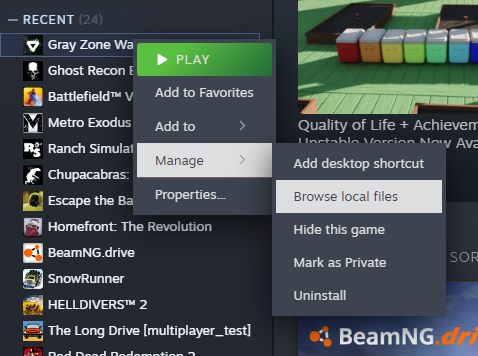
  1. Go to your Steam library
  2. Right click on Gray Zone Warfare
  3. Navigate to "Manage" and then click on "Browse local files"


Congratulations, you've just found your game files.
2. Navigate to "EasyAntiCheat_EOS_Setup" and make a Shortcut of it.
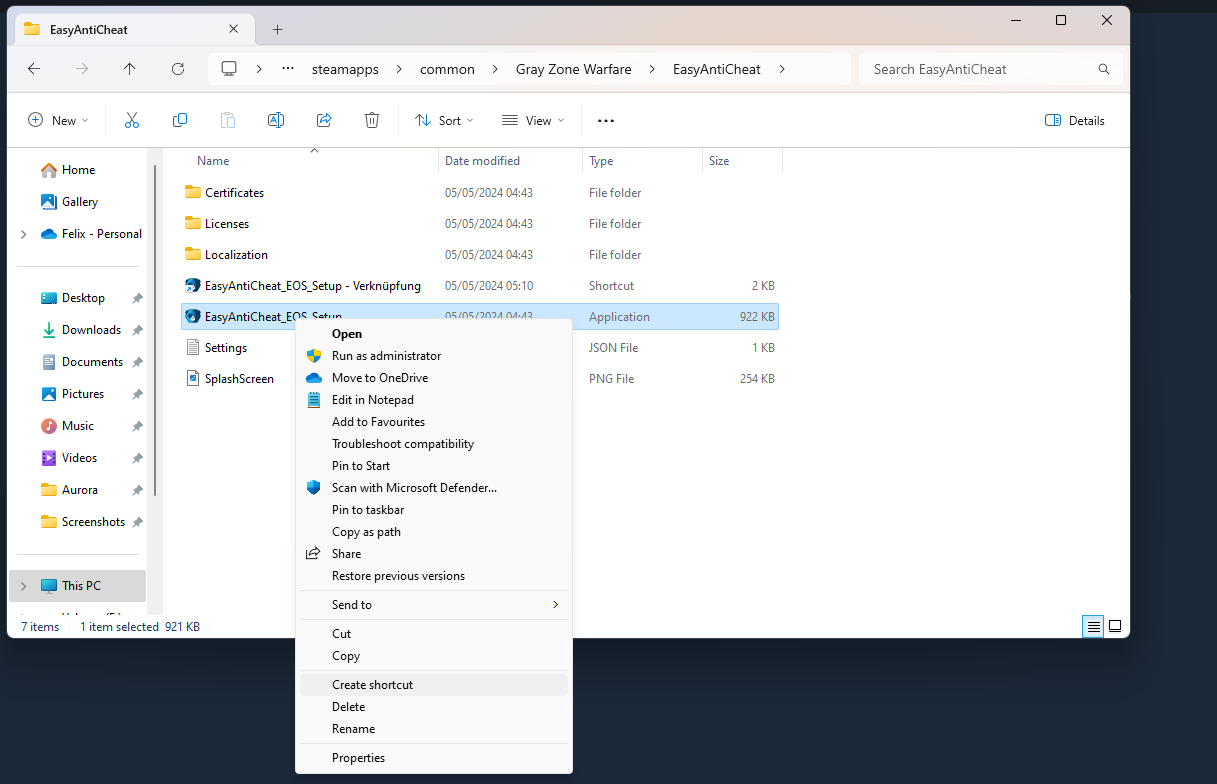
  1. Open your "EasyAntiCheat folder"
  2. Navigate to "EasyAntiCheat_EOS_Setup"
  3. Right click it and choose "Create shortcut" (on Windows 11 you have to click on "Show more options" and then you can click "Create shortcut"

3. Copy your Product ID
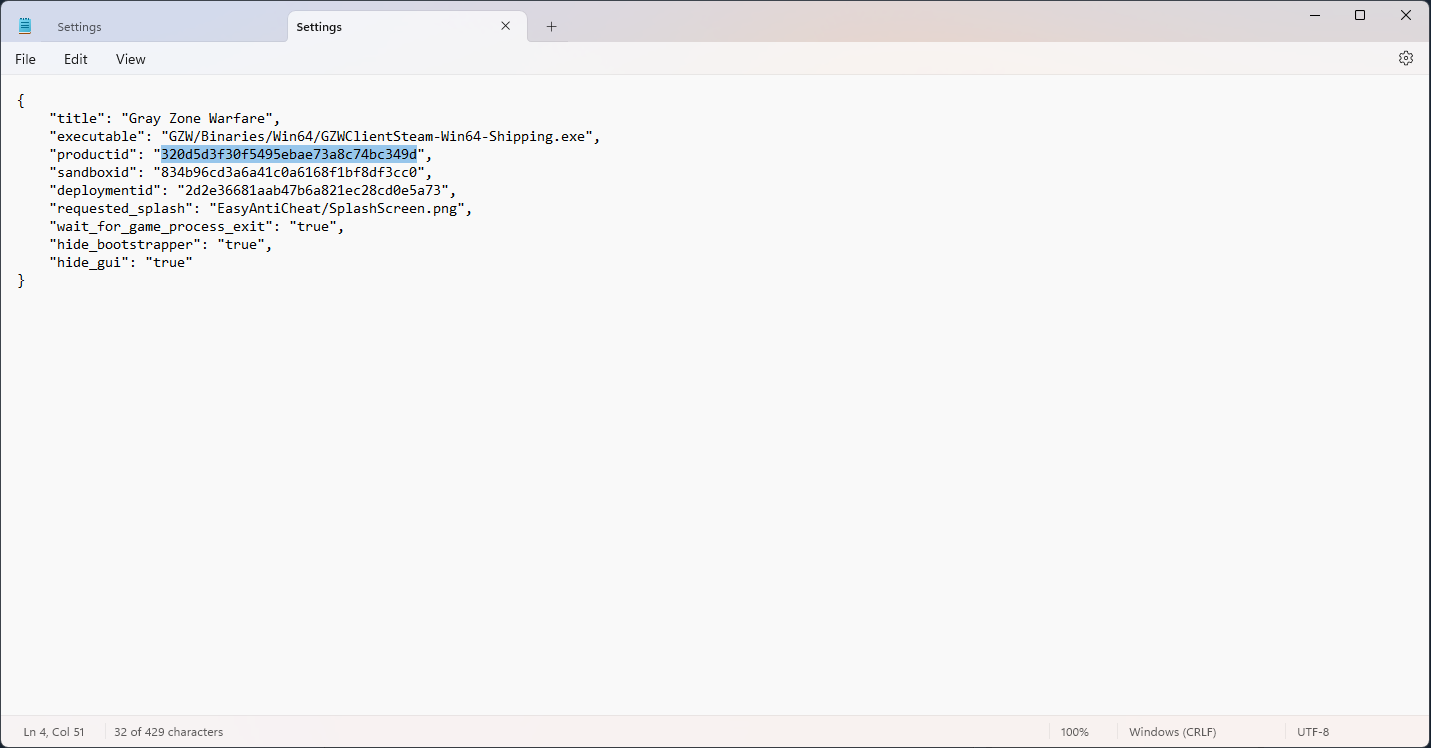
  1. Open the "Settings.json" file in the "EasyAntiCheat" folder
  2. Copy the numbers behind "productid"


For example:


For me it looks like this:

"productid": "320d5d3f30f5495ebae73a8c74bc349d"

Just copy the numbers (Your ProductID)


4. Edit shortcut target of "EasyAntiCheat_EOS_Setup - Shortcut"
  1. Right click on the "EasyAntiCheat_EOS_Setup - Shortcut" (from part number 2. of this guide)
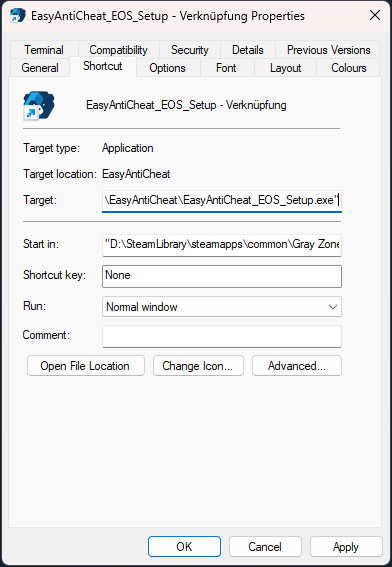
  2. Click on "Properties"
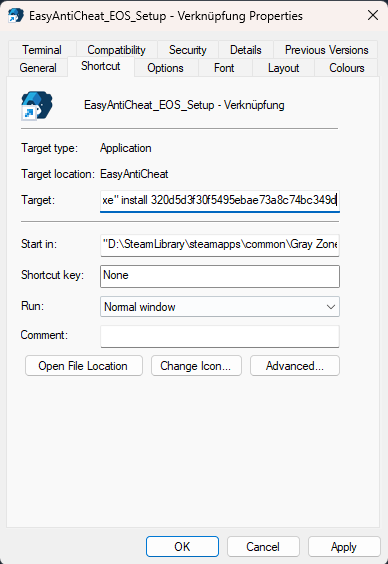
  3. Go to the end of "Target:"

    For me it looks like this:

    "D:\SteamLibrary\steamapps\common\Gray Zone Warfare\EasyAntiCheat\EasyAntiCheat_EOS_Setup.exe"


    Example picture

  4. Now add "install" behind your target and insert the "ProductID" from part number 3. of this guide

    It shold looks like this:

    "D:\SteamLibrary\steamapps\common\Gray Zone Warfare\EasyAntiCheat\EasyAntiCheat_EOS_Setup.exe" install 320d5d3f30f5495ebae73a8c74bc349d


    Example picture

  5. Next click on "Apply"

USE YOUR OWN PRODUCTID IF YOU JUST COPY AND PASTE MINE IT WONT WORK
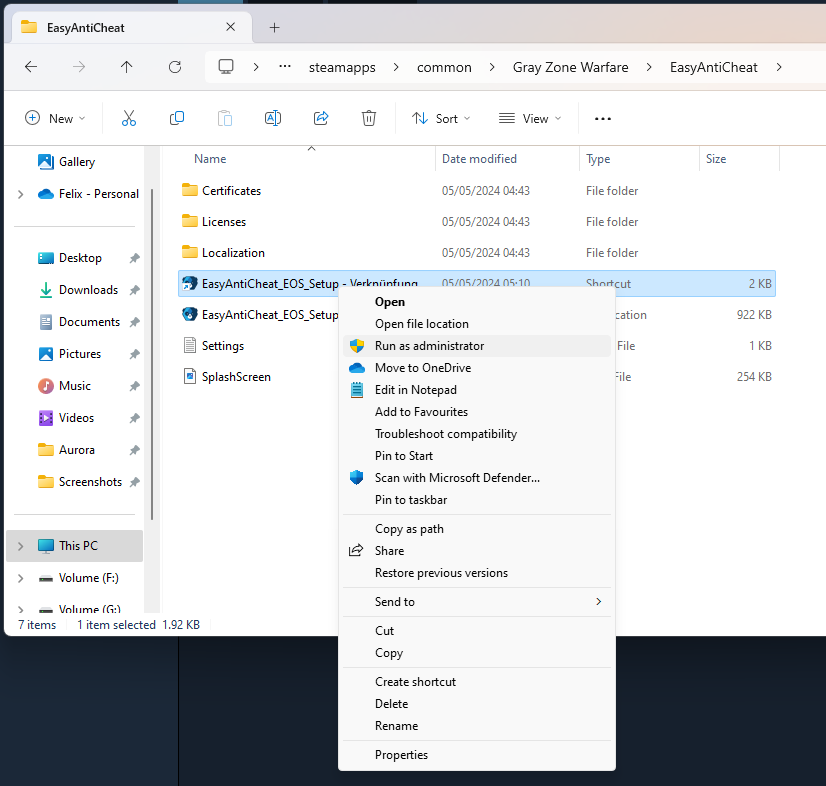
5. Run the "EasyAntiCheat_EOS_Setup - Shortcut"
  1. Right click "EasyAntiCheat_EOS_Setup - Shortcut"
  2. Click on "Run as administrator"


It should open and close a window and after that the error should be gone.
Credits
I found this fix on YouTube but it was for another game so I made this. I think this should work for any game that uses Easy Anti Cheat but im not sure.


The original video on YouTube made by sirhc221:

https://www.youtube.com/watch?v=EtEbtU9IE8w

05/05/2024 Working
12 Comments
Flachkopf Larry  [author] Oct 17 @ 7:30am 
@Kaelwyn Im glad this guide helped you too :D
Kaelwyn Oct 13 @ 2:19pm 
<3 Thank you <3 that was a big help -) :eleven::lilith_whoa:
Flachkopf Larry  [author] Jun 25 @ 11:57pm 
@Ugad Im glad I could help you. :D
Ugad Jun 25 @ 1:57pm 
You are a genius. This worked on Epic as well!
Flachkopf Larry  [author] Apr 5 @ 5:31pm 
@Merlo you´re welcome I´m glad my guide helped you :D
Merlo Apr 5 @ 1:22pm 
worked for me on epic running on w11, you're great man thx
Flachkopf Larry  [author] Mar 16 @ 3:39am 
@とと猫 maybe you have another problem or you did something wrong?
とと猫 Mar 15 @ 9:35pm 
Unfortunately this did not solve the problem.
hnetto Feb 23 @ 3:07am 
amazing! Thank you very much!
Kocie Słucho Dec 25, 2024 @ 8:52am 
Work for me in Empyrion game from Epic Games. Thx.