Evil Genius

Evil Genius

27 ratings
Reset Game Achievements on Steam
By TabMising
This guide explains how to reset game achievements in Steam.
10
6
2
2
2
23
   
Award
Favorite
Favorited
Unfavorite
Introduction
If you have come to this page, then you need it. Reset occurs without third-party programs. So how do you reset a specific game's achievements on Steam? Read below.

⚠️WARNING!!! This can reset all achievements for the selected game on Steam or a specific achievement. It doesn't reset your in-game time, only achievements.

This does not remove the achievement from the game. It resets the progress of the achievement or all achievements in the selected game. This is done so that you can earn the achievement again.

This does not reset achievements from Origin, Blizzard, Ubisoft, Rockstar and other games that have the same achievements as Steam. It only resets achievements on Steam.

If the game has an additional launcher (such as Ubisoft, Rockstar, Origin, etc.) and has the same achievements separately from Steam, then the achievements on Steam are synchronized with the achievements of other launchers. That means that to reset achievements in these games, you need to reset achievements on Steam and in another launcher that runs the game. Otherwise, when you launch the game, Steam will synchronize the achievements from the other launcher and again count these achievements.

When you buy a game on Steam, it is automatically added to your game library. If the game has achievements, they are also added to your achievement statistics. If you reset the achievements in any game in your library, it will reduce the average percentage of achievements in your Steam profile.

To reset your achievements, the game must be in your library. If the game is hidden, you'll need to unhide it back to your library. After resetting your achievements, you can hide the game again.

If you reset achievements and they reset in the game but not in your profile, wait up to 1 day. The information should be updated in your profile.

Ukrainian Version
Numbers of the game on Steam
Let's find out what the numbers are in the game. It's very simple.
First, let's enable the display of links in Steam.
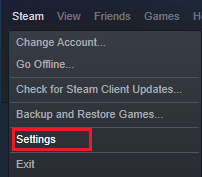
  • Steam
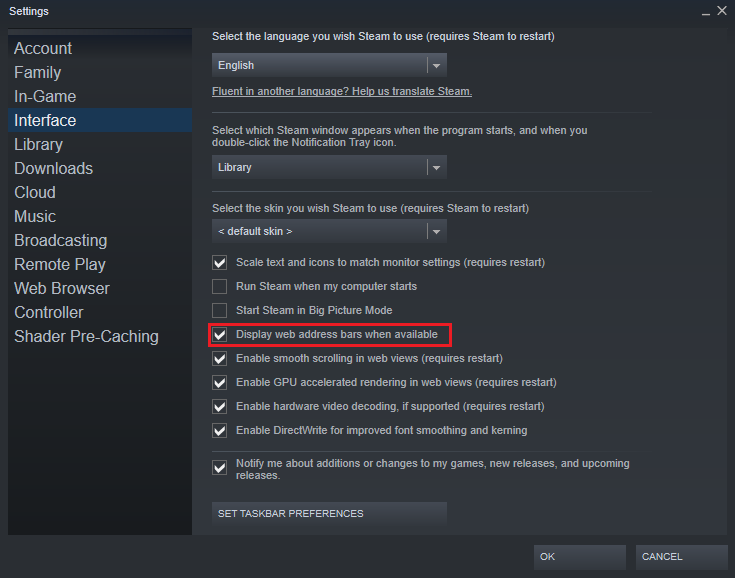
    • Settings
      • Interface
        • Display web adress bars when available
Result:

Choose any game in the store.
Example:
Marvel’s Spider-Man Remastered - 1817070

Papers, Please - 239030
Api Name Game Achievement
Go to the site: steamdb[steamdb.info] (Database)
Enter the desired game in the search.
Example: Marvel’s Spider-Man Remastered[steamdb.info]
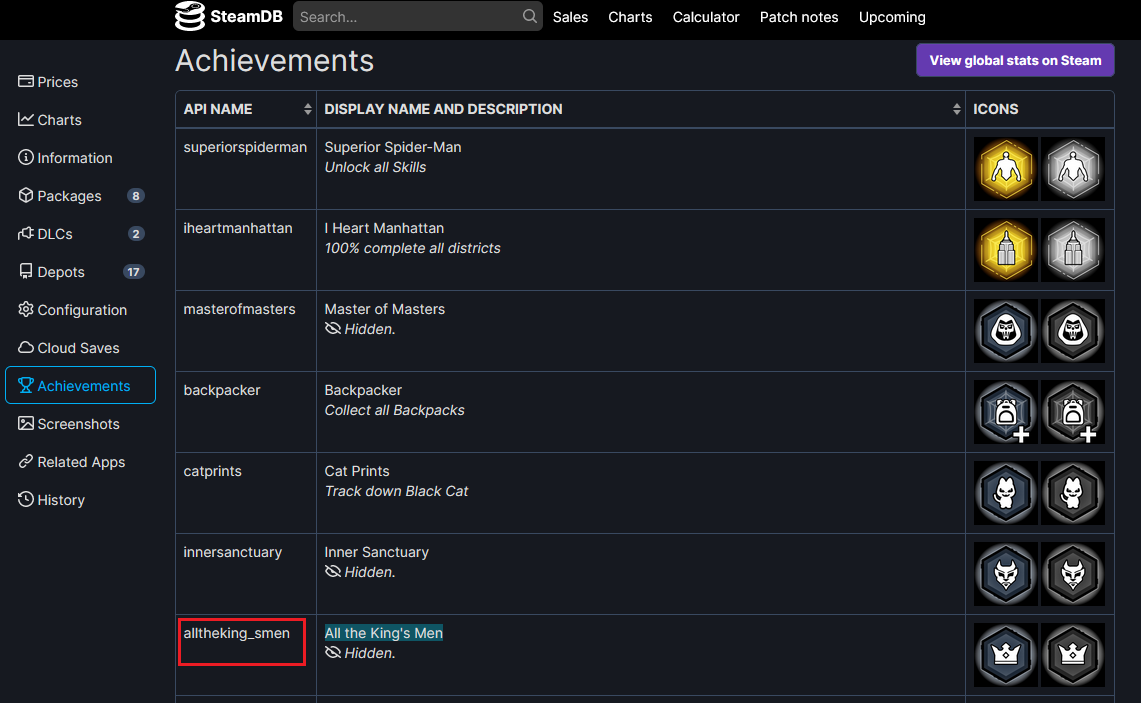
Click left on Achievements.
Achievement All the King's Men - alltheking_smen
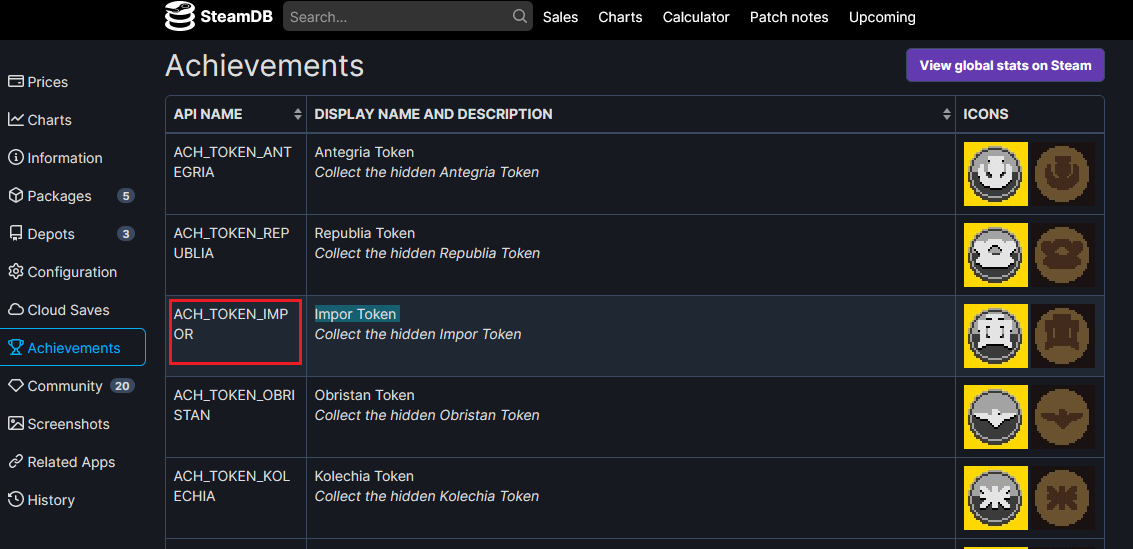
Example: Papers, Please[steamdb.info]
Achievement Impor Token - ACH_TOKEN_IMPOR
Reset Achievements
  • Start Steam client.
  • Press (Win+R)
  • Enter ↴, and press Enter
    steam://open/console
  • In your client Steam appear a new tab (Console).

  • Let's go to the Console.
  • Then there are two options:
    • Resetting one specific achievement from a game on Steam
      ⚠️The in-game achievement will be reset and will need to be re-earned.
      achievement_clear <application ID> <achievement id>
    • Reset all game achievements on Steam
      ⚠️The in-game achievements will be reset and will need to be re-earned.
      reset_all_stats <application ID>
  • Enter the selected option in the console (recheck the information) and press Enter
  • Done. There will be a confirmation of your action in the console.
Example with a game
Dragon's Dogma: Dark Arisen

Reset a specific game achievement on Steam:
achievement_clear 367500 ACH_ACHIEVEMENT_30
Reset achievement The Savior in game Dragon's Dogma: Dark Arisen.
Confirmation in the Console:


Reset all game achievements on Steam:
reset_all_stats 367500
Reset all game achievements Dragon's Dogma: Dark Arisen.
Confirmation in the Console:

Ending
Tab Console will disappear after restarting the Steam client.
Information taken from the site: Gamepressure[www.gamepressure.com]
I hope it helped. Good Luck!
Something went wrong
If the reset achievements didn't work for you.

Method 1.
I think if the game has cloud saves enabled, Steam makes achievements cloud-based as well. So when you reset your achievements and then start the game, Steam checks the achievement file in the cloud and yours on your PC. If there is a difference, it downloads it from the cloud.

When you reset the achievement, turn off the Internet and launch the game in which you reset the achievement. When you start the game, turn on the internet again and then exit the game. The files in the cloud should be replaced by the files from your PC.

Method 2.
Select the achievements you want to reset and reset the easiest achievement as well. After that, you will need to obtain the easiest achievement again. The achievement file should refresh and overwrite.
Its work for me in game Human Fall Flat.
115 Comments
Evil Genius doesn't have achievements though lol, so why is this guide here?
Sep 21 @ 4:55am 
Звісно!
Aug 30 @ 8:14am 
Damocles, I had the same problem, but I found a solution. I created a guide on how to reset your progress in Half-Life 2 that should help.
https://steamcommunity.com/sharedfiles/filedetails/?id=3791671533
Jul 15 @ 9:58am 
having a game removed permantly, also resets the achievemnts / the%
Apr 10 @ 3:16pm 
Yea i noticed it too.

Garry's mod and half life 2 doesn't seem to work for me for example.
Apr 10 @ 2:10pm 
I found the average game completion can be very weird, not all games count sometimes, I am not sure what the bench mark or threshold is for this.
Apr 10 @ 1:46pm 
Update, i tried on 4 out 15 games those solutions : reset_all_stats, restart game, restarting steam and marking game as private then unprivating directly after.

I have NO CLUE which one worked or which game it worked on but it bumped my average completion rate from 56 to 65%.
Apr 10 @ 1:02pm 
Ok so, i tried downloading and booting couple of games i deleted achiements on.
Turns out the achievements are indeed reset but the average completion rate haven't move one bit.
For context, i used the reset_all_stats command on all the games and noone worked.

Will try my last hope with turning off internet.
Apr 10 @ 4:44am 
I see, i will try to reinstall and boot them see if it does anything.
Thanks @J_PERRO_215
Apr 9 @ 8:48am 
It looks like you can use it on any game, even if uninstalled, but the library percentage counter won't change until you boot up the game again. (and as stated in the guide, if you are online, there is a chance all the achievements will unlock again, GoNNER is an example of game that did not reunlock when I launched, Bejeweled 3 did unlock when I launched it)