Garry's Mod

Garry's Mod

Not enough ratings
How to insert a Roblox avatar in to gmod.
By 🪼
This guide will explain in depth and detail how to insert any Roblox avatar on to gmod!
It will require downloads etc but it'll sure be worth it!
   
Award
Favorite
Favorited
Unfavorite
Starting out
First you'll need to download the Rbx2source application. (https://github.com/CloneTrooper1019/Rbx2Source/raw/main/Rbx2Source.exe)
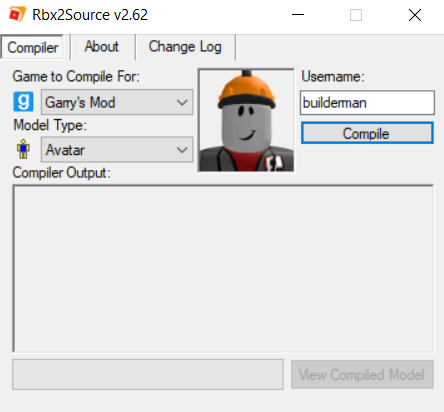
Once you've downloaded and opened you'll come across this page

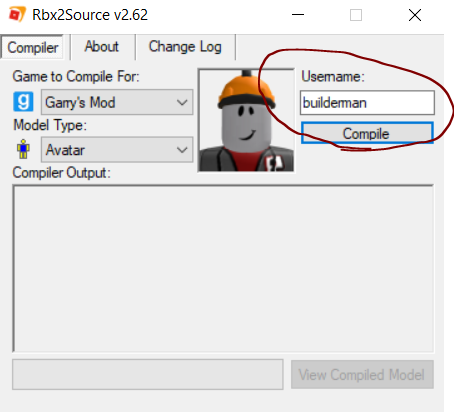
Once on this page click on the circled area seen on the image and put the username of the avatar you want inserted.

Now that you've inserted the username click the button that says "Compile"
If you've been following this guide properly your window should look like this:


If you want to check how it'll look like click compile all!
You've now got an avatar loaded and ready to use on gmod.
So how do you use it?
Scroll down right to the bottom of the spawnlist until you find the games folder. Click it and scroll until you see a folder named "Roblox avatars" Click it and your avatar should appear!
7 Comments
sqrt27 May 26 @ 7:45am 
roblox updated the asset endpoints, please wait for rbx2source to update (or just, do the entire thing manually idk lol)
LλMBDA Huge SCP / Gmod Fan May 22 @ 2:55pm 
I BECOME NAKEDDDDDDDDDDDDDDD WHEN I COMPILE MY FCKING ROBLOX MODDDDDDDDDDDDDDDDDDDDDDDDDDDDDDELLLLLLLLLLLLLLLLLLLLLLLLLLLLLLLL
ScorpiaPlayz Feb 20 @ 4:59pm 
How do I then publish it to the workshop with all its textures mounted with it?
PrincessJackieYT Sep 11, 2024 @ 3:55pm 
or the new 3D clothing
PrincessJackieYT Sep 11, 2024 @ 3:53pm 
it dosen't work if your avatar is using the new heads
꒰🌼꒱ Dandicus Dancifer Jul 23, 2023 @ 1:44pm 
This tool does not work
FF9CAE Jun 22, 2023 @ 11:27pm 
ok but how do i make it a playermodel