American Truck Simulator

American Truck Simulator

32 ratings
Xbox Controller Settings ATS
By M4F10S0
My settings for Xbox One controller.
3
   
Award
Favorite
Favorited
Unfavorite
Controls
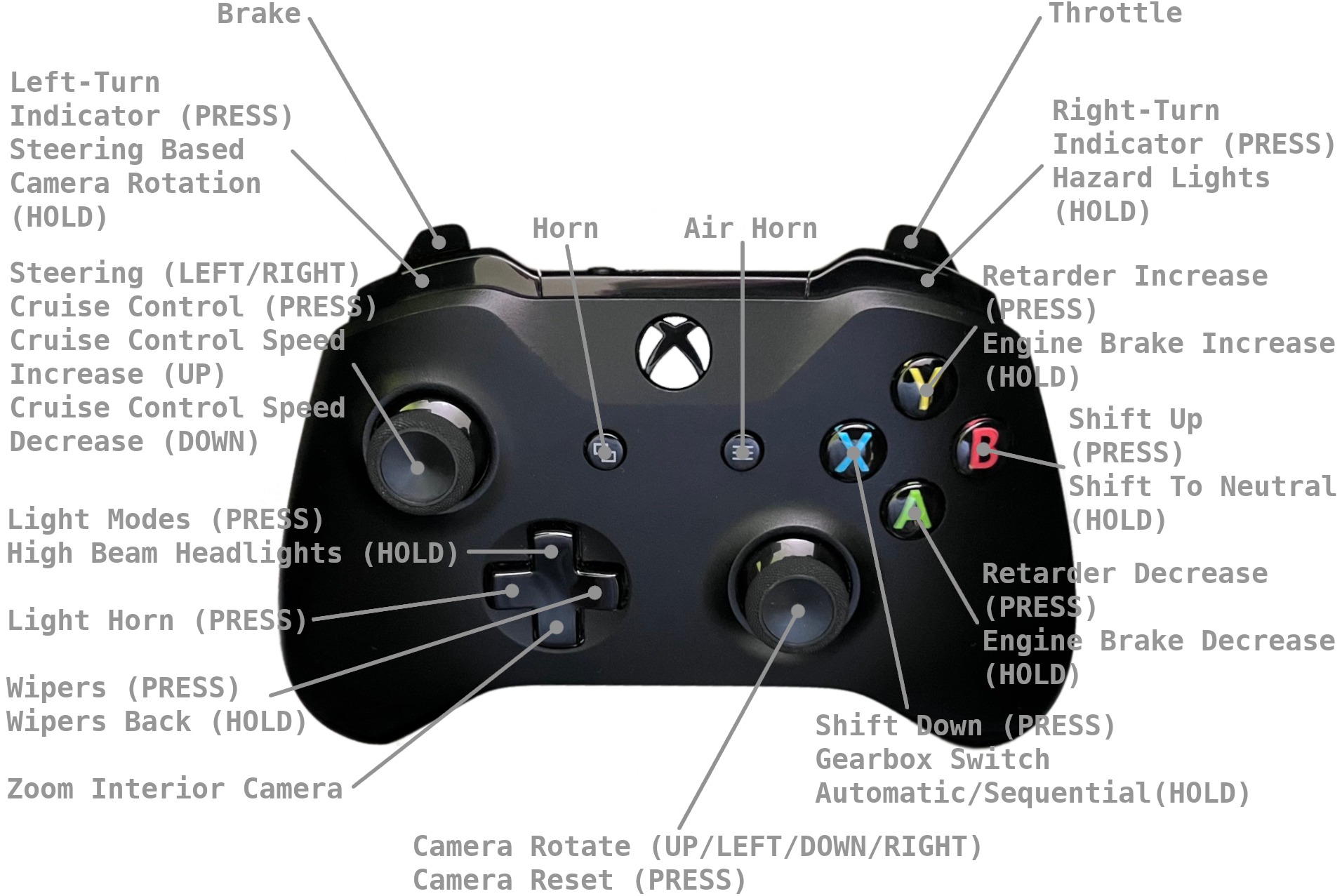
First set up controls. Don't forget choose keyboard+XInput Gemapad 1. If you didn't choose XInput Gemapad, force feedback will not work. Now set up other things like on screenshots.


Buttons
Video
In this video, you can see more settings and how driving with Xbox + keyboard looks during gameplay.

Controls.sii
Here is the link for my content of controls.sii file https://pastebin.com/MzKxGvGw.
Just open controls.sii in any text editor and past the code into your controls.sii which is located in
c:\Users\[user_name]\DocumentsAmerican Truck Simulator\steam_profiles\[profile_id]\ or c:\Users\[user_name]\Documents\American Truck Simulator\profiles\[profile_id]\
after replacing the code, your controls will be set up in the same way as mine.
Thanks for visiting my guide.
8 Comments
M4F10S0  [author] Sep 21 @ 7:09am 
I uploaded the new video.
M4F10S0  [author] Aug 28 @ 2:14pm 
@danoporto7: No, I prefer x-input.
danoporto7 Aug 9 @ 1:07pm 
Can you make it into a steam input layout? Should be fun to give it a test
M4F10S0  [author] Feb 6 @ 2:12am 
@Microfish: It should work, if not try to change it.
Microfish Feb 5 @ 9:11pm 
would this work with a ps-5 controller? Would i need to choose something other than x-input?
memer93_GT Dec 6, 2024 @ 6:14am 
gracias.!!!!
legoadan Jul 3, 2024 @ 9:40pm 
This is great! Thank you!
SCRaP Jun 26, 2020 @ 4:12pm 
so the new elite 2 is desighned in other games as left trigger is a clutch