Bully: Scholarship Edition

Bully: Scholarship Edition

1,005 ratings
Bully Crash Patch - SilentPatch
By Tornadic and 1 collaborators
This patch will fix your Bully crashes! It is not the Rockstar patch, it is made by Silent!

This patch will uncap your frames and stop crashing!
4
2
48
8
5
5
3
3
2
2
2
83
   
Award
Favorite
Favorited
Unfavorite
Introduction
(NOTE: Make sure to get the most recent patch, if you already have the 1st patch, just redownload the recent patch and overwrite it.)

Hello everyone, and today I will be a making a tutorial on how to fix Windows 10 crashes! A patch has finally been made, by Silent. It's very easy process and does not take long at all.


Tutorial
1.)
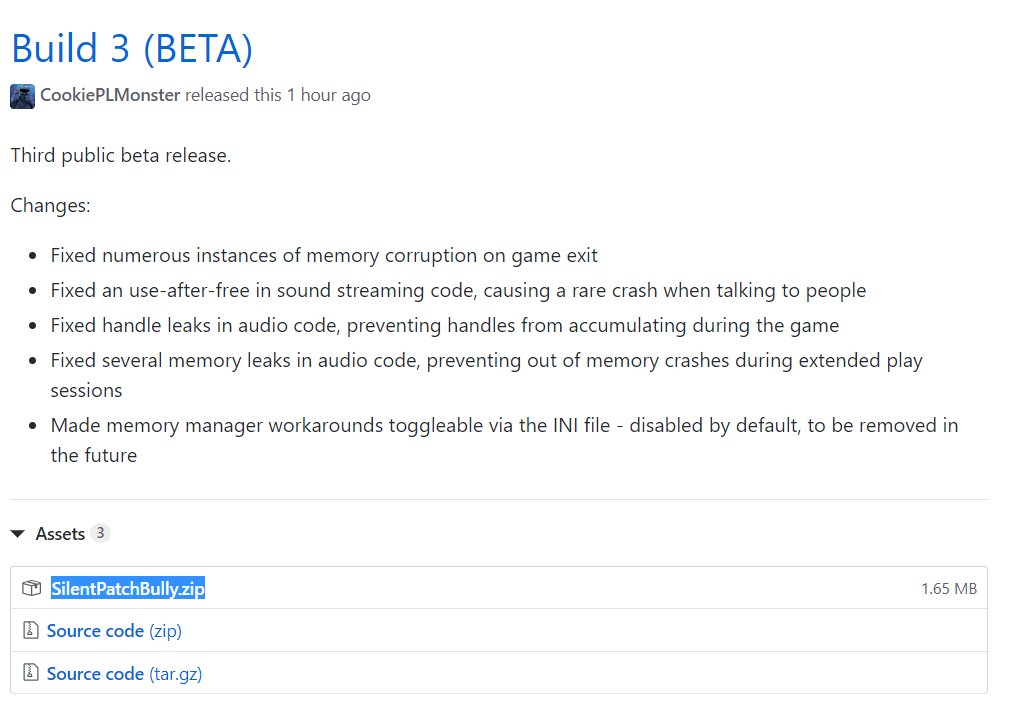
Go to this website, this is where you download the patch:

https://github.com/CookiePLMonster/SilentPatchBully/releases

Click on ''SilentPatchBully.zip under Build 3, and download the patch. Build 3 is the newest patch.
▬▬▬▬▬▬▬▬▬▬▬▬▬▬▬


▬▬▬▬▬▬▬▬▬▬▬▬▬▬▬
2.)
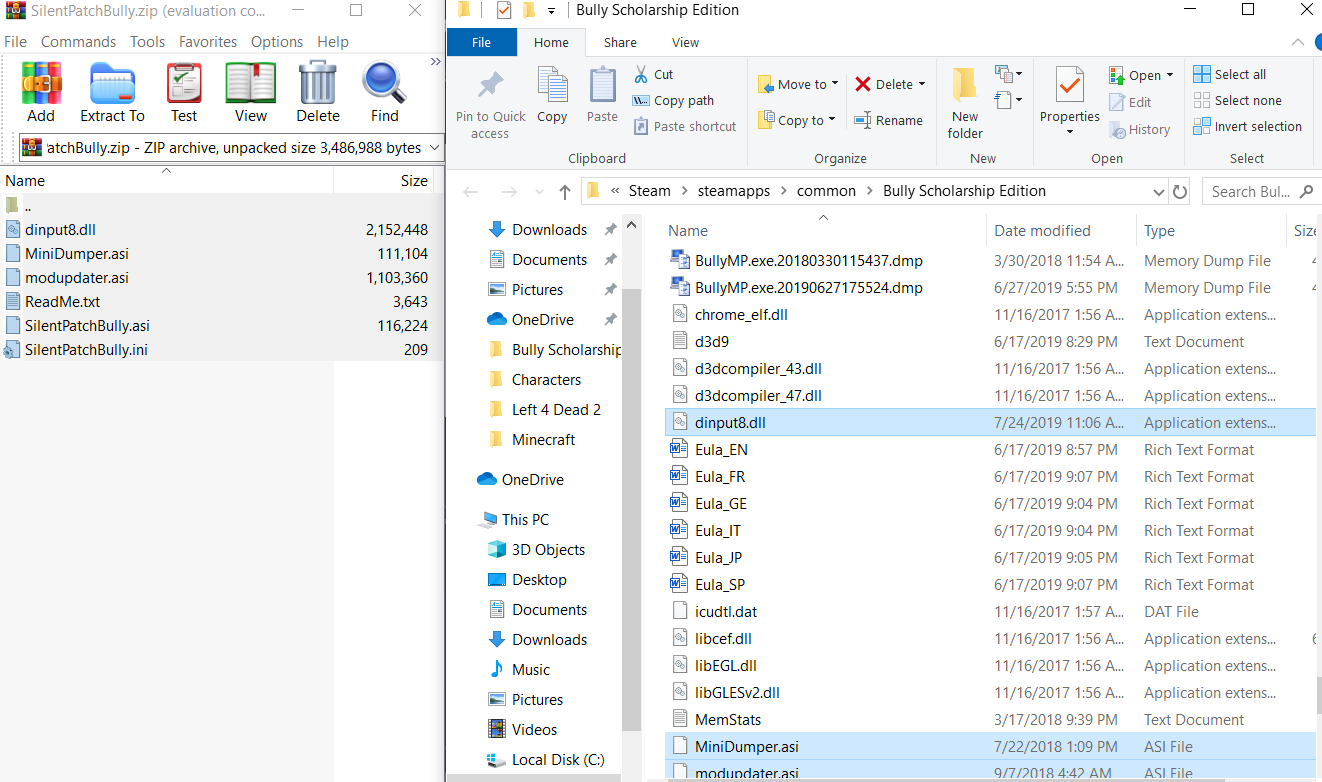
Locate your Bully directory. If you don't know how, right click on Bully in your Steam Library. Then click properties. Click on the tab that says ''Local Files.'' Then, click on where it says ''Browse Local Files.'' Then you should be there!
▬▬▬▬▬▬▬▬▬▬▬▬▬▬▬


▬▬▬▬▬▬▬▬▬▬▬▬▬▬▬
3.)
Now, open up the Bully patch, then extract all the files from the SilentPatchBully.zip into your Bully directory. That's all you have to do to install the patch!
▬▬▬▬▬▬▬▬▬▬▬▬▬▬▬


▬▬▬▬▬▬▬▬▬▬▬▬▬▬▬
4 (OPTIONAL)
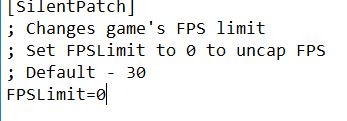
If you don't want to be locked at 30 fps, go find where it says SilentPatch.ini and click on it. It should open up as a notepad. Where it says FPSLimit=30, change the number from 30 to 60 and save (CTRL+S). If you want to uncap frames completely, change the number to 0, however there are many glitches involved and the game plays horribly at 0.

NOTE: Some missions may be affected by 60 fps, such as the Balls of Snow mission, if you are experiencing any weird softlocks or gameplay glitches set the number back to 30.
▬▬▬▬▬▬▬▬▬▬▬▬▬▬▬▬▬


▬▬▬▬▬▬▬▬▬▬▬▬▬▬▬▬


5.)
Enjoy crash free!


Credits
Make sure to check out Silent for fixing this game!


Silent:

https://www.youtube.com/user/CookiePLMonster

https://twitter.com/__silent_
▬▬▬▬▬▬▬▬▬▬▬▬▬▬▬▬▬▬▬▬▬▬▬▬
Me:

https://youtube.com/c/TornadicBandit

https://twitter.com/tornadicbandit
▬▬▬▬▬▬▬▬▬▬▬▬▬▬▬▬▬▬▬▬▬▬▬▬


Enjoy guys!
215 Comments
do i want to keep it as a zip file or extract it?
Jun 23 @ 5:27pm 
i don't have crashing but white screen flashing
Jun 21 @ 12:38pm 
Worked for me Windows 11
May 20 @ 6:33am 
Thanks for showing steps to the directory location. I wasn't sure where it was and finally got the 1.200 SP Build 3 for confirmation. I won't be able to test it out until this weekend, but hopefully it works smoothly.
Jan 25 @ 3:57pm 
did this and now my save file is gone? Yay for me.
Nov 10, 2025 @ 11:49pm 
I tried nixkiez's suggestion and it fixed my crashing issue pretty nicely. Haven't come across any other problems so far so I recommend their tutorial to those who need it for windows 11 :steamthumbsup:
May 30, 2025 @ 4:10pm 
I don't get why this crap still gets advertised so often. It's not a fixer of Win10 crashes. Tried it on 4 different PCs, and it only made a difference on occasional quest crashes, Made ZERO difference on the 3 PCs which suffered from game crashes every 10-15 minutes, and every forum I read online reports the same. If you're having frequent crashes on Windows 10/11, SilentPatch won't fix it.
Mar 29, 2025 @ 3:12pm 
i find 35 fps is playable
Mar 23, 2025 @ 9:23pm 
thanks for the help
Mar 23, 2025 @ 7:43pm 
i need help idk what to do im not good with pc