Cuphead

Cuphead

80 ratings
How to play ONLINE with friends! *ONLY NVIDIA*
By mamechapa2
You can not play coop with a friend who is far away? Now you can!

This is how to play ONLINE with friends through Nvidia Stream.
   
Award
Favorite
Favorited
Unfavorite
DONT USE THIS GUIDE
This guide was created long ago but recently Steam released Steam Remote Play. You can play a lot of games with friends over the internet and for free: https://store.steampowered.com/remoteplay
Requirements
You can not play coop with a friend who is far away? Now you can!

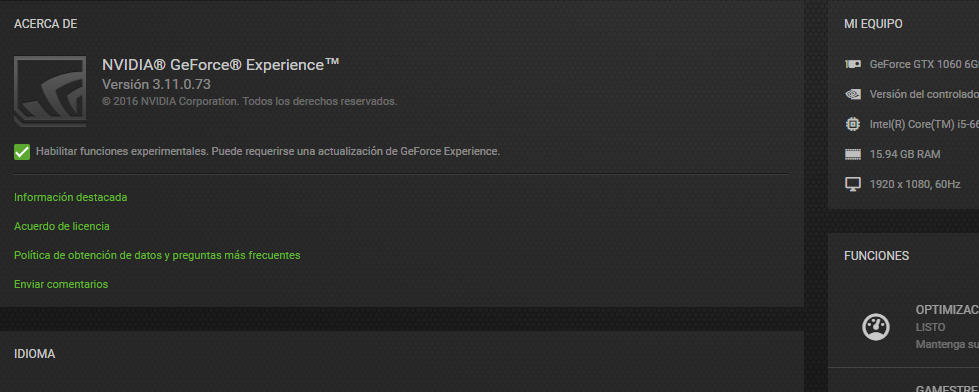
You need a Nvidia card (650 or later) and the experimental functions enabled on GeForce Experience:

After this, you need to update and reboot.
**THIS IS ONLY FOR THE PERSON WHO OWN THE GAME. YOUR FRIEND DOESNT NEED AN NVIDIA CARD**
First step
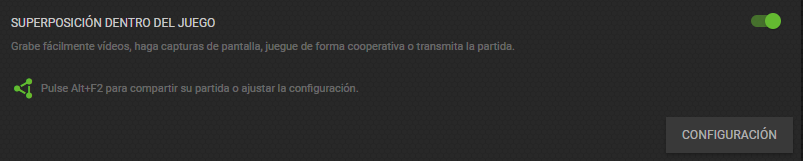
You need to configure the Nvidia overlay here:


Then, you need to open the game and press the combination of keys. Default is alt+z. I have changed mine to alt+f2.
Second and last step
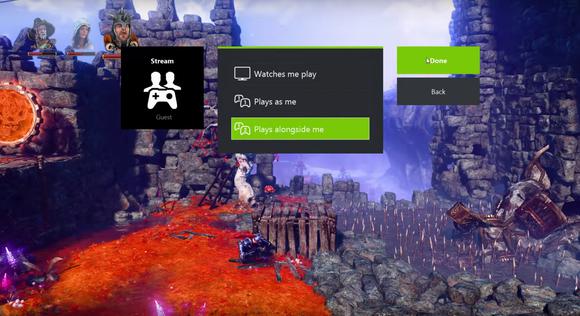
Press on stream and copy the stream link. Send the link to a friend and select play alongside me.
Your friend need to open the link and wait for a windows to be opened. Then your friend would be able to play with you.


*This image is not mine, but it has the same options*

The last thing is to configure the controllers and that it.

Sorry my bad english, but I hope it will help u :)

RATE THIS GUIDE!
23 Comments
Fro Oct 12, 2023 @ 12:28am 
I have been trying to unsubscribe from this thread for 6 years, only to realise just now that there is a dumb tiny checkbox that says subscribe to thread. Jesus Christ.
HennersBBQ Oct 8, 2023 @ 2:02pm 
lollolollollololollolollollololollolollollololollolollollololollolollollololollolollollololollolollollololollolollollololollolollollololollolollollololollolollollololollolollollololollolollollololollolollollololollolollollololollolollollololollolollollololollolollollololollolollollololollolollollololollolollollololollolollollololollolollollololollolollollololollolollollololollolollollololollolollollololollolollollololollolollollololollolollollololollolollollololollolollollololollolollollololollolollollololollolollollololollolollollololollolollollololollolollollololollolollollololollolollollololollol
.Mihai. Jul 25, 2023 @ 9:59am 
9/9:steamsalty:
Rice Farmer Aug 18, 2022 @ 1:22am 
Time to Double Down! :steamhappy:
mamechapa2  [author] Jul 29, 2021 @ 7:26am 
PLS STOP THE COMMENTS WITH STEAM REMOTE PLAY
THIS GUIDE WAS POSTED 4 YEARS AGO
THANKS!
tboots13 Jul 28, 2021 @ 9:13pm 
Mate the bloody steam remote play has been released
Paulmia0916 Jun 4, 2020 @ 9:50am 
Or parsec
foof Apr 1, 2020 @ 6:07am 
This guide has been posted 3 years ago y'all, now you can just use Steam Remote Play
Dalberg Mar 26, 2020 @ 2:07pm 
Mate you can just use Steam Remote Play. Just right-click on whoever you wanna play with in game, and press Remote Play Together. Boom, problem solved.
SGT.MARTINEZ.FTW Mar 3, 2020 @ 5:33pm 
ps4 already does this its called share play....