Attack on Titan / A.O.T. Wings of Freedom

Attack on Titan / A.O.T. Wings of Freedom

Not enough ratings
How to play Attack on Titan / Wings of Freedom with Mouse and Keyboard
By Pg
If you don't have a gamepad or you have a cheap one you can use these programs to use your mouse as camera making the game playable.
2
   
Award
Favorite
Favorited
Unfavorite
Information
I didn't make these programs, all the credits of the finding goes to alex_ul2009 for posting in the LIGHTNING RETURNS: FINAL FANTASY XIII tutorial and for Camarão Subentendido that made a topic here on Steam but I don't think it got enough attention.
Installing Vjoy
You can download both Vjoy and GPDSCK here :
http://www.m ediafire.com/file/4kkom7qp94yyuil/GPDSCK+3.0.rar (delete the space)


Extract the files in a folder and run vJoySetup.exe as admin, remember to unplug any gamepad you have otherwise the installation may not finish, after installing you will need to restart the PC.


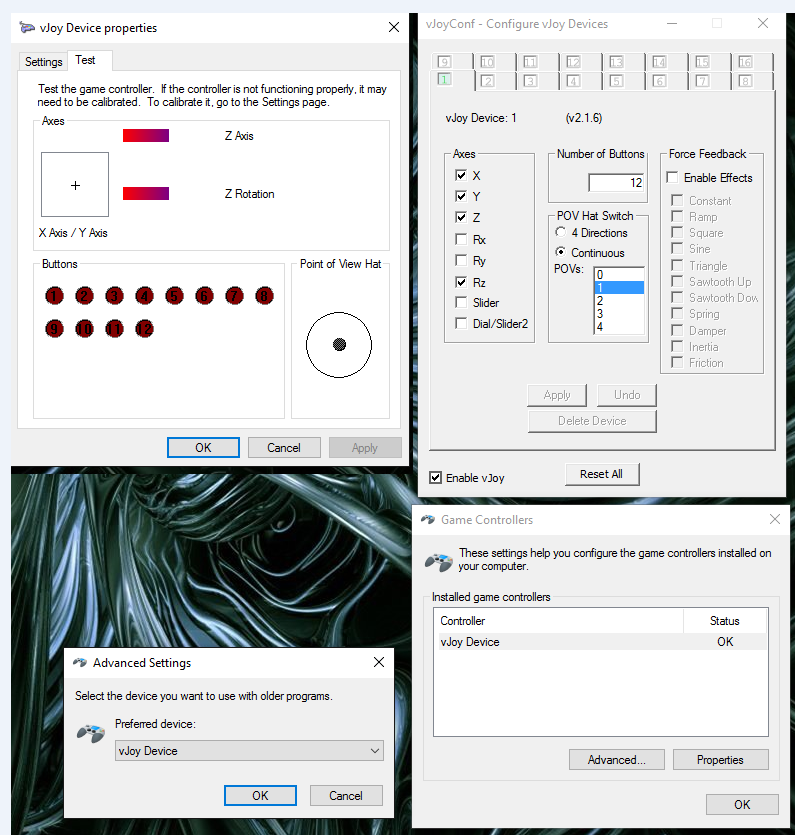
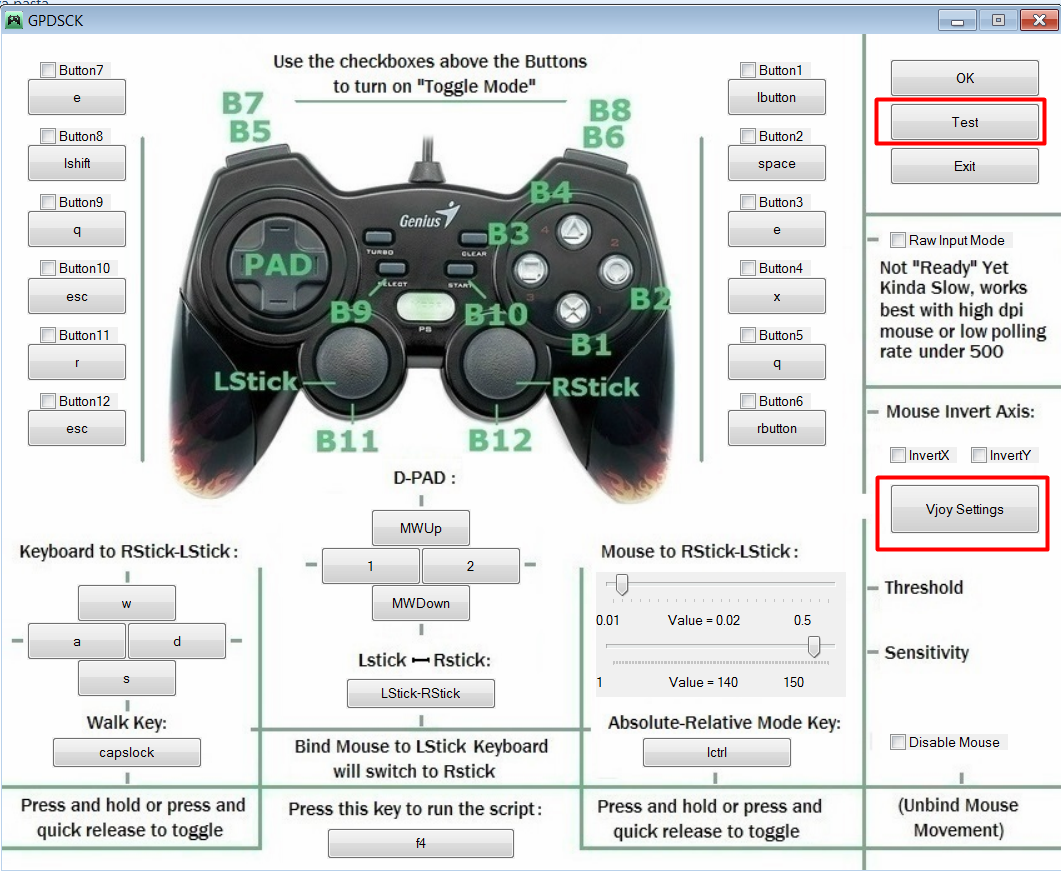
Open the Settings.bmp then the GPDSCK folder and open GPDSCK 3.0.EXE, now click in TEST and Vjoy settings and make sure you settings match the one in the picture.


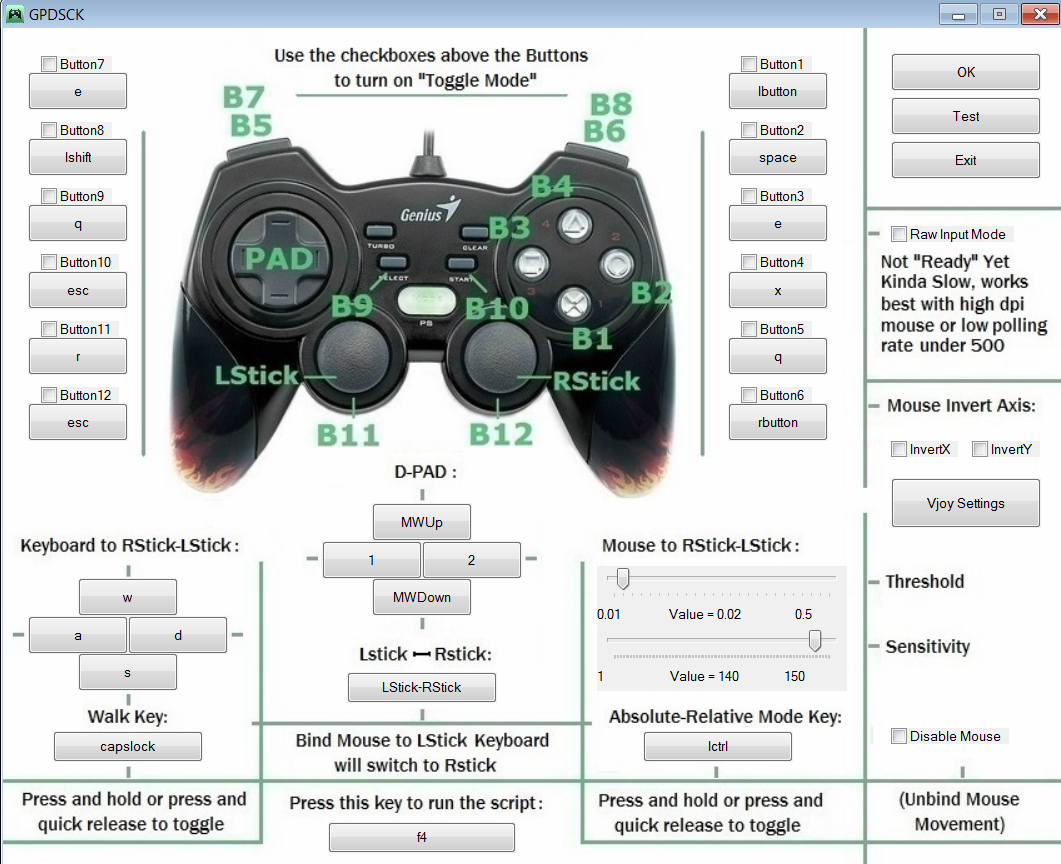
This is my currently keybinding but now you're free to choose your own:


  • I've just got the game from summer sale and played around 2-3 hours and didn't find any problems with it, here a brief explanation:
  • Left click:Shoots the strings
  • Right click:Change the mode to focus titans
  • Scroll up:Use items
  • Scroll down: change the squad behavior
  • Space:Attack
  • E:Jumps and boosts, also interacts and run with horse
  • Esc:Opens menu
  • X:Return in menu, recruit characters and use horse and some other items
  • Shift:Use the squad call special
  • 1 and 2:Change items
  • R:Taunts
  • Q:Have not used so far


Open GPDSCK 3.0.EXE before entering the game, open the game and when you get to the menu press F4, you will hear a Mario sound and now you will be able to move with the mouse and have better controls. You can press F4 to turn it off, if you turn it on before entering the game your mouse will disapear, if you have any problem just press CTRL ALT DEL that the program will stop.


I had no problems so far using this, I tried formating this guide but this Steam thing is pretty weird.
Problems you can encounter
  • Remember to run Vjoy as and admnistrator and unplug any gamepads, also restarting when it finishes.

  • Set the configs as pointed on the .bmp otherwise it won't work
6 Comments
Otaku_Man Jun 2, 2021 @ 4:21am 
yo um, how do I only keep the Z axis and rotation? Like, how do I turn the others off?
apollo Feb 21, 2020 @ 12:00pm 
Pizza Delivery, with a side of D E B T
American187 Jul 2, 2017 @ 6:31am 
Everything is better with kb&m. I'm still blown away that they didnt optimize it for kb&m before release.
GutsRage Jul 1, 2017 @ 1:38pm 
THanks man! I been looking into this since game came out and couldnt figured out a way... tho I'm already very used to play it with keyboard alone but I will give this a shot at some point :D
Pg  [author] Jul 1, 2017 @ 10:31am 
I mean, it's probably easier with a xbox controller but it's pretty playable with mouse and keyboard, if you play around with the configs I bet you can find a perfect combination for you.
lorenzo!!! Jul 1, 2017 @ 7:44am 
Is this better with keyboard and mouse?