MARVEL Tōkon: Fighting Souls

MARVEL Tōkon: Fighting Souls

Not enough ratings
Stress Testing & Performance Optimization Guide [09/18/2026 Patch]
By Captain Rescue
How to push Disney & Sony Corporation's Tōkon™ to its limit in order to optimally configure your game's graphical settings for online play.
4
2
   
Award
Favorite
Favorited
Unfavorite
The Meat
Update [09/18/2026]: - A small update was released today which, as far as I'm aware, only contains adjustments to the bug tracking features added in the last patch. Update [09/04/2026]: - Performance has return to pre-08/28/2026 levels on my system. However, if I play Tekken 8 before or after launching Tōkon, my computer crashes. Both games use the same version of Unreal Engine. I have yet to test whether or not the crash persists if launching other games before/after. This was not an issue prior to the last two patches. ArcSys claims that this update has included tools for them to monitor your game in order to diagnose issues resulting in poor performance and crashing. It gives the impression that their new "monitoring" solution might be overstepping its bounds, though admittedly that's just a feeling. Other users are reporting that this patch has had a negative effect on their performance, so users are still playing a lottery to determine whether or not they'll have access to the game revoked. Update [08/28/2026]: - After downloading the update and warming up shaders, performance had tanked and could not be improved with any configuration of settings. Attempting to warm up shaders again just in case causes my system to power off. Re-installing the program does not solve the issue. The game has been rendered unplayable on my computer. Update [08/21/2026]: - Fullscreen performance has improved dramatically. Previously, assuming you were playing on a 4K monitor, I had recommended playing the game in a 3100x1800 window with resolution scale set to 50.0 I would now recommend playing at 1920x1080 or greater in Fullscreen with scaling set to 100, if your computer can handle it (this has netted me a 2% improvement in GPU Utilization). Just be warned that Magneto's magnetism effect will not display correctly. - AI Upscaling settings now appear to work as advertised. Keep Sharpness at 0 for best performance. - There is a bug in Custom Graphics Quality Settings which may occur after the update is applied. All of your settings may have been set to a glitched value of "4", with the slider extending past its intended bounds. If performance seems worse after the patch, restart your game, and double check your graphics quality settings. - The game will often force Anti-aliasing Type to TXAA without any visible change in the options menu until you've restarted the program. Always restart your game and double check graphics settings after making any changes. - "Adjust Initial Positions" bug has not been fixed (check the Training Mode Tips section for more information). Update [08/10/2026]: - Saved teams are no longer erased on restart. - Champion's trials now function. - CPU performance has improved for some users. - There have been no changes to graphical performance quirks. - Frame skipping has not been implemented, please ensure your game runs at a stable 60/59fps before playing online.

Not all characters/stages are created equal.

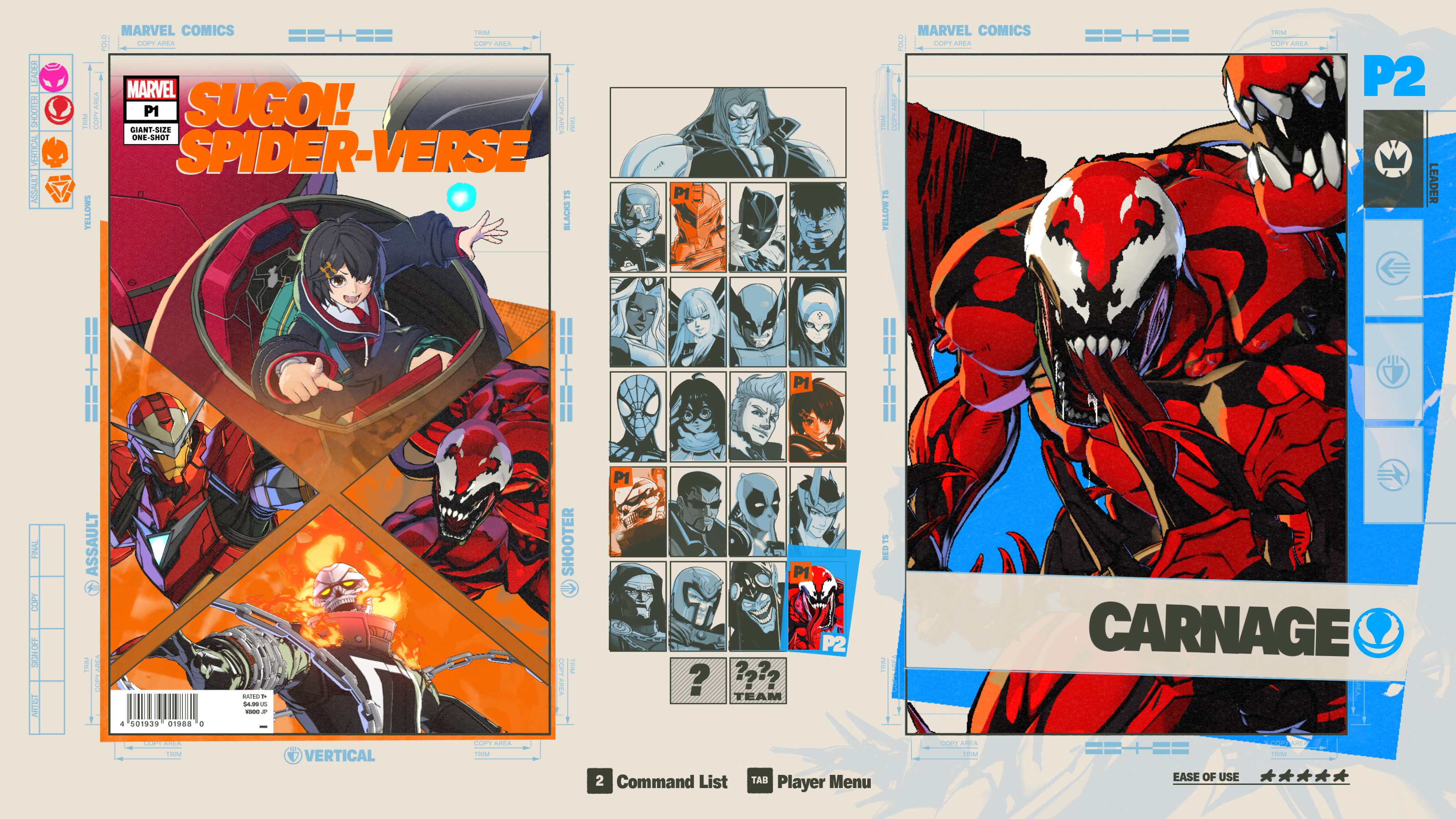
Peni Parker™, Carnage™, Ghost Rider™, and Iron Man™ (in descending order) are, by my reckoning, the logiest characters to display. Carnage™ is heavier than Peni™ on CSS (Character Select Screen) because he has all of his effects running, but idling in-game Peni™ is heavier. I suppose to keep the game's file size down, they may not have included a CSS-version of Iron Man™ with his Hulkbuster Armor™ fully culled.

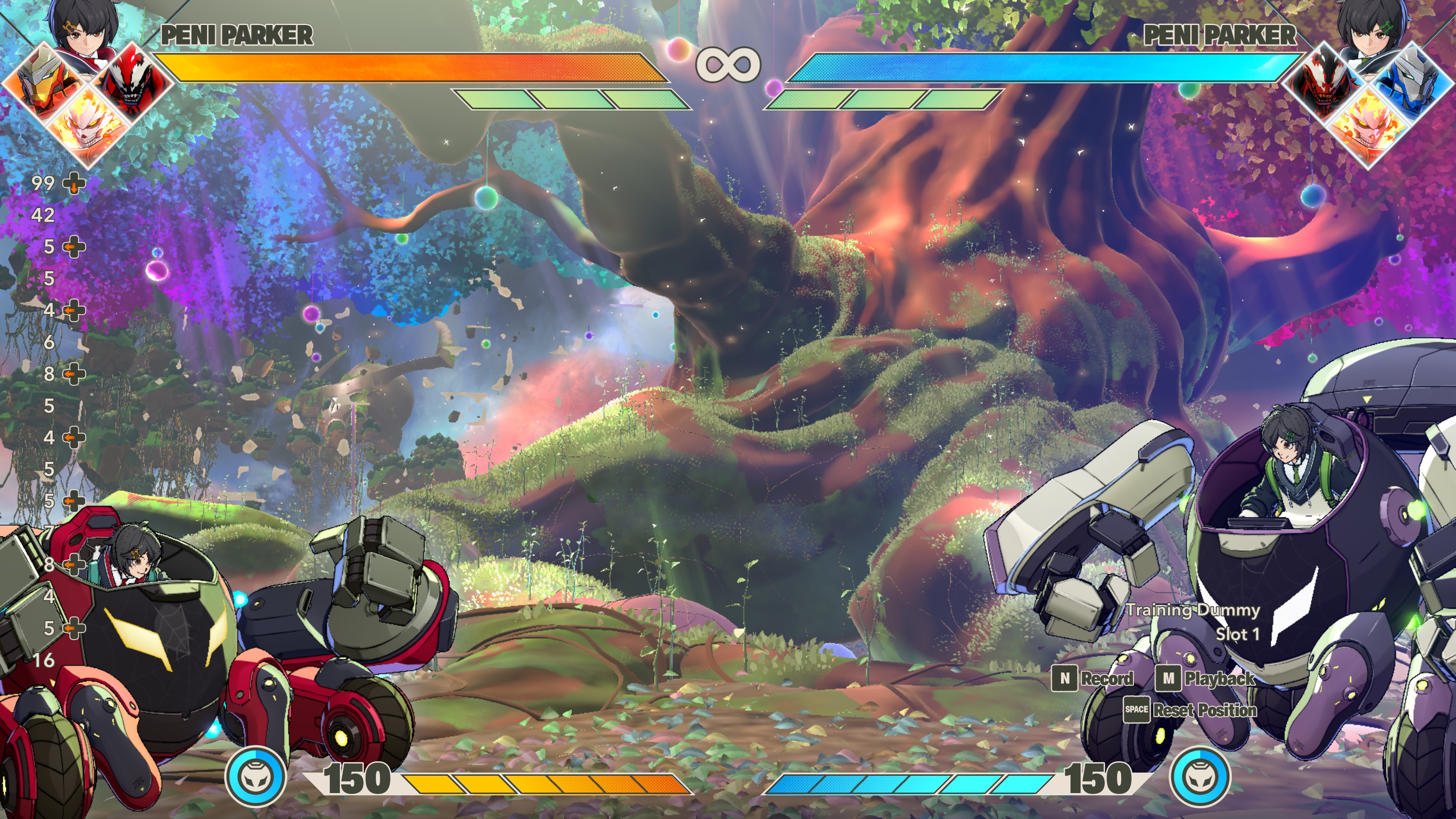
City Center, the default starting area of New York City - Night is the heftiest stage, with Asgard's Yggrasil being a close second (ArcSys, please let us turn off reflections and foliage!).

If you're on Windows (which if you're playing at launch, you are), you can test for yourself by hitting Ctrl+Shift+Esc, then entering the "Performance" tab. At CSS, make sure to hover over every character once before noting any values to give the game a chance to load everyone into RAM.

Navigate to the "GPU" tab, and keep an eye on the "Utilization" percentage as you hover over each character. Watch the "Dedicated GPU Memory" counter as well, and make sure to keep background processes to a minimum if you're nearing the limit.

With all of his effects running, Carnage™ is the most performance intensive character.

Assuming you haven't already done so, hit Shift+Tab to enter the Steam Overlay, go to "Settings" (the gear icon), then "In Game", and set "Show performance monitor" to anything but "Off".

At the title screen, go Quick Menu > Options > Button Settings (Battle) and make sure your "Record" and "Playback" buttons are assigned.

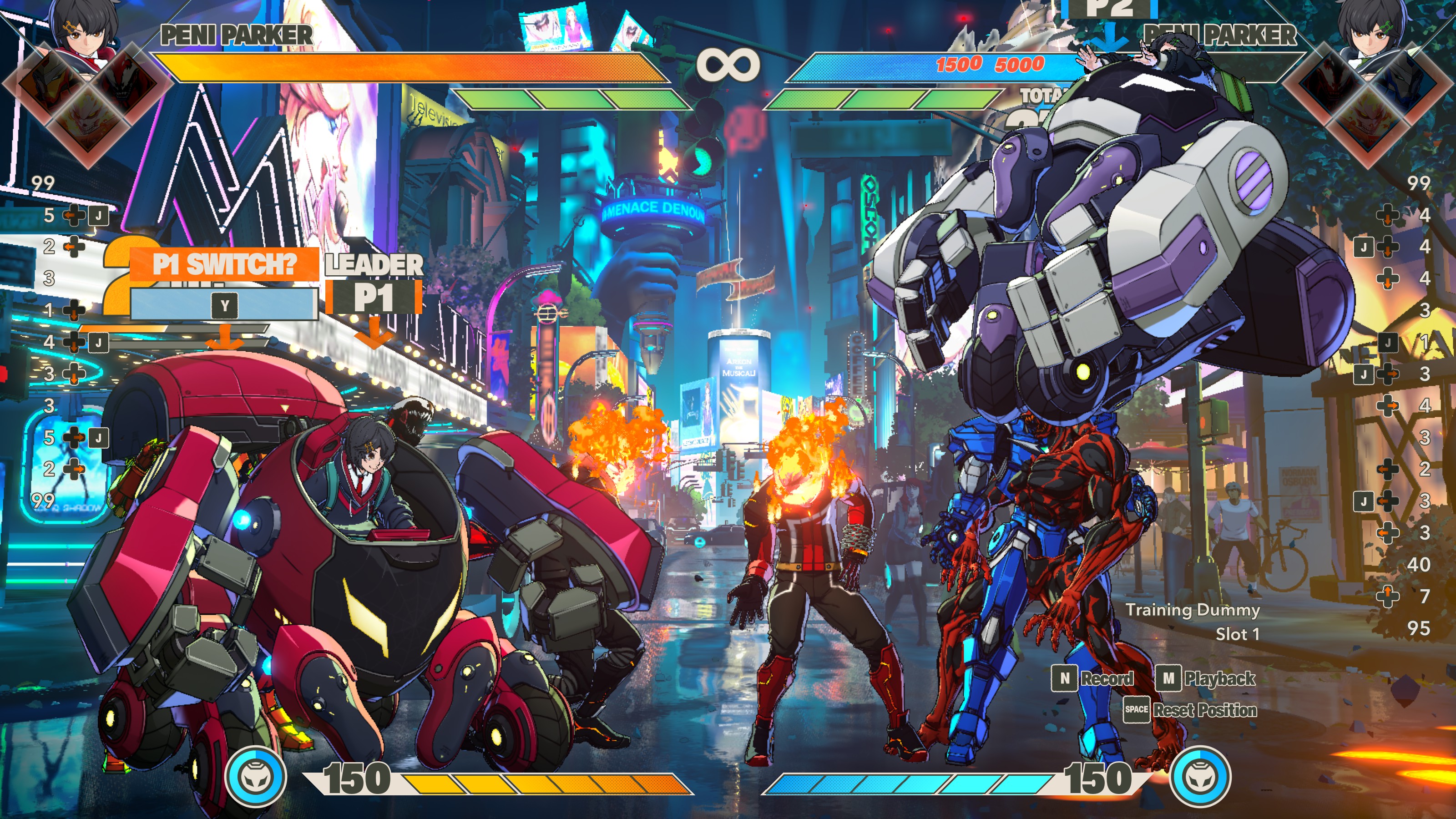
Now, in Training Mode, on the starting area of New York City - Night, with both teams set to Peni™, Carnage™, Ghost Rider™, and Iron Man™, hit the "Record" button twice to begin recording. Jump or whiff a button, then call all three of Player 2's assists at once. Hit "Record" again to finalize the recording.

Hit "Playback", then do your best to time calling all three of Player 1's assists so that all 8 characters are on screen at once.

tl;dr: On this stage, call all of these characters at once to make your game chug, then adjust graphical settings accordingly. Play in Windowed Mode, and don't bother with AI upscaling.

Did your game dip below 60/59fps? If it did, here are some tips to get it running smoothly:

  • Navigate back to the title screen, and go Quick Menu > Options > Graphics Settings.

  • Play the game in Windowed Mode. I have no clue why this is faster than Fullscreen or Borderless Fullscreen. In fact, playing the game at 1080p resolution in Fullscreen runs significantly worse on my computer than playing in a 3200 x 1800 window (though beware of Magneto's bugged magnetism SFX). FIXED [08/21/2026 Patch]

  • Ensure that you've ran Execute Shader Warmup at least once, and keep Launch Shader Warmup on just in case.

  • I can only speak for Anti-Aliasing settings compatible with my GPU, but neither FSR nor XeSS Ultra Performance actually improve performance. FIXED [08/21/2026 Patch]

  • Don't trust Auto Graphics Quality Settings. Manually set everything to off/low and work your way up, stress testing as described.
    Update [08/21/2026]: Auto Graphics Quality Settings is still quite bugged, but the game feels much more playable with the settings it recommends. This is mostly due to the fixed AI Upscaling settings. That said, I would still recommend manually stress testing as described and ensuring your game never dips below 60/59fps, and that GPU Utilization never peaks. Always double check your settings when restarting the game after running Auto Graphics Quality Settings or after updating the game.

  • Restart your game after making any changes to the graphics settings, otherwise performance may sharply degrade. Display Mode, Resolution, and Anti-aliasing Type seem to be the most volatile. In some cases, you may need to restart your computer.

Hopefully your eSports™ product is now playable! Keep an eye on GPU Utilization, and make sure to leave some wiggle room so that it never maxes out. The game uses 6GB of RAM at full load, and about 2.2GB of VRAM, so be sure your system isn't eating up any unnecessary resources to maintain a buffer there as well. See you at Evo™, everybody!

Not to worry, Peni! Go Go Gadget Leaf Blower!
Glitches & Performance-related Observations
  • If you've ran Auto Graphics Quality Settings and then made any adjustments, double check your settings the next time you start the program. Due to a persistent glitch, they tend to get shuffled.

  • There is a glitch where if Player 1 performs an Active Tag, and Player 2 lands a Dust-style launcher on the previous point character after the tag occurs, the newly tagged-to character will take the place of the character hit with the launcher.

    UPDATE: This was not actually a bug, but a strange hitbox interaction with Peni Parker where her launcher hits behind her such that players attempting to whiff punish from behind get launched instead.

  • There's a glitch which causes teams you've saved to be wiped upon restarting the game. FIXED [08/10/2026 Patch]

  • Champion's combo trials are glitched and inaccessible for some users. Attempting to access them causes the program to crash. FIXED [08/10/2026 Patch]

  • There is a glitch where Magneto's magnetism SFX display so large & bright that they completely obscure the afflicted character when playing at lower resolutions.

  • Spider-Man™, and the area past the first left-hand wall break on Knowhere™ are the lightest character/stage respectively.

  • Unfortunately, this game does not seem to perform GPU updates on a dedicated CPU thread, and/or it's forcibly waiting on GPU updates before continuing CPU updates intentionally (for some reason). That is to say, if the game dips below 60fps, the game will actually slow down instead of just skipping draw calls for that frame. That means that as long as your GPU manages to run the game fast enough, there should not be any other issues which would affect your game's online performance. That said...

  • If your CPU is not up to snuff, you may find that the game performs worse online than it does offline. This is because rollback netcode requires CPU logic (primarily collision detection and player state/physics updates) to be looped for as many frames as the "Rollback frame(s)" indicator at the top of the screen displays during an online match. The strength of your GPU in this scenario is irrelevant since the game should only be processing anything graphics-related once after the entire simulation completes.

  • A note on the game's input buffer: While performing a chain combo, hold the next button in the chain instead of tapping/releasing, particularly while buffering an input early on during a slow move. For example, Magneto's sliding 2M often hits late. Holding 5H and releasing once you see him begin to charge will guarantee the chain completes.

    Rollback netcode tends to assume you've continued to hold the last button pressed during predictive simulation, so if you feel your inputs are dropping online, this might save your bacon if network packet loss causes the input buffer to be reconciled incorrectly, or if performance issues stall input polling (though it may just be you).

  • Results may vary depending on your setup. Observations provided are based on system-specific outcomes.

My specs: Microsoft Windows 10 Home AMD Ryzen 9 3950X 16-Core Processor 16GB RAM AMD Radeon RX 6500 XT 60fps at minimal settings, in Fullscreen mode at 1920 x 1080 (Resolution Scale: 100).
3 Comments
Aug 14 @ 6:58am 
I agree with Stoney_Kenobi been telling my buddies the same thing.
Aug 11 @ 6:02am 
I'm at a loss for words. This is ridiculous...
Aug 8 @ 4:22am 
this is a humiliation ritual and no sane consumer should ever have to go through any of this.