ELDEN RING

ELDEN RING

37 ratings
Elden Ring Tracker 2.0 - Free Interactive Map & Save File Progress Tracker
By krut43
Elden Ring Tracker 2.0
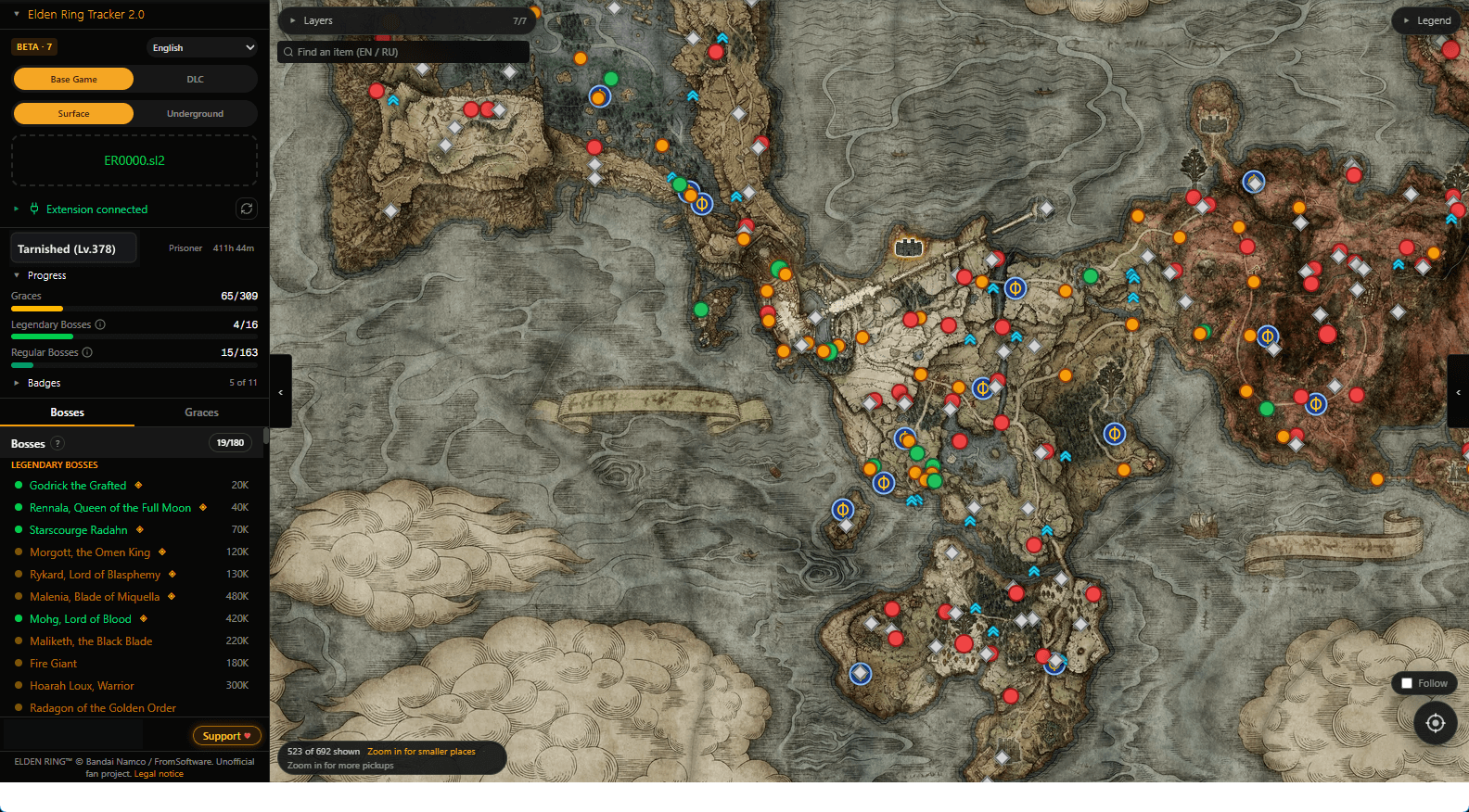
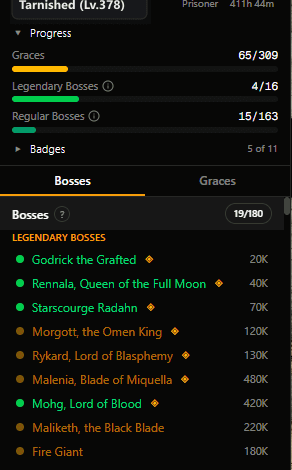
Track your Elden Ring progress automatically: load your save file and see everything on an interactive map. Bosses, Sites of Grace, Scadutree Fragments, Revered Spirit Ashes, weapons, armor and every item in the game, locations, Spiritsprings and Teardrop Scarabs tick themselves off. Dungeon maps level by level, a route to any marker, NPC questlines step by step, co-op with real players. Full support for the Shadow of the Erdtree DLC and the Tarnished Edition. On PlayStation or Xbox? Tick things off by hand. The Build Lab picks weapons and armor against any boss, and with our free browser extension the map updates itself every time the game saves. For newcomers the map is a real help getting through the game, and veterans are bound to find plenty they had missed.
4
2
2
   
Award
Favorite
Favorited
Unfavorite
Begin
In short

An interactive map of the Lands Between and the Realm of Shadow that you can hand your save file to. After that it stops being a reference of "where fragments are in general" and becomes a map of your run: switch on "Missing only" and what remains on screen is exactly what you have not picked up, opened or killed.

The map lives here: Elden Ring Tracker 2.0[eldenring.krut.top]

Your save file never leaves your computer. JavaScript in your own tab parses it - there is no server on the other side that would accept it. How to verify that yourself is in the privacy section below.


What you need

  • A desktop browser - Chrome, Edge, Firefox, Opera. A phone opens the map too, and the easiest way to get your progress onto it is "Show on phone" (see below).
  • The ER0000.sl2 file. It lives in %APPDATA%\EldenRing\<account number>\. Press Win + R, paste %APPDATA%\EldenRing and open the single folder with a long number for a name. Playing with the Seamless Co-op mod? Use ER0000.co2 from the same folder.
  • A free account on the site - Google, Discord, GitHub, or an email and password. You can move the map, switch layers, search for items and read the cards without signing in at all; the account is what lets the map read your save. Signing up takes a minute and happens once.

You do not have to close the game, and nothing is installed into it: the map works with a copy of the data that you show it yourself.

The first five minutes

  1. Open https://eldenring.krut.top and sign in: the link sits in the left panel's footer, under the Menu button.
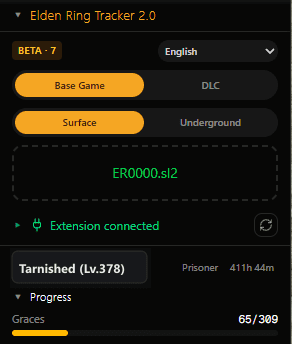
  2. Drag ER0000.sl2 onto the panel on the left - or click it and pick the file the usual way.
  3. Answer the questions in the "Save opened" window: whether the save is yours, whether to show your build in the rating, and whether to remember the file on this device. You can change your mind under Profile → Privacy.
  4. Choose a character: a save holds up to ten slots, and the map shows the name, class, level and playtime of each.
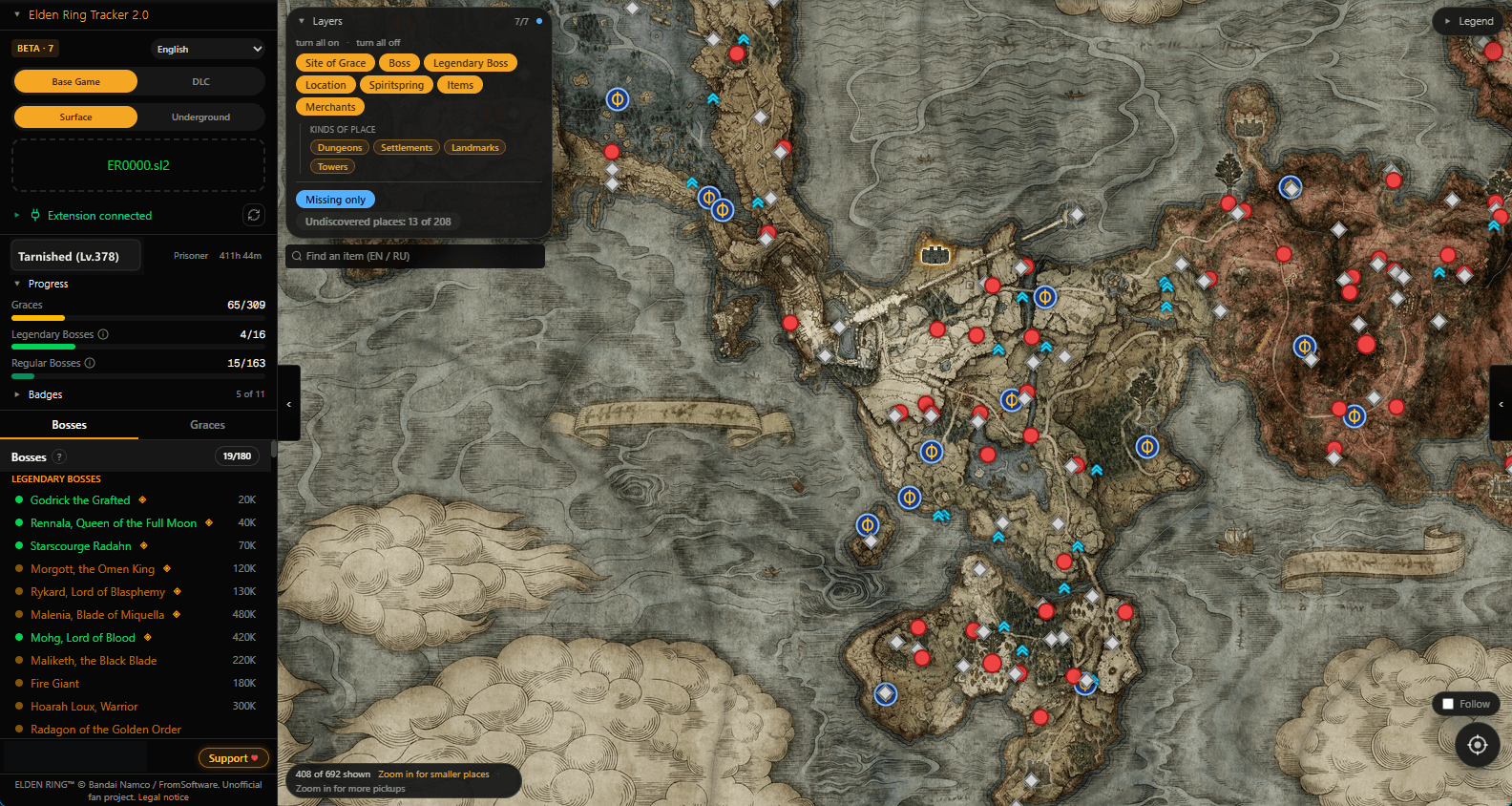
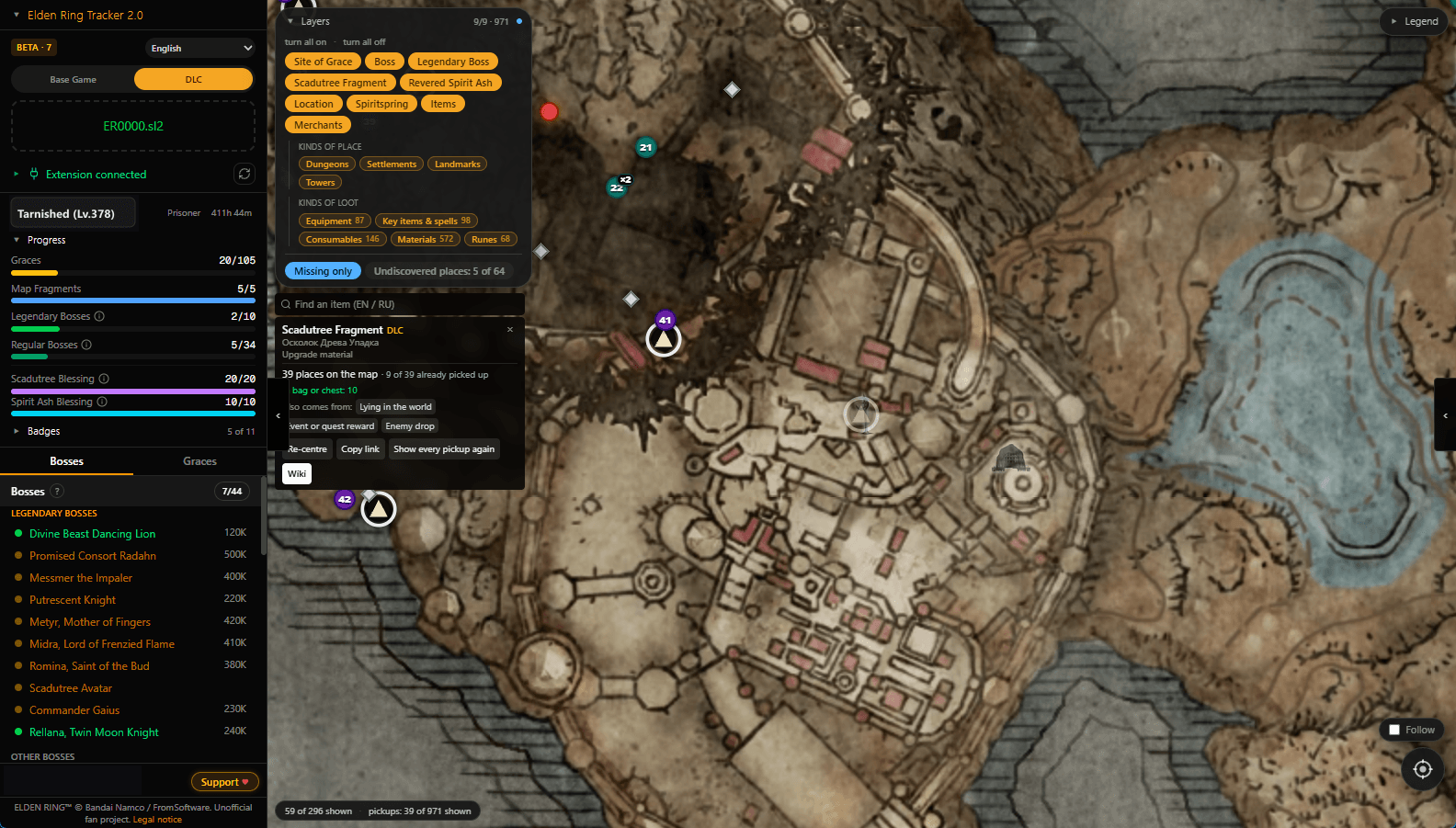
  5. Switch on "Missing only" in the layers panel. That is the one switch this whole thing is built around.


From there the map fills up with your run: Sites of Grace you have found go dark, bosses you have killed go dark, loot you have picked up goes dark.

Playing on PlayStation or Xbox? A console save cannot be loaded here, so you tick things off by hand: signed in with no save open, every marker and item card has a "Tick it off by hand" button, and the boss and grace lists get checkboxes. The ticks are kept in your account.


What is actually on the map

Layer
How many
Sites of Grace
413, of which 105 are in the Realm of Shadow
Bosses
225: 168 in the Lands Between, 13 underground, 44 in the Realm of Shadow
Scadutree Fragments
42
Revered Spirit Ashes
23
Spiritsprings
59 (three of them sealed until you topple the stones nearby)
Locations - caves, catacombs, settlements, towers
282 in four groups: dungeons, settlements, landmarks, towers
Items
3,741 loot pins covering 2,582 distinct items
Scarabs
110: 87 in the Lands Between, 12 underground, 11 in the Realm of Shadow
Merchants
41 stalls - where each one stands
Progression order
28 steps by region with a level hint, and the 40 main bosses inside them

Great and legendary bosses carry their own markers, so you can tell them apart from field bosses at a glance.
How to use it
Layers go on one at a time

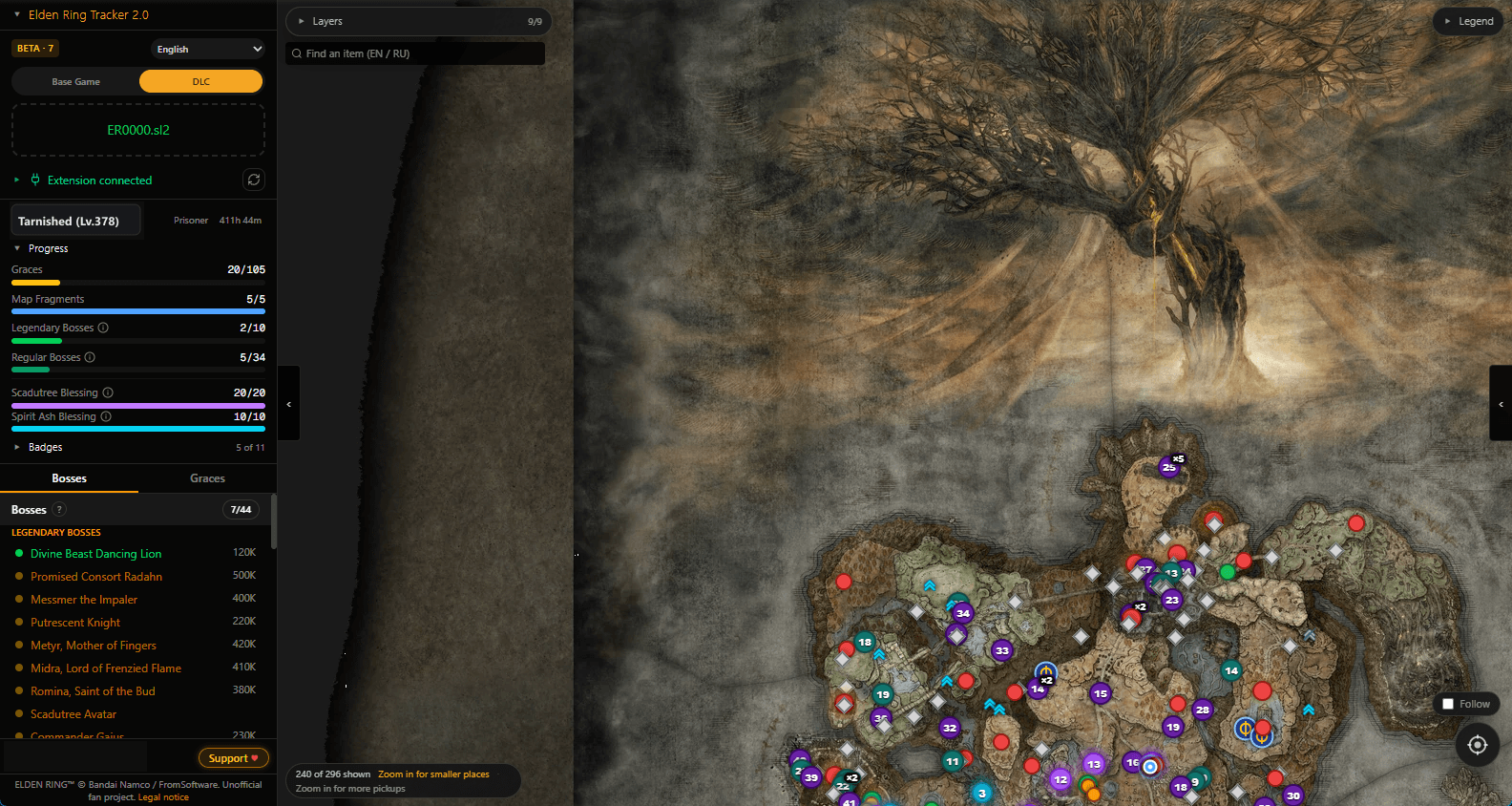
The Layers panel is a row of switches. You may keep as many on as you like, but the point is the opposite: leave one or two on and the map stops being a Christmas tree. There are "turn all on" and "turn all off" buttons for the rare moment when you want the whole picture.

Of the loot, only equipment and key items with spells are on by default - 985 pins out of 3,741. Consumables, materials and runes are off on purpose: together they are 2,756 pins and they bury the map. Looking for a crafting material and cannot find it? Switch its subgroup on. And zoom in: loot appears from the fifth zoom step.

Tarnished Edition items (the Tarnished Pack on PC) are hidden by default: without the pack they cannot be obtained, so they are neither drawn nor counted as missing. Switch them on with the Tarnished Edition chip in the loot kinds row; search still finds them by name, and their cards say where they come from.


"Missing only"

The single switch the whole tool exists for: it removes everything you have already found, killed and picked up. On a third run, when four fragments and one ash are all that is left, the difference between "a map with every pin" and "a map with five pins" is the difference between an evening and ten minutes.

Search: places, bosses and items

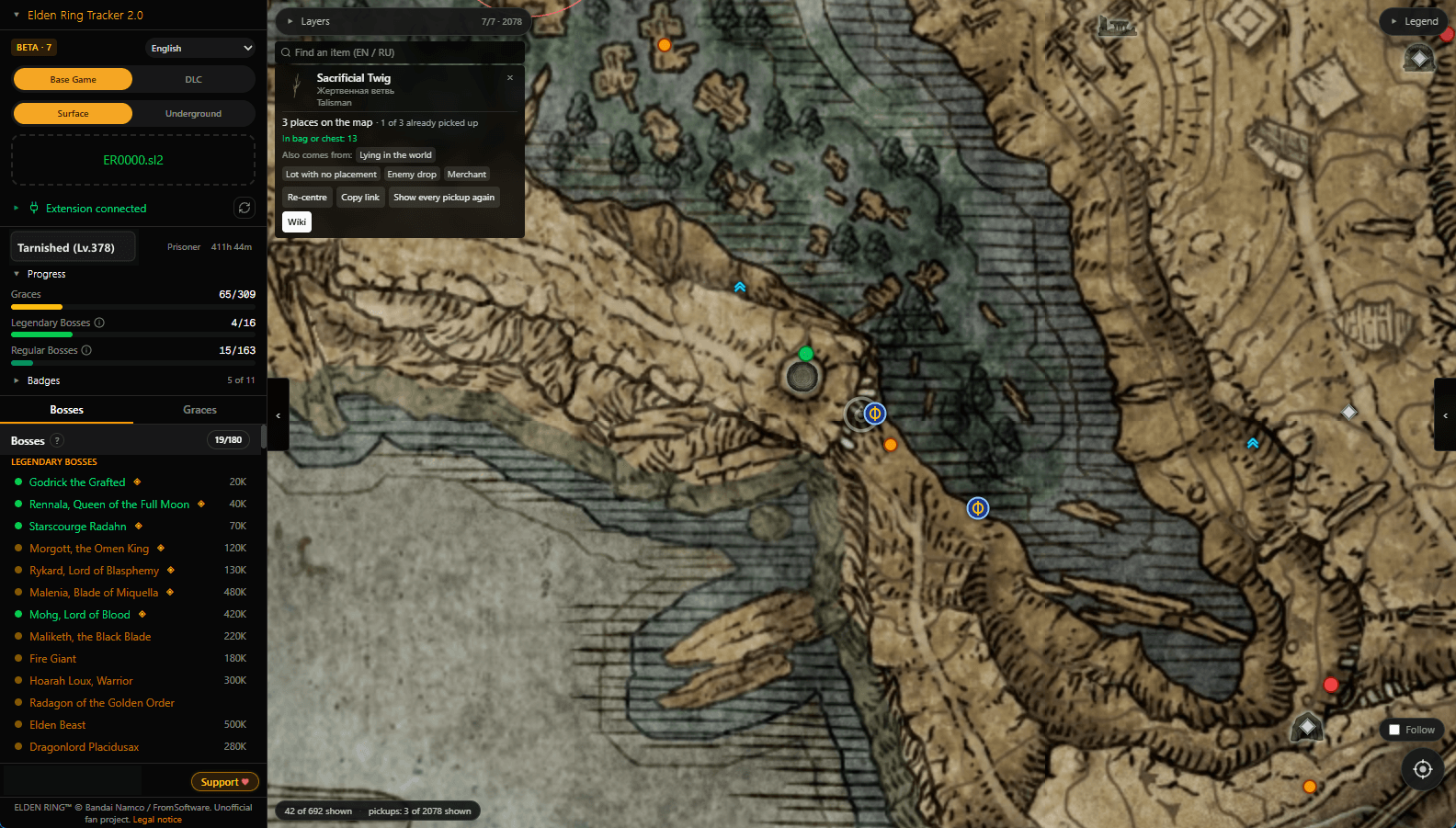
Type at least two letters into "Find on the map" and you get places, bosses and items. For an item the map shows where it lies and how many places it has in total. Names are matched in English, in Russian and in the site language at once, regardless of the language the game runs in: "Rivers of Blood" and "Реки крови" land on the same pin.

If an item has no place on the map, the card says plainly where it comes from instead: dropped by an enemy, sold by a merchant, granted by an event, crafted at the workbench.


The pin card

Click a marker and a card opens: what lies here, whether your save says you already took it, what drops it, and where else the same thing shows up. Copy link gives you an address that opens the map right on that item - easier to paste into a chat than "you know, past the bridge, on the left".

In the same card:
  • Plot a route draws the way to the marker from where your character stands, or from the nearest Site of Grace you have opened - over the ground, around cliffs, with the lifts. Routes are part of Pro.
  • Dungeon map, on caves, catacombs, castles and other dungeons: a plan of the place level by level, top to bottom, with its own markers.


Two campaigns and two depths

The Lands Between and the Realm of Shadow are separate maps with separate counters; the "Base game / DLC" switch is in the header of the left panel. Next to it is the depth: Surface and Underground. Siofra, Ainsel, Deeproot Depths and everything else below the surface sits on its own sheet instead of being painted over the world above. Thirteen bosses and thirty Sites of Grace live down there, invisible on the upper map.


"Show where I am"

The button puts the map where your character stood as of the last save. Next to it is Follow: the map travels with you on every new save. If the game wrote you down inside an interior that the world map does not have, the button says so instead of guessing.
Browser extension
So you do not have to drag the file every ten minutes

The game rewrites the save on its own - when you rest at a grace, when you quit, and simply on a timer. The map has no way of knowing: you drop the file once, you see the progress as of that moment, and it goes stale from there.

The page cannot re-read the file by itself, and that is not laziness. Browsers keep %APPDATA% on a blocked list: neither the file picker nor drag-and-drop grants a page the right to look in there a second time. That is a rule of the browser itself and it applies to every site equally.

Answering "Remember" in the "Save opened" window spares you the file picker after a page reload: the map opens the copy you gave it last time. That does not make it fresh. The copy stays in this browser only and is deleted when you sign out.

What brings the fresh file is a browser extension. It hands it to the open map tab every time the game saves, and the map catches up within seconds. The extension itself is free, and the map working with it is part of Pro:

Get the extension on the Chrome Web Store[chromewebstore.google.com]

It installs in Chrome, and also in Edge and other Chromium browsers, which take extensions from the same store (Edge will show an "Allow extensions from other stores" bar). There is no Firefox build: there you keep dragging the file in by hand.

After installing, open the extension's details and switch on "Allow access to file URLs" - without that box it cannot read the save file. On Edge, also add the file:///* row under "Site access".

The extension has no network permission. Not "it does not send anything, trust me" - literally: its manifest carries no network rights, so it physically cannot send the file anywhere. The file goes to the map tab and nowhere else. What it does and does not do is on the extension privacy page[eldenring.krut.top].

The map on your phone: a second screen

You do not need to play windowed to see the map, and you do not need a second monitor either. On the computer, in the left panel next to the extension, press "Show on phone" and point the phone camera at the QR code. The phone shows the same map: the same ticks, the same character position. There is no need to sign in on it.

What travels to the phone is not the save file but a list of the places you have opened and your position. With the extension the phone map updates itself: the game saves, and a few seconds later the pin is gone on both screens. The link lives one hour and ends by itself. The mode is part of Pro.
Tools, price
Tools on top of the map

The map is half the project. The other half is the tools that do the arithmetic on the same save file. They live in the right panel: a narrow tab with an arrow at the right edge of the screen opens it.

Build lab. Three questions, three screens. "How hard does this hit" takes your real character out of the file - stats, armaments, talismans - and every number moves as you swap a weapon or a talisman: damage, equip load, defence. "What should I hit this with" runs every armament in every affinity against your chosen target, weighing that target's absorption per damage type rather than by feel. "What should I wear against it" picks armour that survives the hit without costing you the medium roll. A save is optional: type the stats in by hand and treat it as a sandbox.

Build rating. An index of your build against each of the 26 legendary bosses, and a shared table alongside other players' builds. Taking part is free and voluntary: your build goes into the table only if you answered "Yes" yourself.

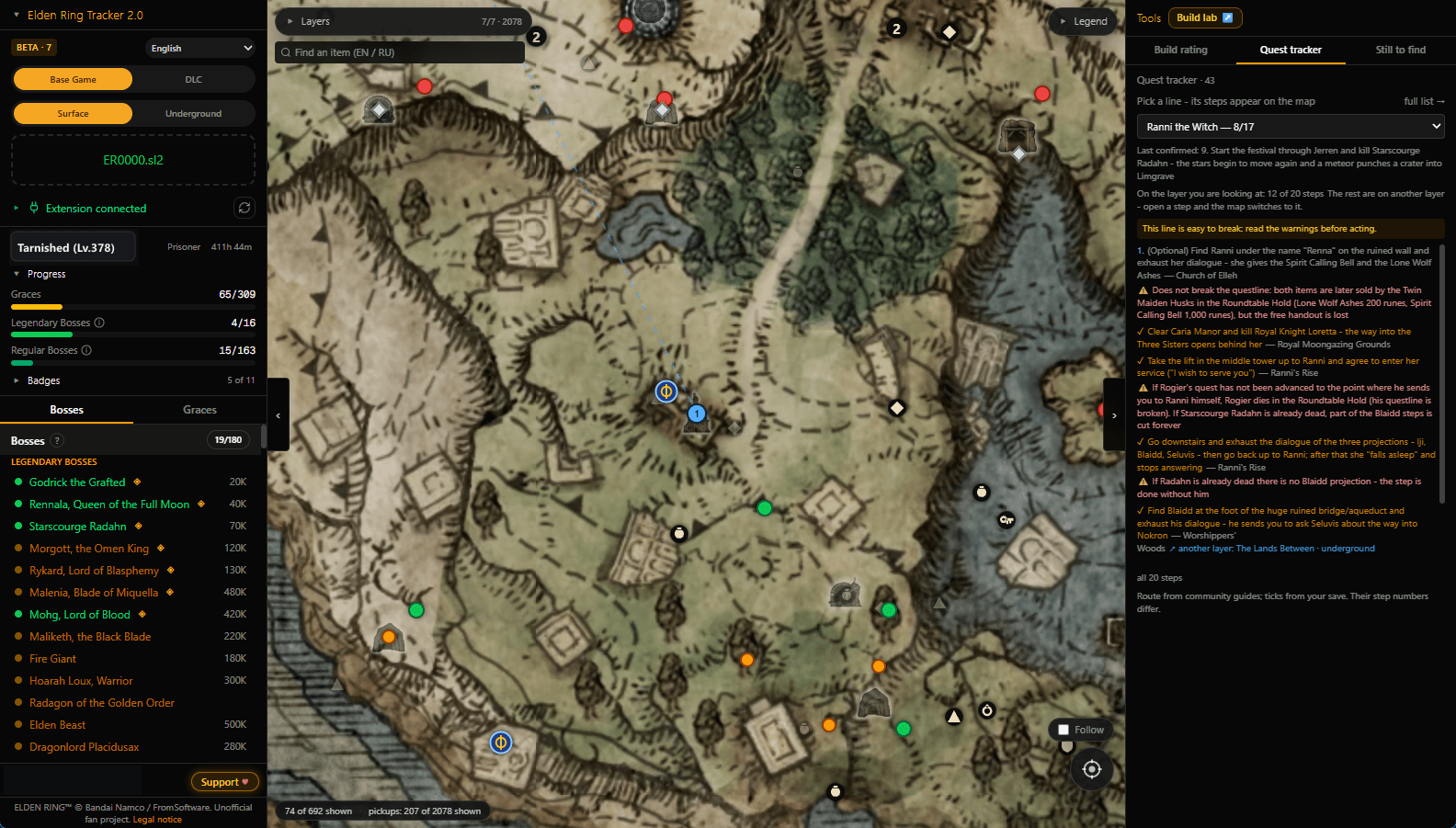
Quests. Elden Ring has no quest log, and NPC questlines close without a word. The panel reads your save and shows where each line stands: what is done, what is next, where it is easy to break, and which lines the game has already closed for good. Any line can be put on the map as a route with numbered steps.

Still to find. A list of what your save says you have not picked up - fragments, ashes, items, gestures - each with a jump to its place on the map.

Co-op. A button over the map, next to the legend. Behind it are live calls on the map, a list of who is here right now, and chat. A call carries what the game needs to match you: platform, character level, weapon upgrade and the session password. Co-op is in beta and for now open to everyone signed in, free of charge.


Privacy - and how to check instead of trusting

The save file does not leave your computer. It takes a minute to verify, and verifying is the right instinct:

  1. Open the map and press F12 for the developer tools.
  2. Go to the Network tab and clear the list.
  3. Drag your save file onto the page.
  4. Watch the requests: there is no request carrying your file. Map tiles and pin data show up - things travelling to you, not from you.

The account stores your settings, the slot you chose and your hand ticks if you use them - not the contents of your save. Your build goes into the rating table only if you answered "Yes" to the rating question. The "share your progress" link does not create a database row: everything it shows is encoded in the link itself.

There is exactly one exception, and you switch it on yourself: "Show on phone". Then a list of the places you have opened and your position travel to the server, so the phone can draw the same map. No save file, no character name and no Steam account number is in it.

What it costs

Free, and staying free: the map itself and all of its pins, the layers, "Missing only", search, dungeon maps, save parsing, hand ticks for consoles, the counters and the lists of bosses and Sites of Grace, the build rating with its table, and the shareable progress link. No ads, no subscription. Working with a save only needs a free account.

Paid (Pro) - the tools on top of the map: the build lab, the tools panel with quests and "still to find", working with the browser extension, save watching, the map on your phone, routes (the way to a marker and the path inside a dungeon map) and co-op, which is free for now while the beta lasts.

The price is one purchase, no subscription: $14.99, €13.50 or 1,200 RUB on a card issued outside Russia; 790 RUB on a Russian card or Mir. The access is identical, the figure depends only on how you pay. The same Pro opens the tools of the Dark Souls III tracker, and every tool added later is included at no extra cost.

You can try it for free: one hour of Pro, 60 minutes straight, once per Steam account.

The details are on the pricing page[eldenring.krut.top].

Why is there a paid part? Hosting, development and keeping the thing alive cost money, and I'd rather charge for the tools than plaster the map with ads.
FAQ
Is this safe for my account? Can I get banned?
The map does nothing to the game: it reads a copy of a file you showed it. Nothing is injected, no memory is touched, no game files are replaced. Anti-cheat deals with the game, not with a website in your browser.

Why are there fewer pins than I expect?
Three reasons, by frequency. You are too far out: loot appears from the fifth zoom step, small places later. A subgroup is off: consumables, materials and runes are off by default, and that is 2,756 pins out of 3,741. "Missing only" is on, and part of the pins is honestly hidden as already done; the line under the map says how many.

I pressed "Missing only" and nothing changed
Then the map has not read your save file yet: without it, everything counts as missing. Load ER0000.sl2 and the mode starts removing what you have done.

I play on PlayStation or Xbox
A console save cannot be loaded, but the map still works: sign in and tick things off by hand with the "Tick it off by hand" button in the cards and the checkboxes in the lists. The ticks are kept in your account.

Does it work on the Steam Deck?
Yes, the map opens in a browser. The save file there lives at:
~/.local/share/Steam/steamapps/compatdata/1245620/pfx/drive_c/users/steamuser/AppData/Roaming/EldenRing/<account number>/ER0000.sl2

What if I play modded?
As long as a mod does not change the format of the save file itself, the map reads it as usual. With the Seamless Co-op mod, use the ER0000.co2 file. Items or enemies a mod adds are of course unknown to it - it shows what is in the game.

What about phones?
The map opens and works: the panels slide as drawers and you zoom with a pinch. The easiest way to see your progress on a phone is "Show on phone": a QR code on the computer, the phone camera, and the same map is in your hand.

Which languages?
Fifteen - the same set the game itself ships with: the names of places, bosses and items, the map's own labels and the guide on the site. The language switch is in the "Map settings" row, and search always understands English and Russian names.

What happened to the old map?
The previous map moved to https://eldenring.krut.top/v1 and keeps working. Everything new happens in 2.0.

Is there one for Dark Souls III?
Yes: https://darksouls.krut.top. The same Pro opens the tools there too.

I found a bug - something is counted wrong
Please write in: the map menu has a bug report form and it is open without signing in. Those reports are the most useful thing you can send - there is a corpus of save files here to reproduce the mistake on and to prove the fix.
Save backups
Next door: save backups

The project has a separate free, open-source program - Erdtree Keeper. It copies save files and can put any copy back into the game, and it names each snapshot after the place you were in: "Leyndell, before Morgott" instead of "backup (3)". Handy before a boss, before a decision in an NPC questline, and after playing online.

It has a guide of its own: Erdtree Keeper - save backups


Links

Russian Version

If the map helped, a rating and a comment do far more for finding it in Steam search than anything the author can say.
23 Comments
Oct 19 @ 1:25am 
@krut43 Man you are awesome!! Did not expect such quick turnaround time when I made the suggestion. Glad to have purchased the pro version.
krut43  [author]
Oct 12 @ 1:23pm 
Done! Tarnished Edition items are now hidden by default, both on the map and in “Still to find”. If you ever get the pack, zoom in and switch on “Tarnished Edition” under Layers - Kinds of loot. And any of those items you open now says “Tarnished Edition item” in its card, so no more googling.
Oct 12 @ 9:44am 
Can we please have an option to turn off Tarnished Edition Items? Its annoying as I dont think tarnished edition adds much value so I am not planning on purchasing it, but I keep seeing those items under "missing only" toggle with no indication that they are from the tarnished edition. then I have to search for it on google to find out.
krut43  [author]
Oct 8 @ 7:04am 
Thanks for the report, and no worries! Mistwood Outskirts is on the map in Limgrave. Graces are hidden only at the most zoomed-out view, where the map shows just the great bosses; one step closer they appear. The "missing" toggle doesn't change your progress: the sidebar counts what your save file says, so a grace turns completed once the game saves and the site reads the new save (open the file again, or use the extension or file watching to keep it in sync). If an icon is ever really missing, the quickest way to tell us is "Report an issue" in the menu, or right here.
Oct 7 @ 10:47am 
strange it updated perhaps from the toggle of missing so ignore me
Oct 7 @ 10:45am 
sorry, learning....missing toggle brought up the site of grace but didnt update on side bar as being completed
Oct 7 @ 10:29am 
It is a site of grace oops
Oct 7 @ 10:27am 
not sure how to submit a missing item on map so here it goes. Icon for Mistwood Outskirts is not there. I tried to zoom in and out.
krut43  [author]
Oct 4 @ 10:50pm 
Thanks for the suggestion, scarabs are on the map now. Open the Layers panel and turn on the new "Scarabs" layer: it shows all 110 Teardrop Scarabs (87 in the Lands Between, 12 underground, 11 in the Realm of Shadow), and clicking one shows what it drops. Load your save and the ones you have already killed are greyed out; "Only missing" hides them. Their loot (Ashes of War, sorceries, incantations, smithing stones) is also in item search, marked "Dropped by a scarab". While we were at it, we added every other guaranteed death drop as well: the Erdtree Avatars' crystal tears, field bosses' weapons and armour, 318 new places in total. Direct link: https://eldenring.krut.top/?scarabs=1
Oct 4 @ 7:36am 
I have found a git repo similar to this. But both repos don't list in the map scarabs ash of wars. if you could add them would be amazing