Project Zomboid

Project Zomboid

8,256 ratings
Mini Health Panel
7
4
3
2
2
38
26
19
12
12
8
7
5
4
3
3
2
2
2
148
   
Award
Favorite
Favorited
Unfavorite
File Size
Posted
Updated
1.478 MB
Sep 22, 2022 @ 10:08am
Oct 4 @ 10:05am
14 Change Notes ( view )

Subscribe to download
Mini Health Panel

Description
✅ The mod is working fine on B42.20 (public stable release) ✅


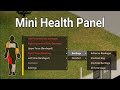
A minimalistic wounds display without the need to open the health panel. Can be disappeared when no wound need to be treated.


Updated for Build 42

The add-on has been updated for Build 42 while a separate version for Build 41 remains untouched and fully compatible, thanks to a new files structure system where each version of the mod is only visible by its respective game build, ensuring seamless functionality for players on both versions.

Only for B42, It now includes a new muscle strain indicator for each body part. The indicator evolves by becoming less transparent and changes color from orange to red as muscle strain worsens.

If auto-hide is enabled, the silhouette is revealed with a brief blinking effect when a strain threshold is reached.

This feature can be toggled off if not needed.


What does it do?
It give a permanent overview of your character's wounds on a minimalistic display. The body silhouette disappear when there are nothing to treat and appear when there is a wound.

When a body part is flashing red, there is a wound that needs to be treated.
When it's white, the wound is either bandaged or splinted.
When it's orange, the bandage is dirty and needs to be replaced.

If the wound is bandaged but it's still flashing that means you didn't fully treated the wound (glass still lodged, deep wound needs to be stitched, etc...)

How to use it?
Right clicking on the component will bring a contextual menu with all wounds and the settings of the addon.

Left clicking just brings up the classic health panel of the base game.

You also can drag it around and place it where you desire.

Optional mod
Mod Options is optional and adds an option to disable my mod (mainly for public servers)

Compatibility
This mod should work with any other mod (no incompatibility has been reported so far)
This mod works in single and multi-player.
This mod doesn't work in split-screen and won't be.

Known issue
  • The update notice may not be closeable
    • This may be caused by other mods that change or alter the behavior of the game's user interface. (such as Neat UI Framework)
    • If this happens, disable any mod that alters the game's user interface, close the update notice (it will not appear again), and then you can re-enable the mod that was causing it.
  • The panel may look small or big depending of your game resolution, this is unfortunately a common problem for most of interface add-ons.

    • This may be looked on when I will have the time.

Support me
If you really like my mod you can support me through Ko-fi[ko-fi.com]

Workshop ID: 2866258937
Mod ID: MiniHealthPanel
Popular Discussions View All (4)
31
Aug 25 @ 1:39am
Suggestions
Yesod™
3
Aug 30 @ 1:16pm
ERROR
Kaofan
2
Jun 21, 2025 @ 11:34am
Russian translation
FREEMANN96REG
466 Comments
Nov 10 @ 4:54am 
Is this working after the update?
Nov 8 @ 5:31pm 
I can't believe this isn't in vanilla. So useful!!
Nov 1 @ 12:58pm 
how to resize the panel? playing at 4k and i love it its just soooo small
Oct 20 @ 9:38am 
indispensable :)
Oct 4 @ 12:03pm 
yeeeeei :spiffo:
Speedy Von Gofast  [author]
Oct 4 @ 10:09am 
Sorry for the long wait (complicated personal life). I pushed an update to remove the update notice.

I also added basic localisation for now.
Oct 3 @ 4:04pm 
Hello. Please add the keys whenever you can so the entire mod can be translated. Thanks
Oct 1 @ 7:20am 
I couldn't click the confirm botton so that update notification blocked me from treating my wound.
Sep 27 @ 2:30pm 
Echoing the request to remove the update notification. Users dont need an in-game update notification, we can just look at the read-me. Or, do what other mods do and have it loaded in the pause screen not the actual in-game UI. Many people use the neatUI framework so having to disable it, then hit "ok" on a notification i wont actually read, then load back in to enable neatUI is a bit much for what is essentially a feature no one asked for.
Sep 25 @ 12:19am 
B42.20 - I can't seem to be able to relocate the panel anyhwere. Do I have to unlock the ability to drag it from a menu?