
The Sims™ 4

The Sims™ 4

39 ratings
Custom Soundtracks
By LeviathanFox
A guide on how to create custom soundtracks in The Sims 4, even without mods!
1
   
Award
Favorite
Favorited
Unfavorite
Introduction
In this guide, I will show you how to import audio files into the game's radio stations. The process is very simple, and is officially supported in the unmodded game.


DISCLAIMER: I do not endorse piracy of music or audio files. Please use legal methods to download them.
Importing The Files
First, locate the Custom Soundtrack folder. This would be located at:
C: > Users > [Username] > Documents > Electronic Arts > The Sims 4 > Custom Music
If it is not there, refer to the Troubleshooting section of this guide.
Once you open this folder, you will notice that there are sub-folders which are named after the genres featured on the radio stations in the game. These genres include the ones featured in the DLCs, too. If there are only a few sub-folders, or you cannot locate the Custom Music folder, refer to the Troubleshooting section of this guide.

From there, it is as simple as moving or copying your music files into the sub-folders, sorting them by genre.
Customizing The Soundtrack
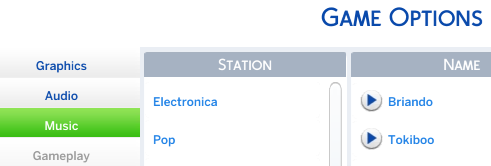
Once you have imported your music files, you should now be able to access them through the in-game menu.
Game Options > Music
From here, you can toggle which music tracks are in the selection pool via the checkbox to the right. If any of your music tracks didn't import correctly or at all, refer to the Troubleshooting section.
Troubleshooting
I can't find my Custom Music folder / Genres are missing
The game probably hasn't generated one yet. Go to Game Options > Music and try playing a track from each genre you are missing. The Custom Music folder will automatically be created, along with any missing genres you have played.


One of my tracks didn't import correctly.
If your files didn't import correctly, it could be because the audio file isn't supported.
The Sims 4 only supports audio files which are:
  • In .mp3 format.
  • In a bitrate at or below 320Kbps


If you have a different issue with custom soundtracks in The Sims 4, please leave a comment below.
2 Comments
May 23, 2023 @ 5:20pm 
OK
Nov 29, 2022 @ 5:59pm 
Another good tip to adding custom music is to add the artist, name, and other information in the metadata. This can easily be done using Audacity.