Insurgency: Sandstorm

Insurgency: Sandstorm

132 ratings
Optimal Settings for high-end PC
By ユーミ
Guide for people with high end PC who has trouble playing this unoptimized mess.
   
Award
Favorite
Favorited
Unfavorite
1.Preset
First of all

go to

C:\Users\"username"\AppData\Local\Insurgency\Saved\Config\WindowsClient

and delete engine.ini and game.ini


Dont worry as it will auto create itself when you launch the game.
2. ingame option


Use SMAA T2X
Put foliage and shadows to low,
(for visibility and framerates)
and put others to very high. they dont cost much frames anyway.


Under

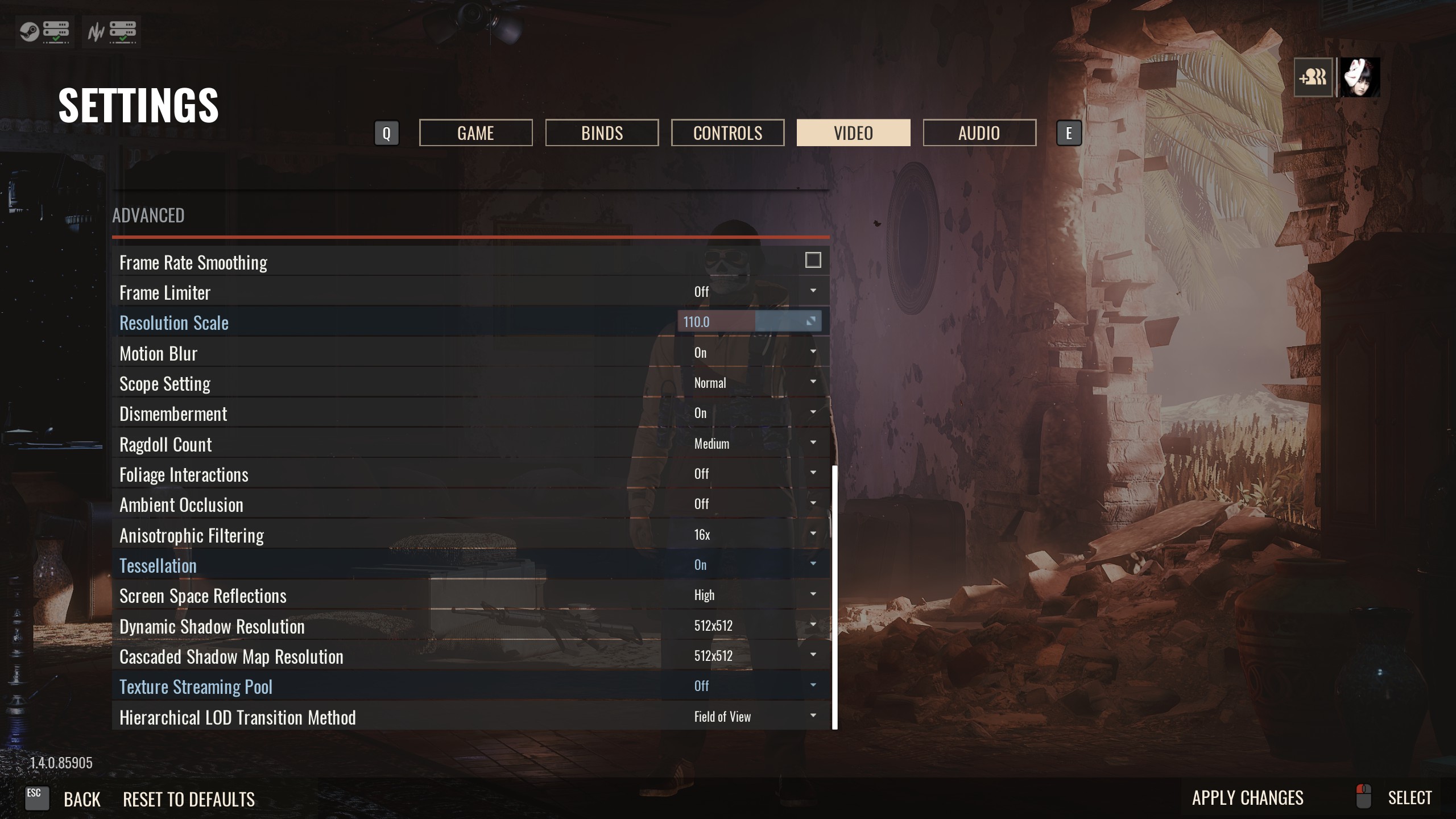
PUT Resolution Scale to 105~120
i use 110. Upping the resolution scale actually utilize your GPU better.
This works for other games like BFV, when you up your resolution scale a bit, you actually get higher framerates.

Under

PUT Resolution Scale to 105~120
i use 110. Upping the resolution scale actually utilize your GPU better.
This works for other games like BFV, when you up your resolution scale a bit, you actually get higher framerates.

turn off Ambient Occlusion.

turn off texture streaming.
3. Nvidia Control Panel
Go to Nvidia Control Panel -> 3D Settings ->

change

Power management mode -> max performance.

texture filtering- tri linear -> on

texture filtering - negative LOD bias -> Clamp
4. Done
its a shame we have to do a lot to optimize a paid game, but nothing we can do about it.

Im using 9700k@5.0, RTX 2070super, 16GB XMP3200mhz and 960evo nvme raid 0.
QHD 144hz monitor.

the reddit and other guide using modified TAA didnt work well for me.
i got consistent Framedrops and stutterings.

but with this settings, i get 130~140 fps on hillside, 120~130 on other maps
and even the notorious refinery doesn't dip below 100fps.

Try this out and see if it works for you.


============================================
still works 3/18/2020 tested on new map power plant
140~170 fps
46 Comments
Skittle Jan 23, 2022 @ 2:35am 
careful with what R4D20 says, just because he didn't work for him does not mean if won't work for you. And he is wrong about the resolution scale, if you have a HIGH END PC (which is what the guide aims at) resolution scaling defo helps, I was running everything at high and couldn't break or maintain 100 fps, I have a Ryzen 5 5600x and a RX 6900XT and that is preposterous, bumped the resolution scale to 110, fixed 144 fps on all maps
Italian old punter Dec 19, 2021 @ 7:09pm 
这里也能看见傻逼香港废青我是没想到的
ユーミ  [author] Oct 8, 2021 @ 6:52pm 
@dima stardust DX12 gives visual glitches and jaggy outlines
Dima Stardust Oct 6, 2021 @ 10:52pm 
what about dx12?
A Lonely Prince Apr 10, 2020 @ 8:05am 
lol "this game can make ur gpu run hot" Not really, no XD

My gpu and cpu don't go above 45-50C.
R4D20 Apr 2, 2020 @ 9:54pm 
This is a terribly misinformed guide, deleting the configs only helps if you played in beta and still have beta settings in there, foliage helps with visibillity but not framerates, shadows is up to you, do you want a richer image? Turn them up to high. Upping the resolutions scale does exactly what its supposed to and does NOT increase your FPS, quite the opposite. And turning off texture streaming does increase FPS in some cases, but also dramatically increases texture pop in, that one is up to personal preference as well, the only good tips in here are SMAA and disabling AO.
ユーミ  [author] Apr 1, 2020 @ 4:10pm 
It doesnt overheat my gpu. I have a gpu with a LCD screen showing its temperature and it seems like just ordinary games heats up.

Freddi Fish Apr 1, 2020 @ 2:52pm 
Also cap your framerate to your refresh rate. This game can make video cards run hot, so DONT overdo it thinking "oh yeah I need those extra frames because I can FEEL it". I run my card with a liquid cooler and I still cap my fps.
boogie Mar 14, 2020 @ 3:09pm 
thanks for the help :steamhappy:
icelake Mar 7, 2020 @ 8:13am 
thx for recomending to turn off ambi occlusion. Now i understend why i didn't see anyone while getting rekt even from the shadows :praisesun: