Guild Wars® Reforged

Guild Wars® Reforged

215 ratings
How To: Guild Wars & Steam
By M. Doucet
This illustrated guide is intended to help both new and old players manage their Guild Wars account on Steam, and is applicable to players who have either purchased Guild Wars outside of Steam or through the Steam Store.
9
14
5
4
3
   
Award
Favorite
Favorited
Unfavorite
IMPORTANT NOTICE
// 2025-12-03: A MAJOR UPDATE TO THE GAME CAUSED CHANGES WHICH ARE NOT YET REFLECTED BELOW. Use this guide right now at your own risk as I update it to include the latest changes. Under construction!! //

Known issues
  • Steam DLC (Eye Of The North, Bonus Mission Pack) seems to be broken right now.
  • If you bought Guild Wars before December 2025, do not buy DLC on Steam at this time - use the Guild Wars store[store.guildwars.com] for now.
  • The official store does not work with new Steam-based GW1 accounts (can't login)
  • Arenanet account management for new Steam-based GW2 accounts is broken (error messages)

Confirmed working
  • You can buy & play Guild Wars Reforged on Steam! (GW1)
  • New Steam-based account creation works! (GW1 & GW2)
  • Old email-based accounts still work great! (GW1 & GW2)
  • Old access key based content has not been changed (GW1)
  • Arenanet password resets & 2FA (authenticator, email, SMS) for email-based accounts are all working

2025-12-06
Introduction


The original Guild Wars is now called Guild Wars Reforged. It’s the same game! Just one title instead of three, upgraded for Steam Deck, with controller support and quality of life features. All old email-based accounts continue to work normally with the new features, and now new players buying on Steam create Steam-based accounts tied to their Steam ID.

The main difference for old players is that existing accounts were granted access to all three campaigns if they did not have them already. To new players on Steam, it means getting access to the original core game without having to create another account.


If you buy Guild Wars on Steam after 2025-12-03 (Steam-based)

+ Can buy and log in to Guild Wars Reforged on Steam.
+ Can buy and use DLC on Steam. (Some report not working yet)
+ Buy account upgrades from the Guild Wars store. (Currently broken)
- Can only link to Steam-based Guild Wars 2 account.
- Can only play Guild Wars 2 through Steam.


If you use an email address to log in to Guild Wars (email-based)

+ Can buy and log in to Guild Wars Reforged on Steam.
- Can no longer buy and use DLC on Steam. (It will not work!)
+ Buy account upgrades from the Guild Wars store[store.guildwars.com].
- Can only link to email-based Guild Wars 2 account.
- Can only play Guild Wars 2 outside of Steam.


If you play Guild Wars 2
+ If you log in to Guild Wars 2 with Steam, you should buy Reforged on Steam!
+ If you log in to Guild Wars 2 with an email address, you should buy Reforged from the Guild Wars store[store.guildwars.com]!
* It is not currently possible to link Steam-based accounts to email-based accounts and vice versa.


While I update this guide in the coming days, you can check the official Reforged FAQ[www.guildwars.com] for more information, or leave a comment below with your questions or experiences. Let's keep going another ten years!
Get Your Access Key
If you purchased Guild Wars content on Steam prior to Reforged, you can still access any purchased Access Keys (called "CD keys" in Steam). You can find your old keys by right-clicking "Guild Wars Reforged" in your Game Library and selecting Manage > CD keys as shown:


A window will appear listing any Guild Wars Access Key(s) purchased through Steam:


Keys listed here can be used for Creating a New Account or Adding a Key to an Existing Account.
Creating a New Account
Steam-based account
If you purchased Guild Wars Reforged on Steam, the first thing you will see when you open the game is this:


To create a new account, click that big button that says "Create New Account Via Steam." Pick a public display name on the next page and then you can make your first character. Congratulations!


Email-based account
Begin by starting Guild Wars Reforged and selecting the option to "Create Account or Add Access Key" shown here:


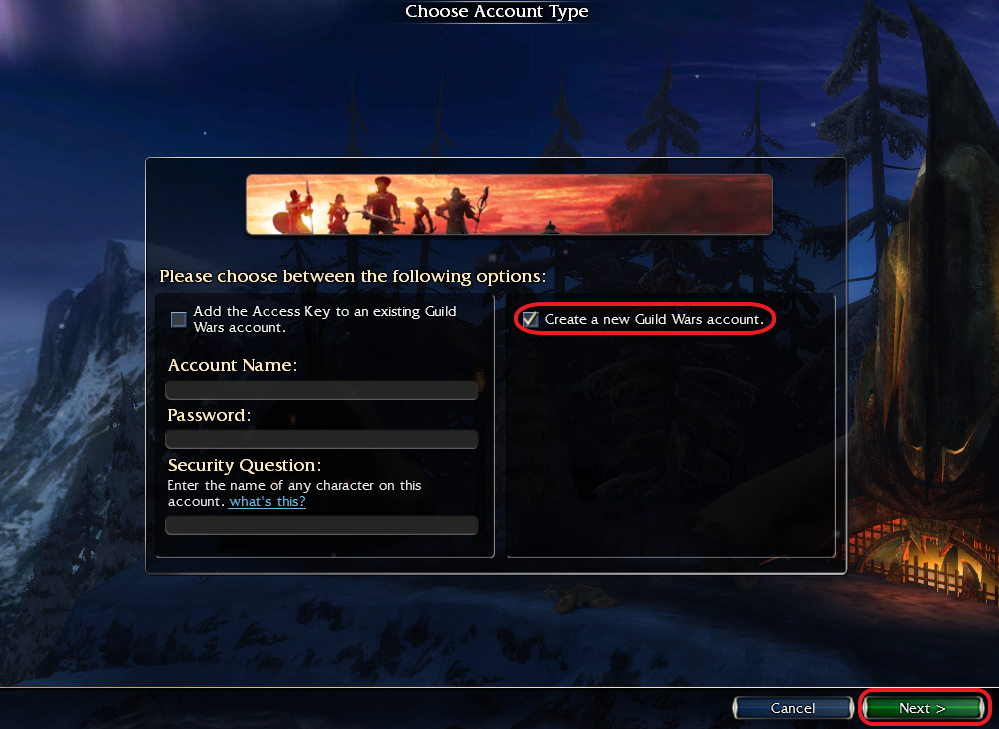
On the following screen, check the box to "Create a new Guild Wars account" and then click the "Next" button in the bottom right-hand corner (leave the Account Name and Password fields on the left blank for now).


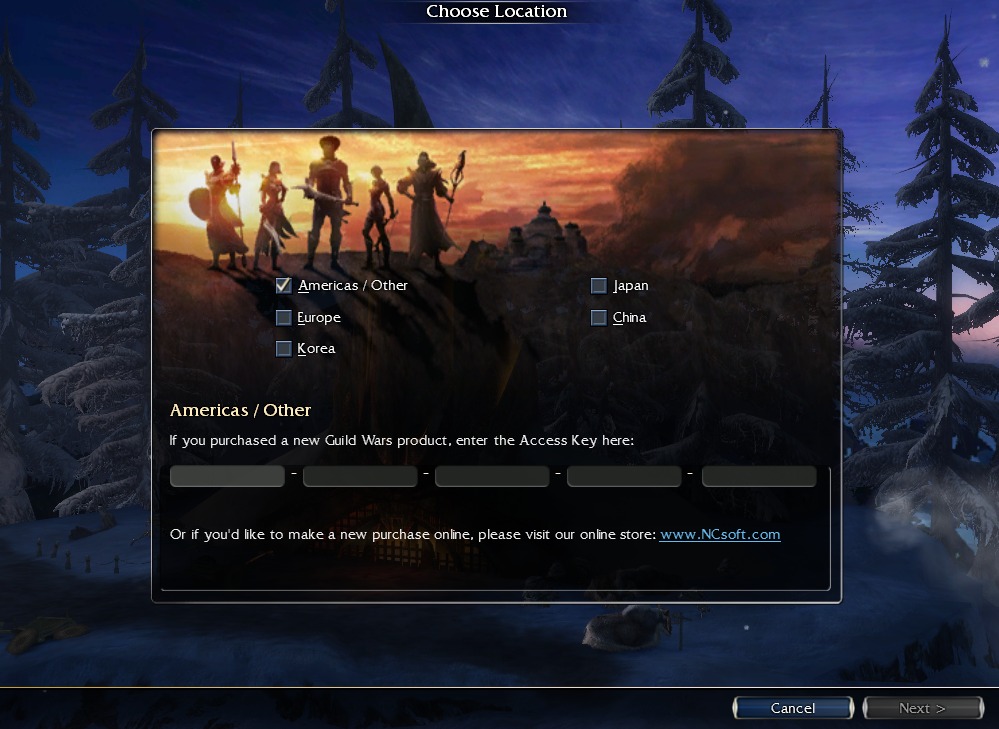
Select your region (choose "Americas / Other" if you receive an error) and enter your Access Key, then press "Next" in the lower right-hand corner:


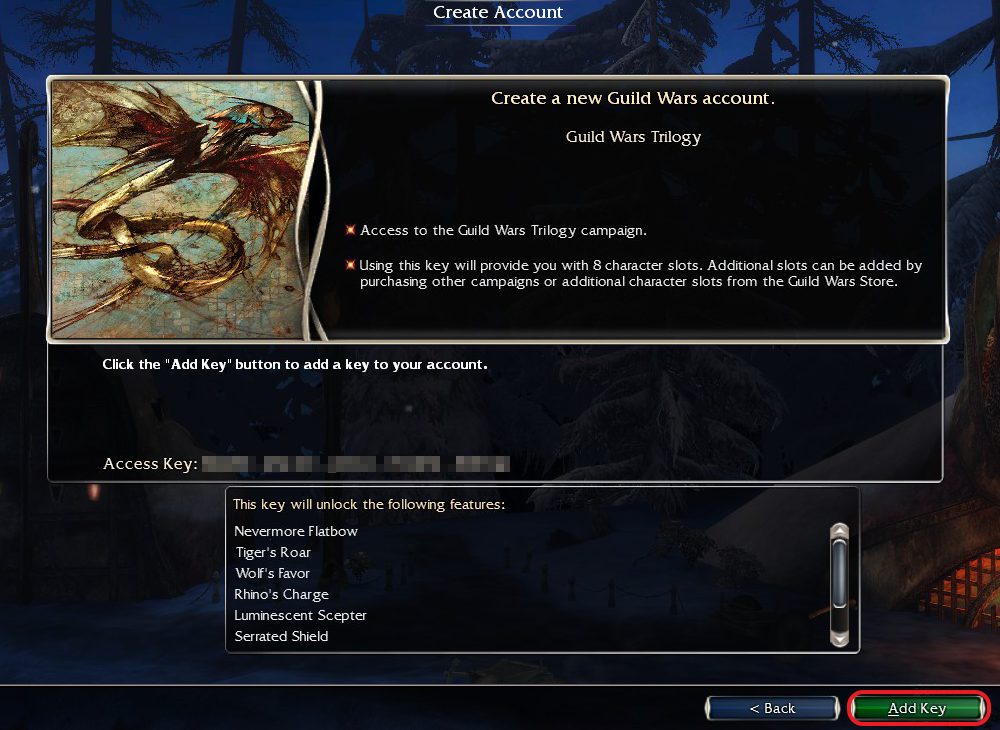
The following screen will show a confirmation message for the key you just entered, and list any bonuses it will unlock. Click the "Add Key" button in the lower right-hand corner to confirm.


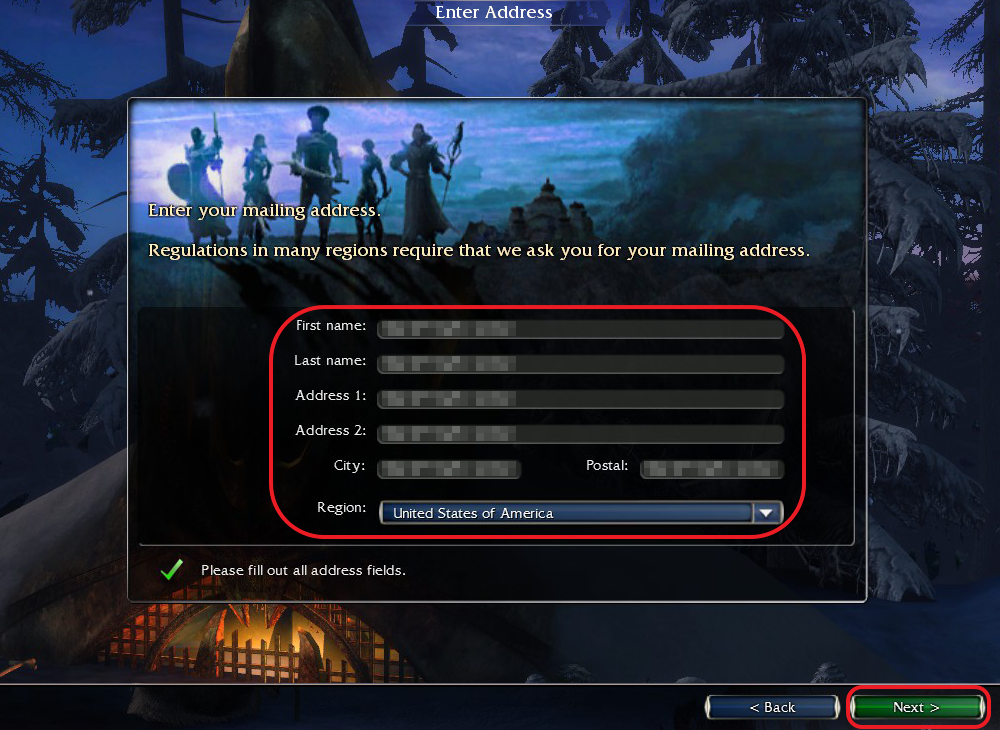
Fill out your full, complete mailing address and then click the 'Next" button.


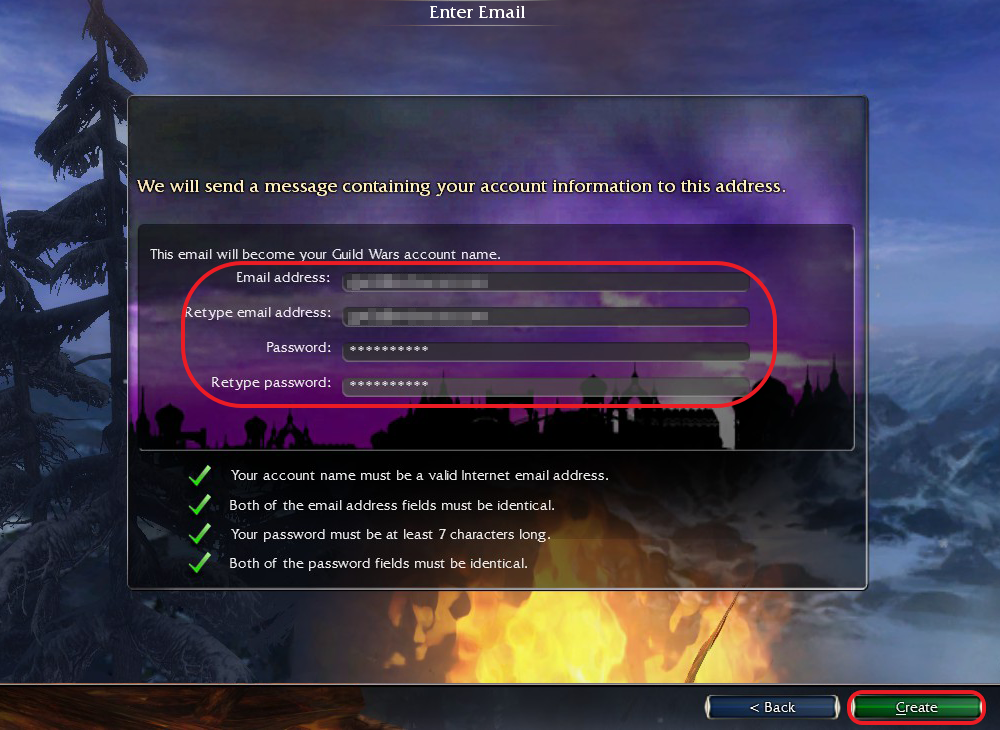
Finally, you will be asked to create your login and password. Your email address will be used as your Account Name (username). When you've entered your account information, click the "Create" button in the lower right-hand corner to create your account.


Adding a Key to an Existing Account
These steps will apply for all accounts whether or not you've purchased Guild Wars content on Steam.

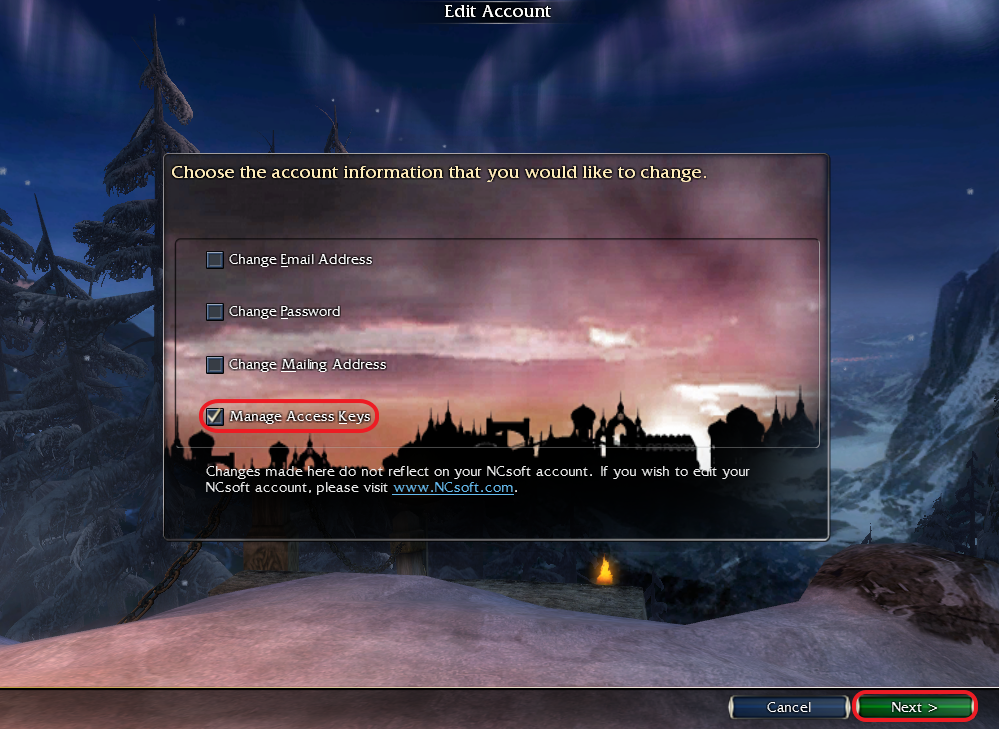
Once you've started Guild Wars Reforged and logged into your account, you will be at the Character Select screen. Click the button in the lower left that's labeled "Edit Account."


On the Edit Account screen, check the box beside "Manage Access Keys" and click the "Next" button in the lower right-hand corner. (Steam-based accounts will not show any other options on this screen.)


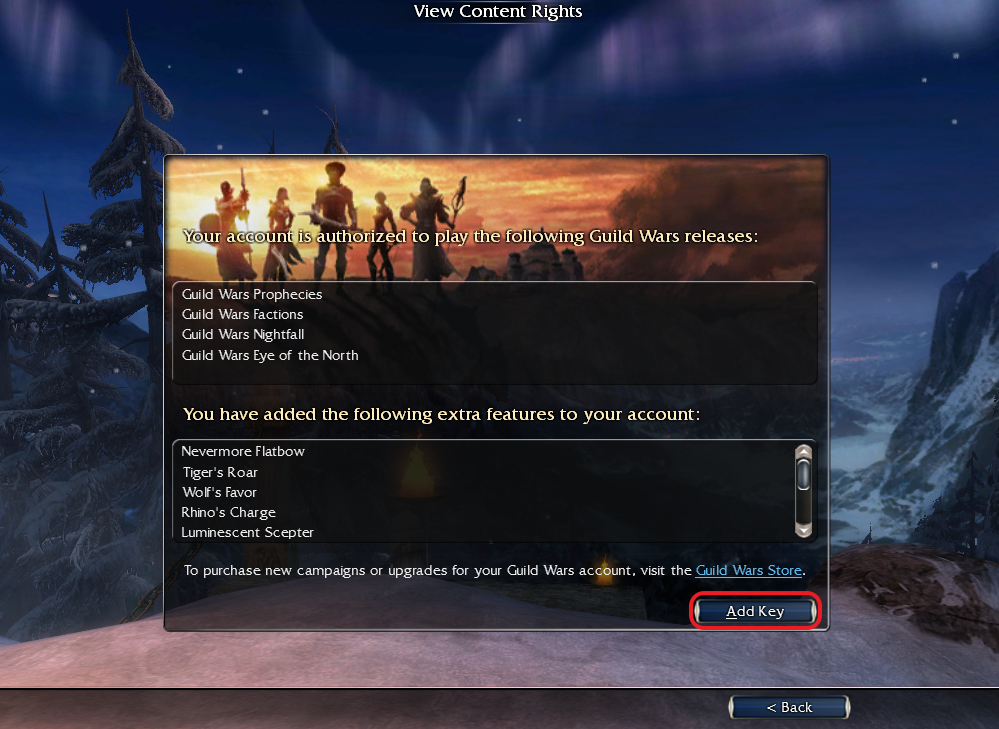
The following screen will show you all the content currently unlocked for your account. To add an additional Access Key, click the "Add Key" button near the bottom of the window, and add the new key as normal.


Please note that there is no way to merge Access Keys between two separate accounts. Any keys added through this screen will become permanently associated with that single account.
Adding a Non-Steam Version
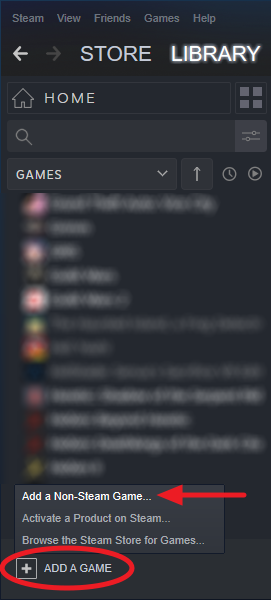
If you have not purchased any Guild Wars content on Steam but want to launch the game from your Steam Library and gain access to the Steam Overlay, you can add it as a "Non-Steam Game" by clicking this option from the "Add a Game" menu at the bottom of your games Library.

You cannot use the "Activate a Product on Steam" option with an existing Access Key.

Note that the non-Steam version is not linked to the Guild Wars store or community pages and will not have the same library features (including screenshot uploads) as the Steam version. You can still access this content, but will need to do so manually via the Guild Wars community hub.

Using the Guild Wars Store
2025-12-06: Steam-based accounts cannot use the official store yet. You can shop, but cannot sign in with your Steam account to complete your purchase.

The official Guild Wars Store at https://store.guildwars.com/ sells all kinds of exclusive Guild Wars content that you can use on Steam!
  • The base game and DLC
  • Account storage, character slots, name changes, makeover credits
  • Skill, pet, and item unlock packs
  • Costumes
  • PVP-specific content
Details are available on each item's store page, but most purchases are account-wide: You will be able to access costumes, extra storage slots, skills, pets, and mercenary heroes across your entire account with any character that can use them!

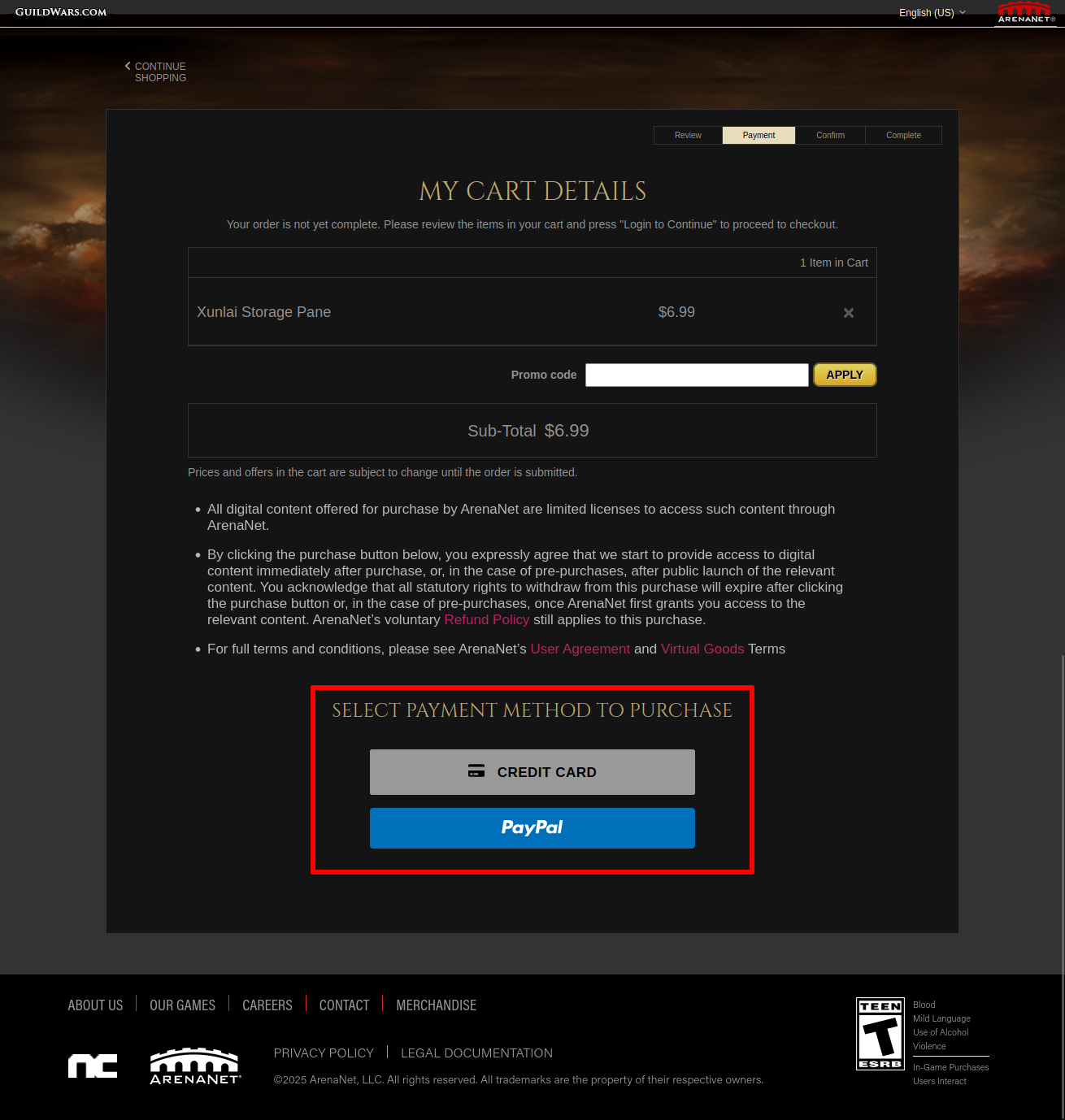
The store currently supports purchases with credit card or PayPal.


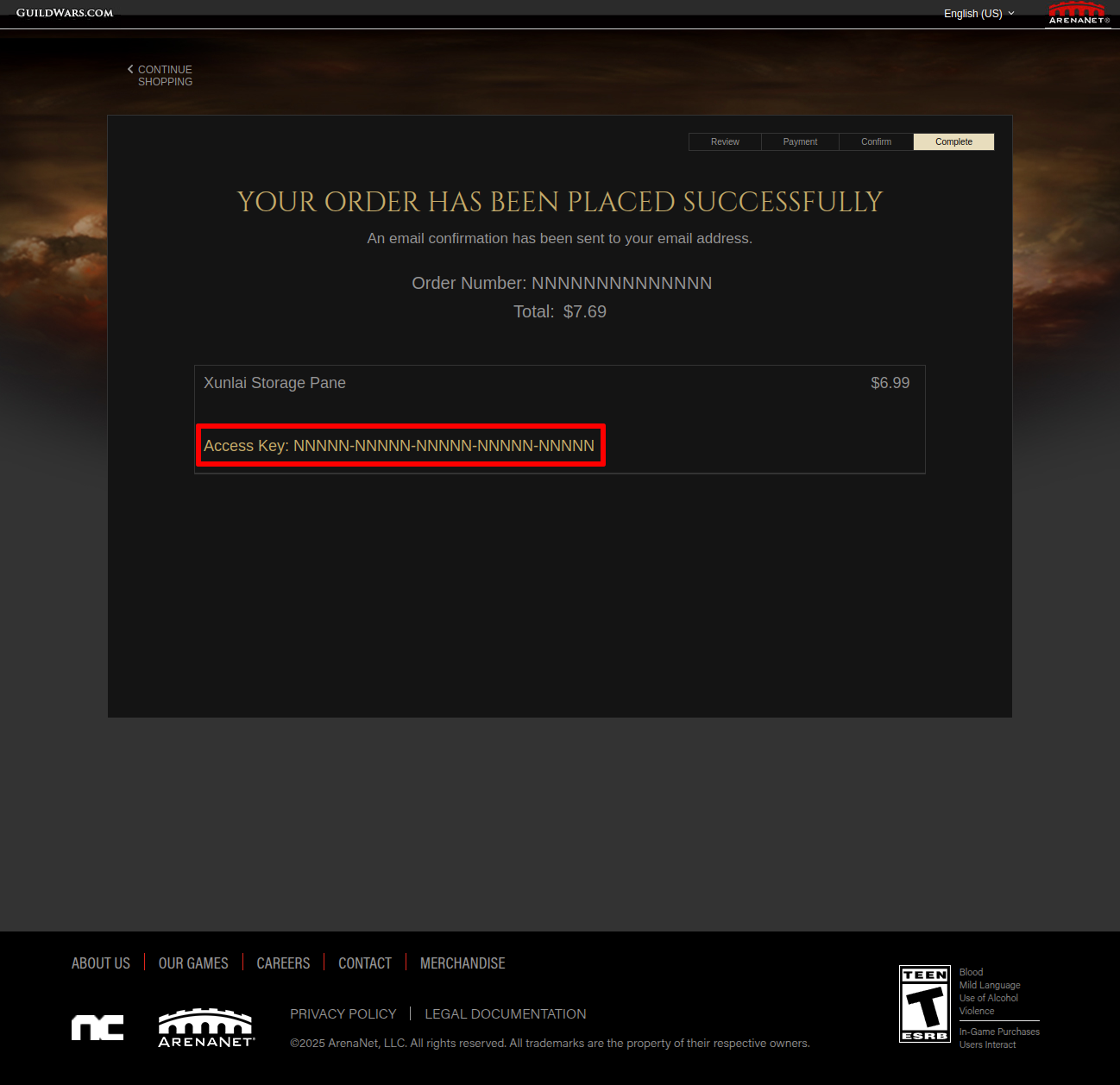
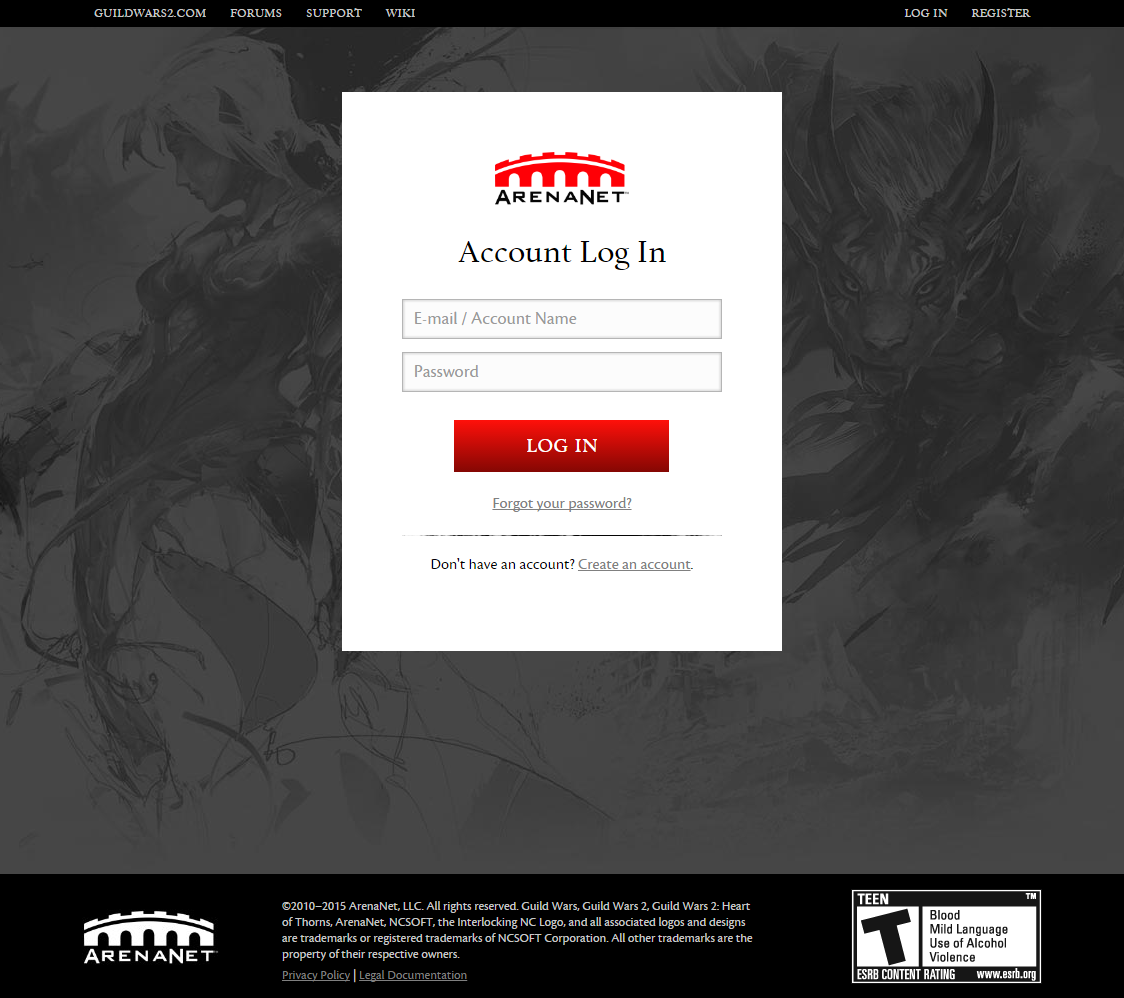
Although the purchase process involves creating or logging into your account via the arena.net website, purchases grant you an Access Key instead of adding your new content automatically:


This means you will need to follow the same instructions as above for Adding a Key to an Existing Account with any new keys you buy. The Access Key is also emailed to you as part of your receipt for email-based accounts.

Please note that although you can buy several items at once (and will receive individual access keys for each item), you cannot buy more than one of the same item at a time. This means you will need to do separate transactions to buy multiple character slots, Xunlai storage panes, etc.
Linking to Guild Wars 2
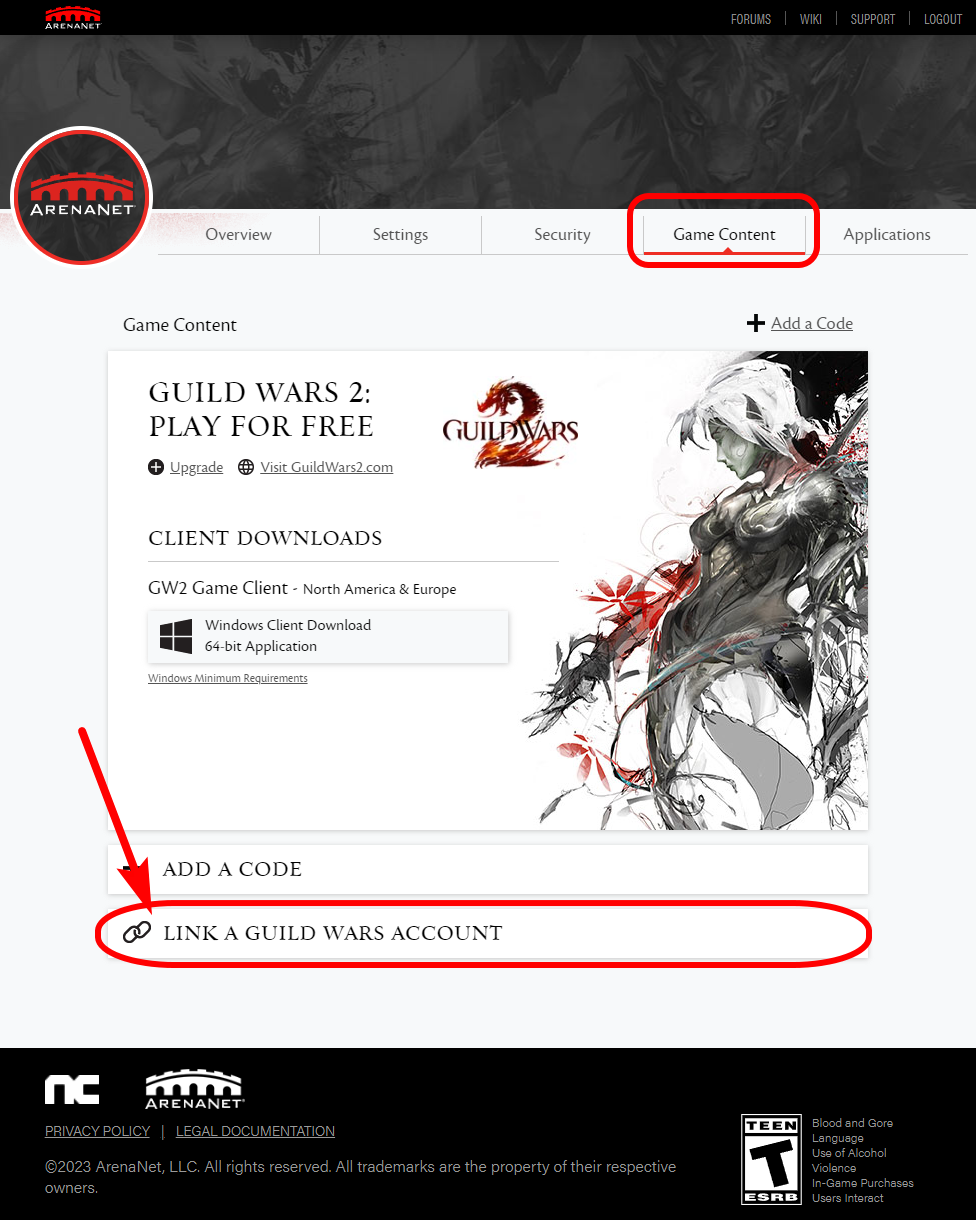
If your Guild Wars 1 and Guild Wars 2 account logins use the same email address, your accounts should be linked automatically. Unlinked accounts will should have the option to "Link a Guild Wars Account" at the bottom of the Game Content tab of the Guild Wars 2 account page at: https://account.arena.net while linked accounts simply will should not have this option. (Note that the status listed at the bottom of the the initial Overview page for Guild Wars 1 is unreliable.)

Note also that Guild Wars 2 accounts created via Steam are ineligible for account linking. (Source[help.guildwars2.com])

Manually Linking Accounts
Once your Guild Wars 1 account has been created, you will need to login to your Guild Wars 2 account page at: https://account.arena.net


Click the "Game Content" link near the top of the screen, and then find the option to "Link a Guild Wars Account" at the bottom.


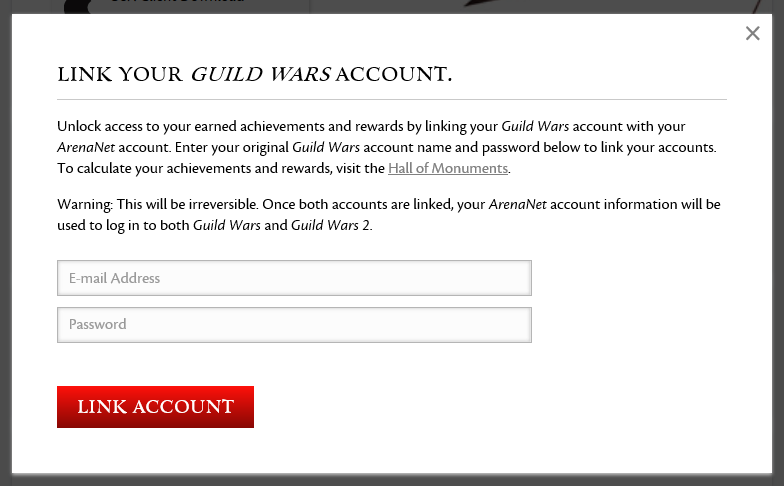
This link will open a dialogue to let you enter your Guild Wars 1 account credentials:


As noted in the dialogue, your existing Guild Wars 2 credentials will be used to login to Guild Wars 1 after linking accounts. Once your accounts have been linked, you should no longer see an option to link your accounts.


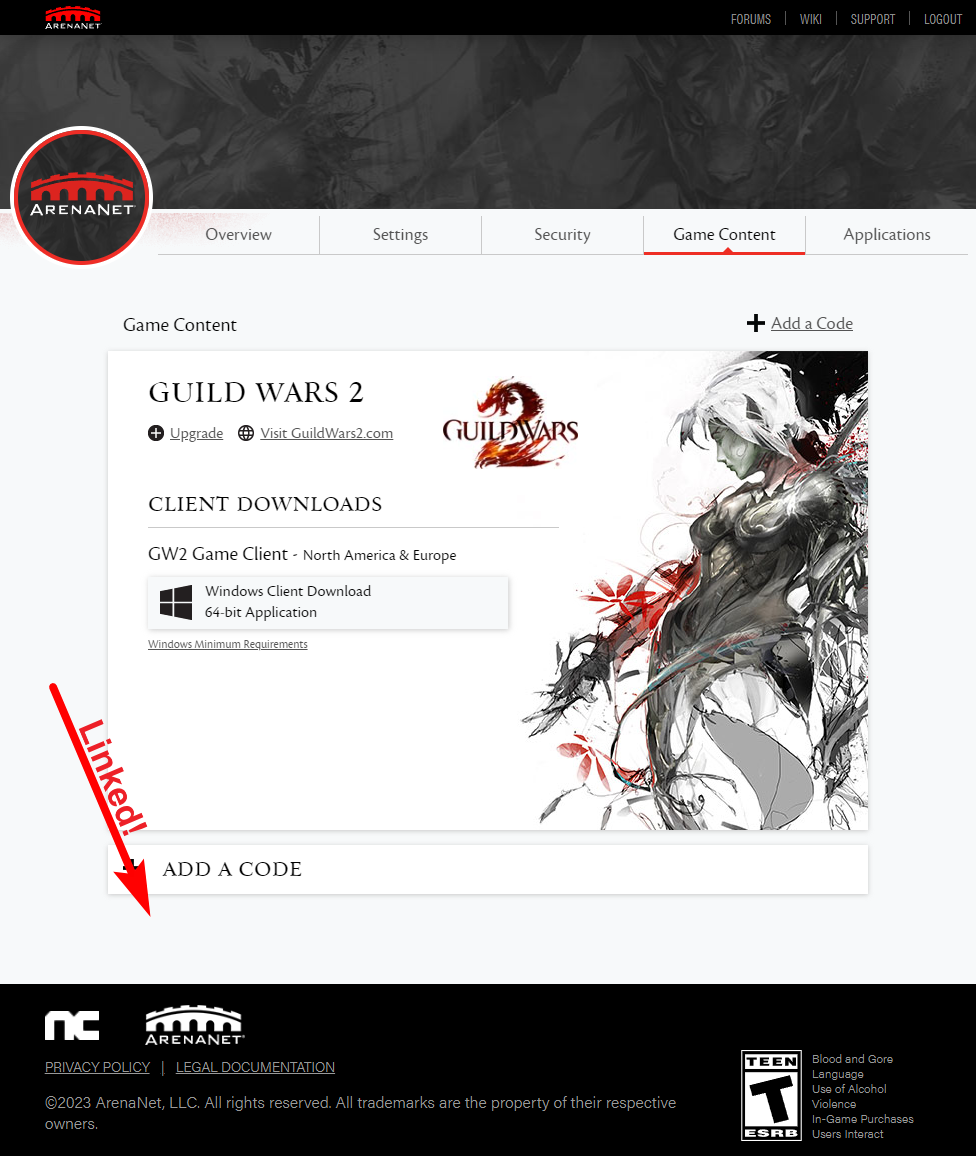
That blank space (where the option to link accounts used to be) is the only indication that your accounts have been linked. If you are having issues linking your accounts, you will need to file a support ticket at https://help.guildwars2.com

Please note that only ONE Guild Wars 1 account can be linked to a Guild Wars 2 account. Use caution when selecting a Guild Wars 1 account to link to as this process is permanent and irreversable.

Verifying In-Game
Occassionally ArenaNet has "display issues" with their website which fails to show whether or not accounts have been linked. In all cases, if your Guild Wars 1 and 2 accounts were registered with the same email address, your accounts should be linked automatically.

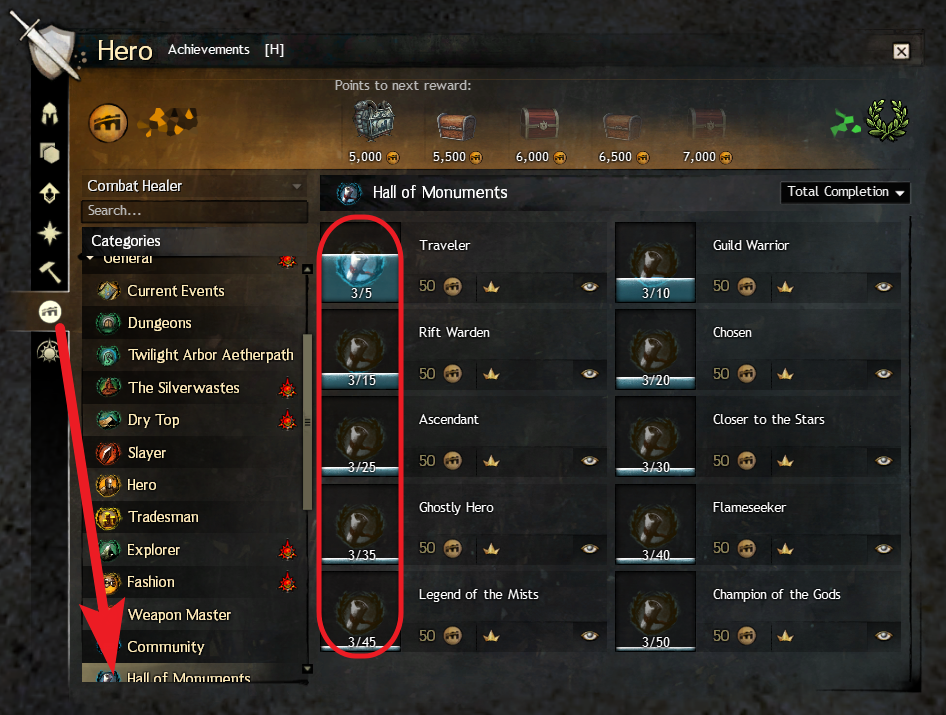
You can independently verify your accounts have been linked successfully in-game by viewing the "Hall of Monuments" section of the Achievements tab in your Hero Panel in Guild Wars 2, which will show at least 3 points when an account has been linked to Guild Wars 1:


Special thanks to Steam user [TFOD]DoomOfGods for providing this solution and screenshot!
Questions & Answers
I have an old Guild Wars account. Can I buy additional campaigns or expansions through Steam?
Yes. Any Guild Wars content you purchase on Steam will add a "Guild Wars" entry to your game library, and will grant you a single Access Key for the content you purchased. You can follow the instructions above to retrieve your new Access Key and add it to your account. Campaign content (Game of the Year [Prophecies], Factions, Nightfall) does not need to be installed separately through Steam, as this content will automatically be downloaded by the game client when needed.

I bought [campaign name] on Steam but I already have Guild Wars installed elsewhere on my computer.
If you want to continue playing through your existing installation, get your Access Key using the steps above and then add it to your account If you'd prefer to launch with your new Steam version, use the "Install" link on the "Guild Wars" page of your game Library to install the launcher under Steam. Since both installations use the same "Guild Wars" directory in My Documents to store builds, screenshots, and other local files you should not have to copy anything, but if you uninstall one version make sure to back that folder up first just in case! Windows: %UserProfile%\Documents\Guild Wars\

How do I update my old @ncsoft username?
Old school! If you have an ancient account that needs to be updated, it now needs to be managed through the ArenaNet Website. Login here: https://account.arena.net/login and click the "Settings" link on the top. You should be able to add an email address in place of your previous username. Note that your email address will become your new username.

How do I update my email address?
You will need to file a support ticket. According to Support:
Originally posted by GM Tanzun, Guild Wars 2 Support Team:
There is no way to change your account name or e-mail address on your end, in order to do it you need to contact us so that we can make that change on our end. The only suggestions I give you is to fulfill all or as much of the information on the form as you are able to provide when contacting us through the Guild Wars 2 Support Interface. Please be aware that we are unable to help you with a request filed through any other means.

When doing so, please provide the e-mail address you want to use to log in to the game in the future. Please also be aware that the e-mail address that you submit in connection with this request cannot already be associated with a Guild Wars or Guild Wars 2 account. (In fact, for maximum security, we suggest you may wish to use an e-mail address for Guild Wars 2 that is not used anywhere else.)

To access our support interface, please go to the following link: https://help.guildwars2.com/anonymous_requests/new . Once you have opened that page, select "Account Issue" from the drop-down menu and fill in as much of the information on the form as you are able to provide. An agent will reply to your ticket as soon as they are able to do so.

I forgot my email address/password. How do I login?
You will need to file a support ticket. Visit https://help.guildwars2.com and click the "Submit a request" link near the top right. Select "I Can't Log In" and fill out the form as completely as you can.

I get an error when trying to install: "The installer could not write Guild Wars to the specified directory."
Try running the Guild Wars executable directly as an administrator. Go to the folder where you have Steam installed and navigate to \Steam\steamapps\common\guild wars\ and right-click "Gw.exe" and select "Run as an administrator." After successful installation, you will be able to launch Guild Wars from Steam normally.

The game won't run or get past the launcher after installing Guild Wars on a new PC.
Try running either Steam or the Guild Wars executable directly as an administrator. Right-click the file at \Steam\steamapps\common\guild wars\Gw.exe and select "Run as an administrator." After successful installation, you will be able to launch Guild Wars from Steam normally.

I get an error when trying to create an account: "Network error. Please check your connection to the internet and try again (code = 4294967)"
This happens when you are trying to create an account using a Guild Wars: Eye of the North CD key. Eye of the North is expansion content that requires the base game to play. You must purchase one of the core game campaigns to play, as stated in the product notice on the Eye of the North store page: "Guild Wars: Eye of the North requires an existing paid account for Guild Wars, Guild Wars Factions, Guild Wars Nightfall, or Guild Wars Trilogy."

I get an error when trying to create an account: "Network error. Please check your connection to the internet and try again (code = 3006)"
This happens when you are trying to create an account using an email address that has already been registered to Guild Wars 2. You will need to use a different email address when registering Guild Wars 1. If you wish you may then link your accounts using the steps described above.

I get an incorrect password error when I try to create an account (code = 011)
Use the same password you use for Guild Wars 2 or try using a different email address.

I get an error when trying to log in: "The email address "" was not found... (Code=244)"
This happens when you try to login using a Guild Wars 2 account that has not been linked to a Guild Wars account. If you want to log in using your Guild Wars 2 credentials, you must first link your accounts using the steps described above.

Why do I get an error when I try to confirm my account from email?
This is normal and can likely be ignored. Upon account creation, you will be emailed a link at the address you specified to confirm your account, but the page it links to is no longer active. Instead, you see a message saying, "We're sorry, but the web page you seek appears to have disappeared in the mist." I assume the link you receive is still active, but the confirmation page you are supposed to see is not.

What do I do if my Access Key/CD Key is missing in Steam?
If you know you purchased Guild Wars content on Steam and it will not display your Key using the steps described above, try restarting Steam or rebooting your computer. If the problem persists, contact Steam support to troubleshoot.

Can I play non-Steam Guild Wars with friends who purchase on Steam?
Yes. All players use the same servers.

Why doesn't the Steam library page for Guild Wars look like other games?
Erm.. Short answer is because of Access Keys. Guild Wars uses legacy Steam systems which are necessary to generate valid game keys, meaning the developers do not have access to more modern Steam APIs to support standard features with better Steam integration. They're aware of this, but these kinds of changes are apparently non-trivial.
Account Linking FAQ
What do I do if I don't see an option to link my accounts?
Real answer: Try again later. Very often, the ArenaNet Website does not give an option to link eligible accounts, and may even indicate that you have done so already by listing Guild Wars as "Active" on the account Overview page. If refreshing the page doesn't work, just try again in a few hours. You can file a support ticket instead if you prefer, but the issue will likely resolve itself before they have time to reply.

How do I link my Guild Wars 1 account to my Steam Guild Wars 2 account?
Guild Wars 2 accounts created via Steam are ineligible for account linking. According to GW2's official Steam FAQ:[help.guildwars2.com]
Guild Wars 1 accounts cannot be linked to a Guild Wars 2 account that was created via Steam. If your Guild Wars 2 account was created via Steam, you will not have the option to link a Guild Wars 1 account within the Account Management page of your ArenaNet account.

However, if you have a Guild Wars 1 account that was created via Steam, you will be able to link it to an existing [non-Steam] Guild Wars 2/ArenaNet account that was created via the Guild Wars 2 website.

I have a non-Steam Guild Wars 2 account and want to buy Guild Wars on Steam. How do I make sure the accounts are linked?
Create a new Guild Wars account as normal using the instructions above, but use your Guild Wars 2 login details on the last step when asked for your email address and password. Your accounts should then be linked automatically.
Update History
2025-10 Updated Questions & Answers.

2025-09 Updated Creating a New Account and Disclaimer.

2025-07 Clarified information on Access Keys from purchases on the official Guild Wars store and updated disclaimer language.

2025-05 Added a section about using the official Guild Wars store.

2025-03 Clarified some instructions.

2024-04 I've been maintaining this guide for 10 years!! Simplified the introduction and cleaned up the Q&A to celebrate.

2023-12 Updated Questions & Answers.

2023-11 Replaced a few older screenshots, edited some content for clarity, moved Update History to its own section.

2023-10 Added a second Q&A section for questions pertaining to account linking.

2023-08 Added a more prominent note above about Steam Guild Wars 2 accounts being ineligible for account linking.

2023-01 The Account Linking feature for Guild Wars 2 is no longer reliably available. Added a new item to the Q&A addressing this, as the steps to link accounts are still correct when this feature is working properly. If it isn't, just try again later.

2022-11 Added a note about Guild Wars 2 accounts created via Steam being ineligible for account linking. (Source[help.guildwars2.com])

2020-09-30 Character names are no longer required to login to Guild Wars. Per build notes, "Players are encouraged to add two-factor authentication to their accounts[help.guildwars2.com] if they have not already done so." The content above has been updated to reflect this change.

2017-08 The Account Linking feature for Guild Wars 2 will no longer indicate that accounts have been linked successfully. Instead you can verify your accounts have been linked successfully by the absence of an option to link them. You can also verify in-game by checking for at least 3 points in the Achievements tab under Hall of Monuments in your Guild Wars 2 Hero Panel.

2017-06: The Account Linking feature for Guild Wars 2 is working correctly again. The guide has been updated to provide manual instructions for both times when this feature works and times when it does not.

2017-04: The Account Linking feature for Guild Wars 2 will no longer indicate that accounts have been linked successfully. Instead you can verify your accounts have been linked successfully if you have at least 3 points listed in the Hall of Monuments section of your Achievements tab in your Guild Wars 2 Hero Panel.

2014-12-11 All Guild Wars accounts now need to be managed through the Guild Wars 2 account management page (accessible at: https://account.arena.net), even if you don't have a Guild Wars 2 account. (Source[help.guildwars2.com])
Disclaimer & Acknowledgement
The author of this guide, M. Doucet, is unaffiliated with ArenaNet (Guild Wars) and Valve (Steam), and is providing this content for community reference only. If you are having problems with your purchase on Steam you should contact Valve directly, and problems with Guild Wars or your Guild Wars account should be directed to ArenaNet. You can contact Valve at: http://www.valvesoftware.com/ and ArenaNet here: http://www.arena.net/

Use of this guide is at the player's own risk, and the author hereby disclaims any and all liability for issues that may arise from your use of information contained within this guide. This guide may not be displayed elsewhere without express consent from its author, and may be modified or removed at the discretion of ArenaNet, Valve, or the author at any time, without advance notice. The author assumes no obligation to maintain this guide or ensure the accuracy of its content.

The Steam logo and all screenshots of Steam software are copyrights of Valve Corporation. Screenshots of the game Guild Wars, Guild Wars 2, and the arena.net Website are copyrights of ArenaNet. No ownership of the assets presented here is intended to be implied by the author, and each copyright holder retains full ownership over any reference image.

Acknowledgement
Special thanks to Steam users TerrorBite, Xens, [TFOD]DoomOfGods, Ze4lex, Chantellabella, and Eala Dubh for providing updated information on account linking and helping to keep this guide up-to-date!

Thanks also to Neotropic2023, Pow Meow, and MxFM for reporting new error codes.

Also Steam user nik for insight into the Mac Steam client.

Finally, thanks to Steam user Gogo for tracking down the Reddit link about Steam integration.

The Steam community is lucky to have users like you!
140 Comments
Guan Yin Dec 7 @ 2:14am 
Thank you @scorpidoo, it helped me so much. I haven't seen steam log-in promt🤦‍♀️
Scorpidoo Dec 7 @ 2:12am 
Not seeing Steam log in prompt, follow these steps:
1. Win + R
2. Type "steam://open/console" and Run
3. Type "app_license_request 4103440" into console and hit Enter.
M. Doucet  [author] Dec 5 @ 8:24pm 
@Zephyrus - Thank you for reporting that the DLC is not working correctly. You shouldn't need (or get) an access key anymore for DLC, so it makes sense your CD keys window is blank, but it should still show in-game under Character Select > Edit Account > Manage Access Keys. If it not there, you should contact Steam for support.

@Hammy - That error seems traditionally used in cases of a revoked access key, so I don't know that it is accurate. I would personally try emailing Arenanet for advice before Valve just in case due to the value of the missing characters.
Hammy Dec 5 @ 6:36pm 
So everyone knows thats willing to help. I did have the og client installed and updated the game to reforged prior to purchasing it on steam. Thank you all. I'm down pretty bad right now.
Hammy Dec 5 @ 6:33pm 
I have an old Guild Wars 1 account but bought it again on Steam to support the company. I created a new Steam account ingame and played about 20 hours over the past two days without issues. Because everything worked, I transferred 2k+ ecto, all my plat, tonics, and more from my old ArenaNet account to the Steam account. Around lunchtime today I was logged out, and when I tried to log back in I received this error:

"You account is not currently authorized to play Guild Wars. If you wish to continue playing, please use the 'Enter Store' button above and purchase the appropriate Guild Ware campaign"

Now I can’t play or see my characters. Steam shows no CD keys (I didn’t check earlier), and activating my original purchase key says it’s already in use. I’ve rebooted, cleared the Steam DB, used a VPN, tried old keys, and I’m out of ideas. Any help would be greatly appreciated. As it stands, I’ve lost hundreds of hours of progress and really don’t want to start over.
Zephyrus Dec 5 @ 4:36pm 
/bonus does NOT work for those who bought everything on steam...so no DLC is not working.

Also, when clicking manage keys...its blank, there is literally no keys at all. It says here are your keys but nothing shows.
M. Doucet  [author] Dec 5 @ 11:15am 
@leaphigh.fa - You can see a screenshot with that security link above, which appears only after you login at https://account.arena.net/login/ - if you can't login, certainly you won't see a link to account security.

As you saw, Steam support cannot help with the issue you described. ArenaNet accounts can also use SMS or an authenticator app, so there are other places to check besides email. For what it's worth I tested password reset emails and all three authenticator types for you without issue. If you are still having trouble logging in please check this page [help.guildwars2.com] for details about what to do next. If all else fails, there is an email address on that page you can use to contact support directly.
leaphigh.fa Dec 5 @ 8:18am 
if sentence doesn't make sense it's because I had to shorten it. issue is GW1and EOTN purchased on steam, cant log in because need authentication code that never arrives in my email, spam in box or trash folder. steam said i have to contact Arena.net and they havent helped either. also i cant find the security link on arena.net if someone cold post a pic of its location.
leaphigh.fa Dec 5 @ 8:13am 
I purchased GW1 (trilogy) & EOTN through steam before the 2 step account verification was in place I use an email to log into Gw never had an issue have 5k + hours on game says I have 2 step verification ( I didn't add such a thing to my account)
I have checked my yahoo and my Gmail vigorously, inbox spam folder and trash folder but the code never arrives, and I have been unable to log in to my own account. I have contacted steam, and they sent me a reply saying they can't help it's an Anet issue for my particular account. I have tried looking this issue up and can't seem to find my issue.
Also, can't find videos for where the security link is on the arena.net page (supposed to be on top of the page) don't know what it looks like and its never there.
M. Doucet  [author] Dec 3 @ 5:31pm 
@Hokkaido_Emi - Thank you for sharing your experience. I am watching closely to see how these issues are managed over the next few days and will post updates for situations like yours as soon as I can. If you receive a response from ArenaNet before I do, please share it here.